Multiple options are available to use for Credentials in Remote Desktop Manager Windows entries.
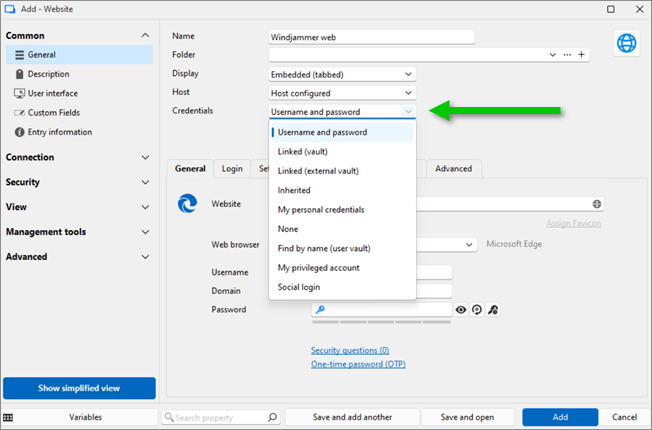
Multiple options are available to use for Credentials in Remote Desktop Manager macOS entries.
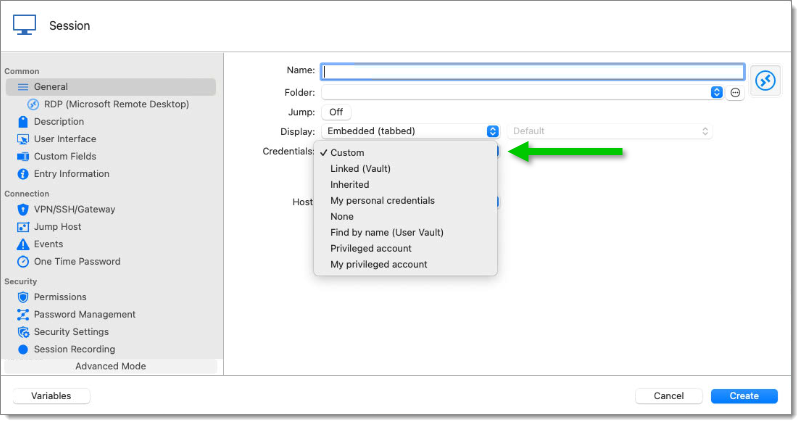
| OPTION | DESCRIPTION |
|---|---|
| Custom | Enter custom credentials in the General section of the entry. |
| Linked (vault) | Link an entry to use an existing Credential entry in the same vault. To use this feature, users must have the View permission on the credentials entry. |
| Linked (external vault) | Link an entry to use an existing Credential entry in a different vault. To use this feature, users must have the View permission on the credentials entry. |
| Inherited | The credentials used by this entry are inherited and defined by climbing up the navigation tree until it has access to a set of credentials in a parent folder. |
| My personal credentials | Use the credentials set in My personal credentials feature. This allows to centralize one credential to replace or emulate the ones for a Windows session. |
| None | No credentials will be allowed to be saved or linked to this entry. |
| Find by name (user vault) | Search the user vault for the name specified. If the box is left empty, when launch, a Credential list will open with all available Credentials entry from the user vault. |
| Privileged account | Select a PAM account to use from your Privileged accounts list. Once an account has been selected, you can click the Default elevation override link below the field to pre-select AD groups to be used for privilege elevation during session checkout. This method removes the need to choose AD groups manually on session launch or rely on the Default JIT privileges configured on the Domain user entry (Edit – JIT authorization). |
| My privileged account | Use the chosen username/password combo. Needs to first be set up in File – My account settings – My defaults – My privileged account. |
| Social login | Use credentials from a federated identity provider, e.g., Google, Facebook, Amazon, Slack, etc. Note that Social login only works if the Password manager browser extension is installed. |
 Share your feedback