Le paramètre Activer la Connexion Unique avec les comptes Windows dans Remote Desktop Manager permet à une session utilisateur Windows authentifiée d'être réutilisée automatiquement pour l'accès à certains services et ressources sans demander à nouveau les identifiants.
Pour localiser le paramètre, ouvrez Remote Desktop Manager et allez dans Fichier – Paramètres – Types d'entrée – Sessions – Site Web.
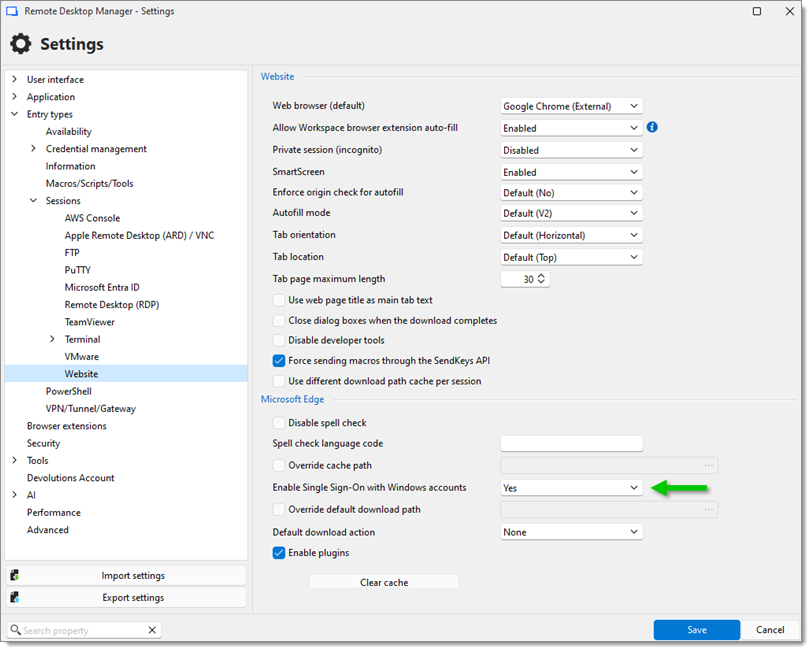
Lors de la création d'un profil Microsoft Edge dans Remote Desktop Manager pour se connecter à Microsoft 365 avec un locataire secondaire, Edge peut se rouvrir en utilisant le locataire principal qui est joint à Active Directory Azure. Après le redémarrage, changer pour le locataire secondaire vous demande de vous connecter à nouveau.
C'est parce que les paramètres Activer la connexion unique avec les comptes Windowss utilisent la même authentification unique que celle utilisée en dehors de Remote Desktop Manager. Par conséquent, il doit être réglé sur Non.
 Partagez vos commentaires