The CyberArk PVWA entry is a credential entry type in Remote Desktop Manager Windows. The entry is located under Add new entry – CyberArk PVWA. It is the recommended method to:
Apply password injection (bypassing CyberArk PSM), or
Leverage CyberArk PSM for session brokering.
Privileged Session Management (PSM) is a CyberArk component that brokers privileged sessions to target systems while enforcing isolation, access control, and session recording. RDM integrates with PSM to transparently launch those sessions for the user.
This article explains how the PVWA entry works, how to configure the resolving mode, and how RDM determines which CyberArk component and technology to use at connection time.
CyberArk integrations require the Privileged access management solutions package license.
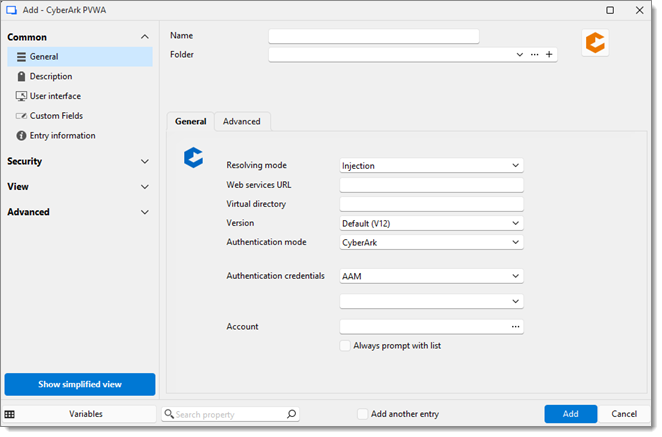
| SETTINGS | DESCRIPTIONS |
|---|---|
| Resolving mode | The Resolving mode defines how credentials are used. There are two supported modes: Injection:
PSM Connection:
Other session types are not supported in PSM Connection mode. |
| Web service URL | Enter the CyberArk server address in this format to connect to your CyberArk instance: https://<server name>.<our domain>.loc/.The following is what your Web services URL will be, depending on your CyberArk subscription:
|
| Virtual directory | Enter a Virtual directory. This field is either /privilegecloud or empty. |
| Version | Select a Version in the drop-down list. This refers to the CyberArk PVWA version seen on the CyberArk authentication page. Note that we only support the CyberArk V12 API for now and that CyberArk version 12.1 is required. |
| Authentication | Select the Authentication mode used to connect to the CyberArk instance (CyberArk, Windows, LDAP, RADIUS,SAML, PKI, or PKIPN). SAML authentication is supported with CyberArk in Remote Desktop Manager starting in version 2022.3.25. Important improvements and bug fixes were added in later versions. We recommend to at least update to the 2023.1 version of Remote Desktop Manager if your current version is older. In 2023.1, you no longer need to provide the identity provider IdP sign-in URL when configuring SAML authentication. If you have trouble with your SAML authentication, consult SAML Configuration and Troubleshooting. SAML authentication for CyberArk Privilege Cloud requires Remote Desktop Manager 2023.2.17 or newer. Your CyberArk vault administrator should provide you with the authentication model being used. In PVWA, if you select a link that matches your corporate domain name, that typically indicates that LDAP model is in use. |
| Account | Select the account this credential entry is going to use. Check Always prompt with list and let the user choose the account. |
| SETTINGS | DESCRIPTIONS |
|---|---|
| MFA delimiter | The MFA delimiter option exists in Remote Desktop Manager to mirror the one that already exists with CyberArk. The character that is entered in the delimiter field will be used to separate the values of the SecurID code and the password that are then sent to the API. |
| Domain search method |
|
| Domain field |
|
When using PSM connection in Resolving mode, the target system is not defined in the PVWA entry itself. Instead, it is specified in the linked session entry.
The target endpoint is defined in the Host field of the RDP entry.
The target endpoint is defined in the Website field of the website entry.
Once the PVWA credential entry and the session entry are configured, Remote Desktop Manager automatically resolves the connection when the user launches the session.
The process is as follows:
Remote Desktop Manager reads the credential configuration (CyberArk PVWA).
If required, Remote Desktop Manager prompts the user to select the CyberArk component (for example PSM-RDP, PSM-SSH, or other PSM-enabled applications).
Remote Desktop Manager determines or prompts for the PSM technology to use:
RDP-based PSM, or
HTML5 (Guacamole) PSM
Although RDM only natively supports RDP and Website session types, these primary entries can trigger a wide range of PSM-managed applications on the CyberArk side (for example SQL Server Management Studio, PuTTY, Active Directory Users and Computers, and more).
4. Remote Desktop Manager contacts CyberArk to request a connection object based on the selected parameters.
The availability depends entirely on the applications configured in CyberArk.
In some scenarios (for example CyberArk AppRemote), additional configuration may be required.
See the CyberArk AppRemote documentation for more information.
Injection mode offers the most flexibility but does not provide PSM session recording or isolation.
PSM Connection mode enforces CyberArk controls but restricts supported session types.
Proper endpoint configuration in the session entry is critical for successful PSM connections.
If you need the domain specified most of the time, you need to set the Domain search method to Field, and then the Domain field to Address.
 Share your feedback