Here are the steps to configure MCP server to give it access to Devolutions' documentation for the most common agents/LLMs.
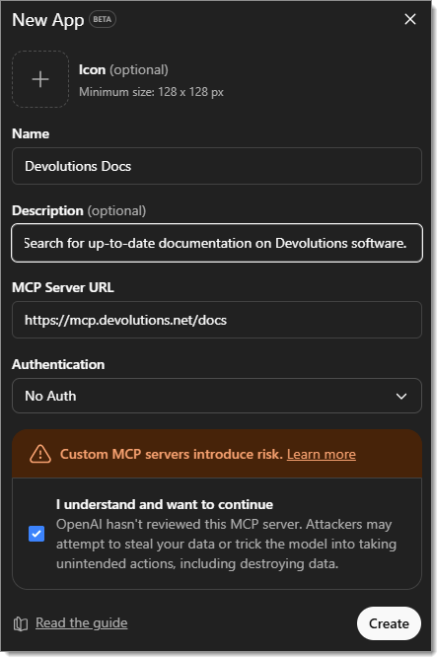
Head to Workspace settings – Apps & Connectors – Create.
Enter a Name for the new connector, then paste
https://mcp.devolutions.net/docsin the MCP Server URL field.
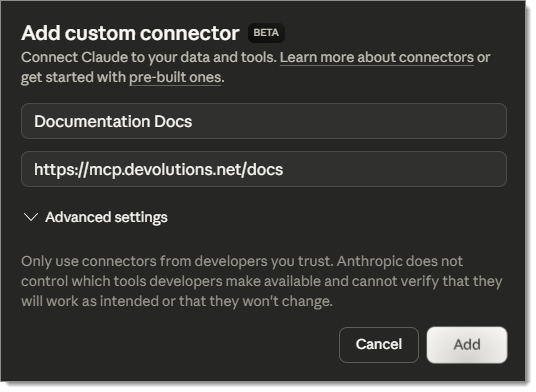
Navigate to Admin settings – Connectors – Add custom connector.
Enter a name for the connector, then paste
https://mcp.devolutions.net/docsin the second field.
Enter the following:
claude mcp add --transport http "DevolutionsDocs" https://mcp.devolutions.net/docs
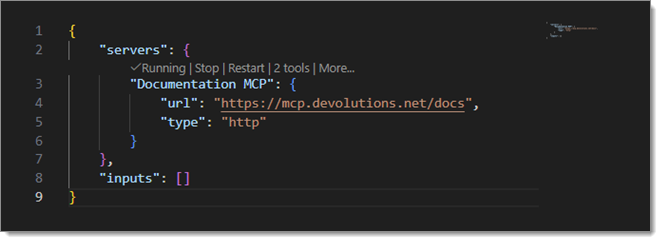
In the command palette, go to MCP: Add Server, then HTTP (HTTP or Server-Sent Events).
When asked for a URL, paste
https://mcp.devolutions.net/docsand choose a name for the MCP Server. Press Enter.
 Share your feedback