Use the RoboForm credentials entry to log in to remote sessions without manually copying passwords. Remote Desktop Manager handles the injection so you can launch sessions faster and keep sensitive data hidden.
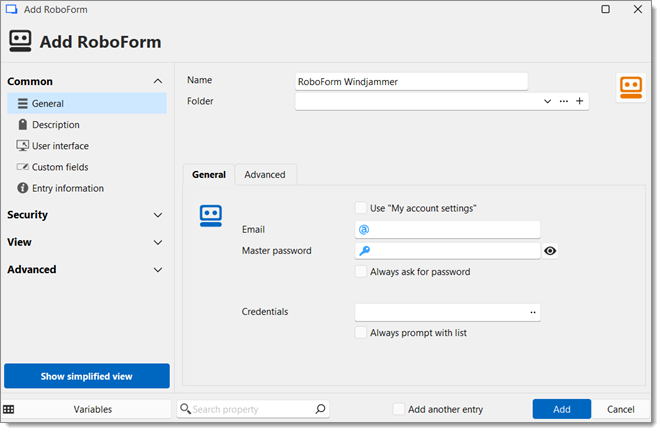
| SETTINGS | DESCRIPTION |
|---|---|
| Use "My account settings" | Use the RoboForm (Credentials) Email and Master password configured in File – My account settings – RoboForm, under Password management. |
| Enter your RoboForm account email. | |
| Master password | Enter your RoboForm account master password. |
| Always ask for password | When this option is checked, you will be prompted to enter your RoboForm Master password every time you use the entry. |
| Credentials | Select credentials stored in RoboForm. Click the ellipsis button (...) to choose from the list. |
| Always prompt with list | When this option is checked, you will be prompted with a list containing the credentials stored in RoboForm every time you use the entry. |
The Advanced section allows you to match RoboForm fields with Remote Desktop Manager fields should they differ. If this section is left blank, the fields act as default.
 Share your feedback