The browser DevTools displays the following error when information is saved in the Devolutions Server administration panel:
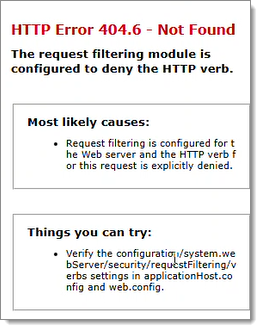
To resolve the issue, enable Allow unlisted verbs in the Request Filtering settings in IIS Manager.
Open IIS Manager and navigate to your Devolutions Server site.
Open Request Filtering.
Select the HTTP Verbs tab.
In the Actions pane, click Edit Feature Settings...
Enable Allow unlisted verbs and click OK.
Retry the action in the Devolutions Server administration panel.
Once Allow unlisted verbs is enabled, IIS should stop blocking the required HTTP verb, and saving information in the administration panel should work normally.
 Share your feedback