Webhooks allow you to send real-time notifications to external services whenever certain events occur in Devolutions Server. Note that webhooks are also available in Devolutions Hub Business.
-
Navigate to Administration – Webhooks.
-
Click Add.
-
Enter a descriptive name.
-
Provide the endpoint URL where Devolutions Server sends the HTTP POST requests.
-
Choose which events trigger the webhook.
-
Optionally, define a custom payload to be sent with the webhook. For example, to send a message in Slack for every new entry created, the Custom HTTP Body (JSON) would look like this:
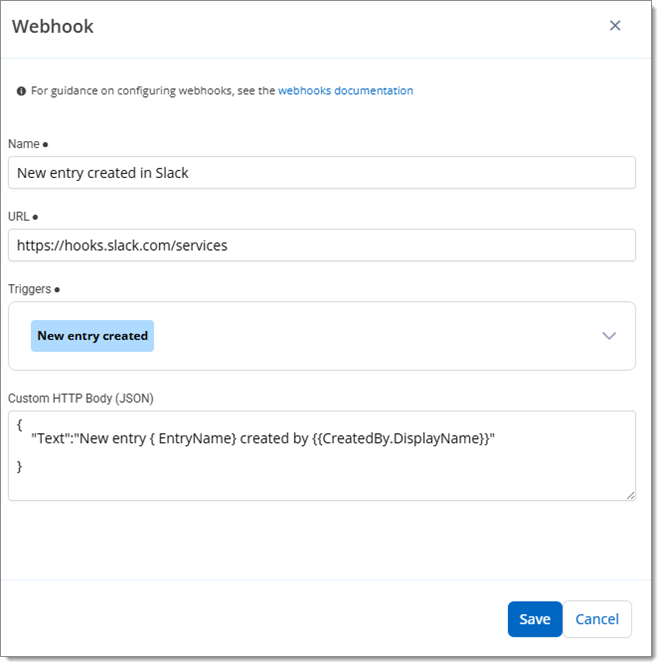
Custom HTTP Body (JSON) example -
Save the webhook.
The following list contains the available handlebars placeholders. These are automatically replaced with actual event data whenever a webhook is triggered.
TriggerType (enum)
TriggerTypeName
VaultNameVaultName
Approved (bool)
ApproverMessage
Approvers (Array of {DisplayName: "name", Email: "email@example.com"})
EntryId
EntryName
RequestedMinutes
Requester.DisplayName
Requester.Email
RequesterMessage
CreatedBy.DisplayName
CreatedBy.Email
EntryId
EntryName
Approvers (Array of {DisplayName: "name", Email: "email@example.com"})
EntryId
EntryName
RequestedMinutes
Requester.DisplayName
Requester.Email
RequesterMessage
Approvers (Array of {DisplayName: "name", Email: "email@example.com"})
EntryId
EntryName
RequestedMinutes
Requester.DisplayName
Requester.Email
RequesterMessage
Approved (bool)
Approver.DisplayName
Approver.Email
ApproverMessage
EntryId
EntryName
RequestedMinutes
Requester.DisplayName
Requester.Email
RequesterMessage
 Share your feedback