Learn how to transfer OTP storage to a Devolutions Hub Business or Devolutions Server data source in Workspace mobile app.
Open Workspace mobile app.
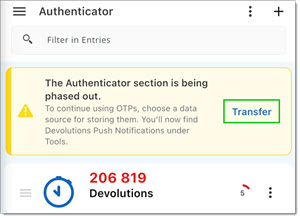
Tap Transfer in the Authenticator section.
Select your data source or connect to one.
Tap Transfer to confirm the data source selection.
Select the choosen data source.
Tap to view OTPs stored in the data source.
Confirm that the OTPs section loads under the data source.
The OTPs section is linked to a data source.
The message about the Authenticator section being phased out no longer requires action.
OTP entries (if any exist) appear under the selected data source.
 Share your feedback