Add a layer of security to your Devolutions Account by configuring two-step verification, alternative verification methods, and recovery codes.
Follow the steps below in order to fully configure multifactor authentication on your account.
-
Connect to your Devolutions Account and go to Sign-In & Security.
-
Under Two-Step Verification, click on Configure, then Add recovery method.
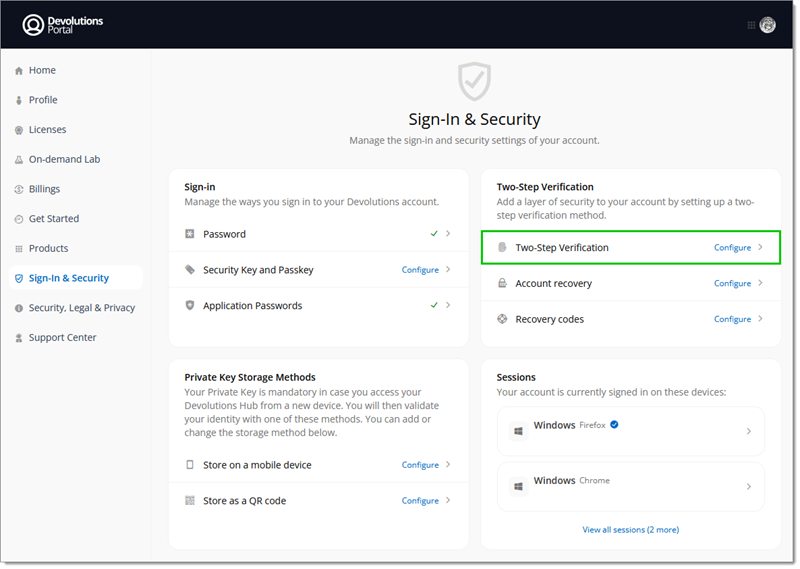
Configure multifactor authentication
Enter your password to reauthenticate if prompted to, then click Submit.
Choose between the SMS and Email alternative verification methods methods.
Enter the 6-digit code received via the chosen method.
Sign-in recovery codes are used as a last resort method to access your account. You will be able to regenerate them once the configuration process is completed. This step is mandatory for security reasons.
Download, Copy, and/or Print the sign-in recovery codesin a safe accessible place. Click Next.
Enter your password to re authenticate if prompted to, then click Submit.
Choose between the Devolutions Workspace Push, Authenticator App, or Security Key and Passkey multifactor authentication methods.
Download and install the Devolutions Workspace application.
Use the Devolutions Workspace app to scan the QR code or manually add the code to the application using the provided key code.
Download and install an Authenticator application (Google Authenticator, Microsoft Authenticator, or Authy).
Use the authentication app to scan the QR code or manually add the code to the application using the provided details.
Enter the 6-digit code generated by the authenticator app.
If you chose this method, you will be redirected to the Security Key and Passkey section of the Devolutions Account.
 Share your feedback