The Domain user provider allows Devolutions Hub Business to store the domain account credentials to be used for Active Directory account discovery and to achieve password rotation or password propagation.
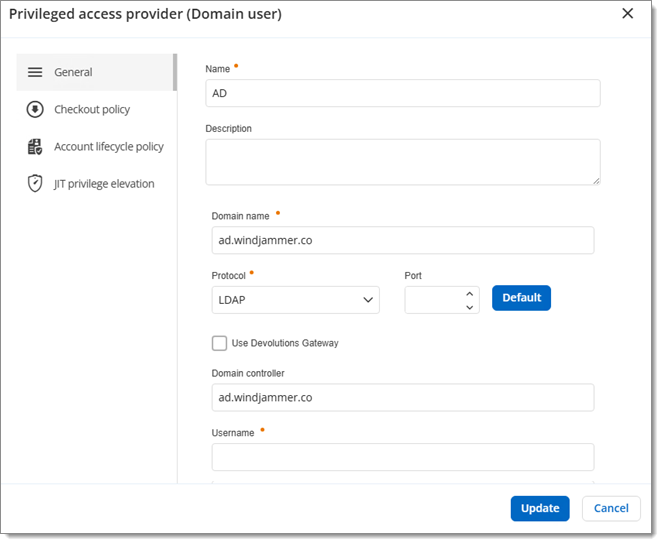
| SETTINGS | DESCRIPTION |
|---|---|
| Name | Display name of the provider. |
| Description | Description of the provider. |
| Domain name | FQDN of the domain against where the scan or the password rotation will be executed. |
| Protocol | Protocol used to contact the domain controller. Select between:
|
| Port | Set the port number used with the configured protocol. |
Use Devolutions Gateway | Choose a Devolutions Devolutions Gateway from your list. Requires Devolutions Gateway to be installed and configured beforehand. |
Domain controller | Set a Domain controller (optional). |
| Username | Username of the domain account. |
| Password | Password of the domain account. |
SETTINGS | DESCRIPTION |
|---|---|
Checkout policy mode | Choose a checkout policy mode:
|
| SETTINGS | DESCRIPTION |
|---|---|
Account lifecycle policy | Choose a checkout policy mode:
|
| SETTINGS | DESCRIPTION |
|---|---|
| Select provider privileges to make available for temporary elevation | Select the Active Directory groups of which a privileged account will be elevated to member status. Click on the pen icon next to a selected group to assign a Devolutions Hub Business display name to it. |
| Enable privilege sets | Create privilege sets to group similar privileges together by assigning provider privileges and privileged accounts. |
| Temporary group name prefix (max: 27 characters) | Prefix of the Active Directory group name to be created, which will be a member of the selected group and in which the privileged account will be a member. |
| Temporary group creation location | Location (OU) where the temporary Active Directory group will exist in the Active Directory structure. |
| Password propagation latency | Some domains may require additional time to apply permissions. Introducing latency helps prevent sessions from opening too quickly, which could result in a failure. |
 Share your feedback