> For the complete documentation index, see [llms.txt](https://docs.devolutions.net/llms.txt). Markdown versions of documentation pages are available by appending `.md` to page URLs; this page is available as [Markdown](https://docs.devolutions.net/server/it/knowledge-base/troubleshooting-articles/iis-web-site-logging.md).
# Registrazione dei log del sito web IIS
Descrive i campi di registrazione consigliati del sito Web IIS e la registrazione degli eventi di riciclo del pool di applicazioni per la risoluzione dei problemi di prestazioni di Devolutions Server.
Ecco la descrizione delle impostazioni desiderate quando si risolve un problema di prestazioni/connettività relativo all'applicazione client.
### Registrazione del sito Web IIS
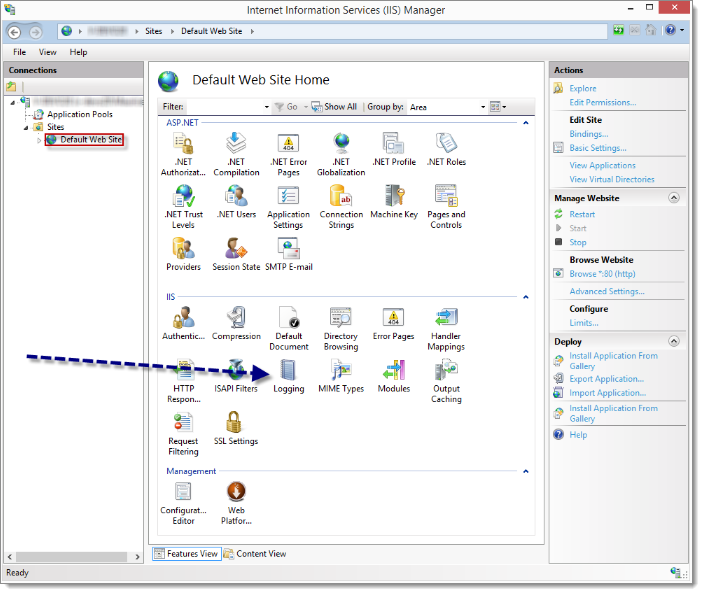
1. Apra IIS Manager e vada nelle impostazioni ***Logging***.
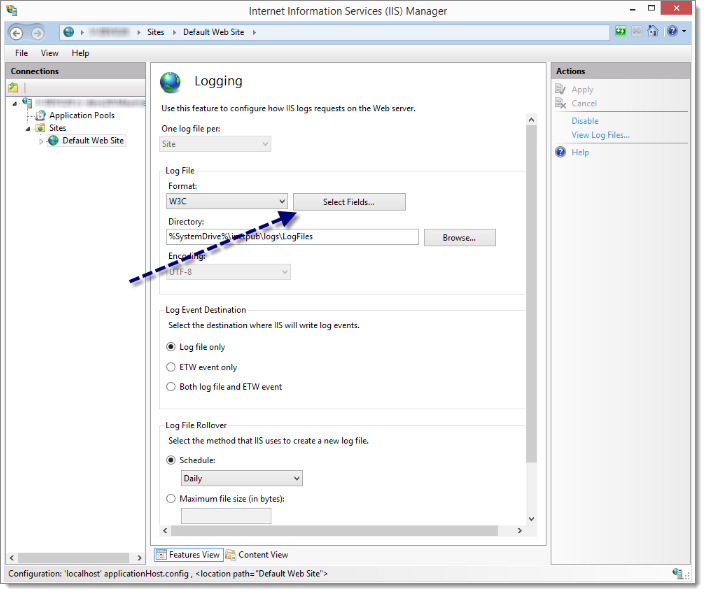
2. Clicchi su ***Select Fields***.
3. Consigliamo di selezionare almeno i seguenti campi:
* Ora (`time`)
* Indirizzo IP client (`c-ip`)
* Nome utente (`cs-username`)
* Indirizzo IP server (`s-ip`)
* Porta server (`s-port`)
* Metodo (`cs-method`)
* Stem URI (`cs-uri-stem`)
* Query URI (`cs-uri-query`)
* Stato protocollo (`sc-status`)
* Sottostato protocollo (`sc-substatus`)
* Stato Win32 (`sc-win32-status`)
* Tempo impiegato (`time-taken`)
* User Agent (`cs(User-Agent)`)
* Referer (`cs(Referer)`)
### Riciclo del pool di applicazioni
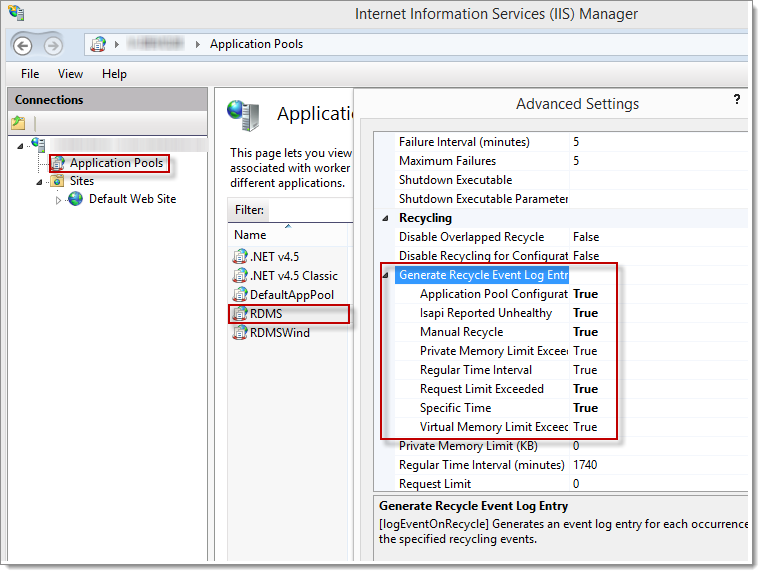
Il pool di applicazioni che esegue effettivamente l'istanza può essere riavviato per una moltitudine di motivi. Può essere utile sapere quando tali ricicli si verificano e per quali motivi. Vada nella sezione ***Application pools*** di IIS Manager, quindi apra le ***Advanced settings*** del suo pool di applicazioni. Abiliti tutti i ***Recycle events***: verrà creata una voce di log nel ***Windows Event Log***.
---
# Agent Instructions
This documentation is published with GitBook. GitBook is the documentation platform designed so that both humans and AI agents can read, navigate, and reason over technical content effectively. Learn more at gitbook.com.
## Querying This Documentation
If you need additional information that is not directly available in this page, you can query the documentation dynamically by asking a question.
Perform an HTTP GET request on the current page URL with the `ask` query parameter, and the optional `goal` query parameter:
```
GET https://docs.devolutions.net/server/it/knowledge-base/troubleshooting-articles/iis-web-site-logging.md?ask=&goal=
```
`ask` is the immediate question: it should be specific, self-contained, and written in natural language.
`goal` is optional and describes the broader end goal you are ultimately trying to accomplish on behalf of the user. GitBook uses it to tailor the answer towards what is most useful for that goal.
The response will contain a direct answer to the question and relevant excerpts and sources from the documentation.
Use this mechanism when the answer is not explicitly present in the current page, you need clarification or additional context, or you want to retrieve related documentation sections.