> For the complete documentation index, see [llms.txt](https://docs.devolutions.net/llms.txt). Markdown versions of documentation pages are available by appending `.md` to page URLs; this page is available as [Markdown](https://docs.devolutions.net/server/it/knowledge-base/troubleshooting-articles/failed-request-tracing-with-iis/configuration.md).
# Configurazione
Spiega come configurare il tracciamento delle richieste non riuscite in IIS per Devolutions Server utilizzando lo strumento a riga di comando appcmd o l'interfaccia di IIS Manager.
Esistono due metodi per configurare il tracciamento delle richieste non riuscite:
* [Utilizzo del comando appcmd.exe](#using-the-appcmd.exe-command)
* [Tramite l'app IISManager](#via-the-iismanager-app)
### Utilizzo del [comando appcmd.exe](https://docs.microsoft.com/en-us/iis/get-started/getting-started-with-iis/getting-started-with-appcmdexe)
| |
| ------------------------------------------------------------------------------------------------------------------------------------------------------------------------------------------- |
| appcmd.exe set config -section:system.applicationHost/sites "/\[name='Default Web Site'].traceFailedRequestsLogging.enabled:True" /commit:apphost |
| appcmd.exe set config -section:system.applicationHost/sites "/\[name='Default Web Site'].traceFailedRequestsLogging.maxLogFiles:10" /commit:apphost |
| appcmd.exe set config -section:system.applicationHost/sites "/\[name='Default Web Site'].traceFailedRequestsLogging.directory:%SystemDrive%\inetpub\logs\FailedReqLogFiles" /commit:apphost |
| appcmd.exe set config "Default Web Site" -section:system.webServer/tracing/traceFailedRequests /+"\[path='\*']" |
| appcmd.exe set config "Default Web Site" -section:system.webServer/tracing/traceFailedRequests /+"\[path='\*'].traceAreas.\[provider='WWW Server',areas='Rewrite',verbosity='Verbose']" |
| appcmd.exe set config "Default Web Site" -section:system.webServer/tracing/traceFailedRequests /\[path='\*'].failureDefinitions.statusCodes:"400-599" |
{% hint style="info" %}
Si noti che i passaggi sopra riportati si applicano solo a IIS 7.0 o versioni successive e che i comandi funzionano al meglio quando cmd.exe viene eseguito come amministratore.
{% endhint %}
### Tramite l'app IISManager
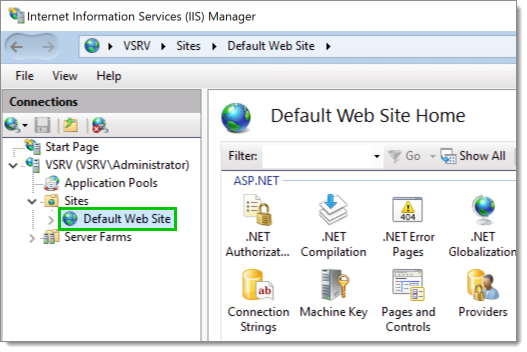
1. In IIS Manager, espanda il nodo radice, espanda ***Sites***, quindi selezioni ***Default Web Site***.
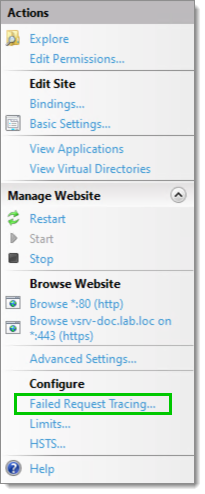
2. Nel riquadro ***Actions*** a destra, selezioni ***Failed Request Tracing***.
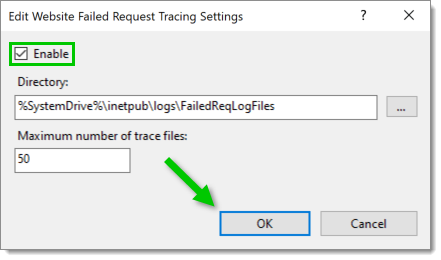
3. Selezioni la casella ***Enable*** (obbligatoria). Le opzioni di destinazione ***Directory*** e ***Maximum number of trace files*** possono essere personalizzate (facoltativo). Al termine, clicchi su ***OK***.
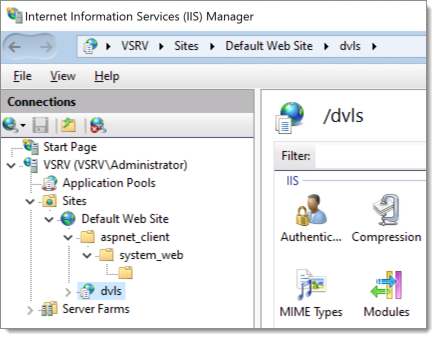
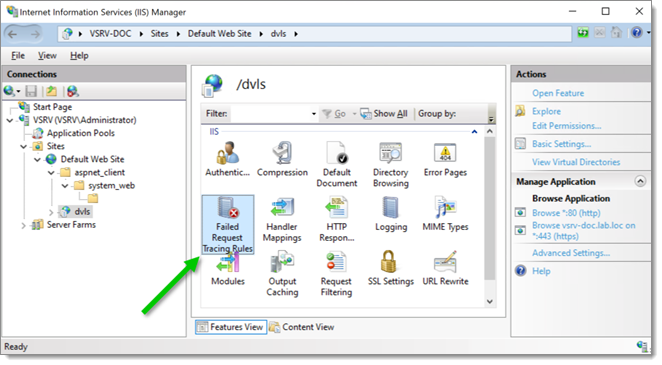
4. Espanda ***Default Web Site***, quindi selezioni il sito web da tracciare.
5. Faccia doppio clic sull'icona ***Failed Request Tracing Rules*** del sito web selezionato.
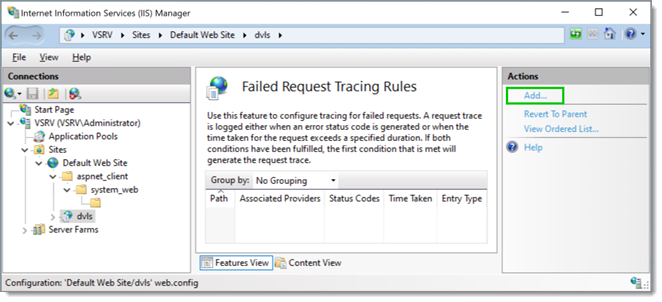
6. Nel riquadro ***Actions*** a destra, clicchi su ***Add*** per aggiungere una nuova regola.
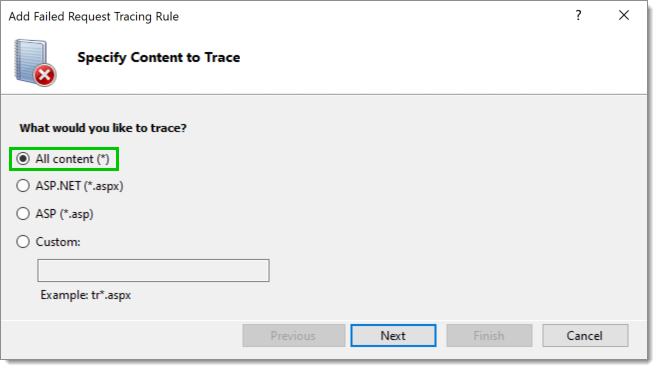
7. Selezioni ***All content (*****)**\*, quindi clicchi su ***Next***.
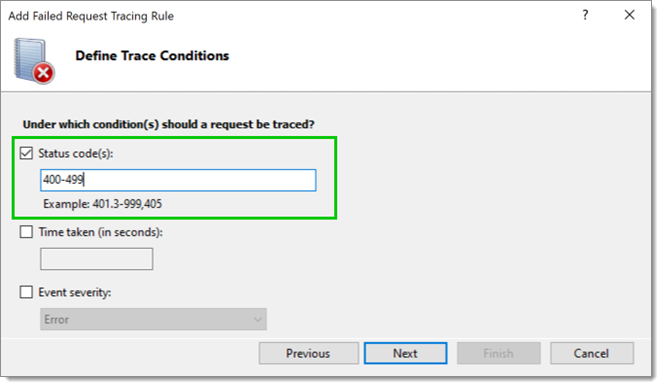
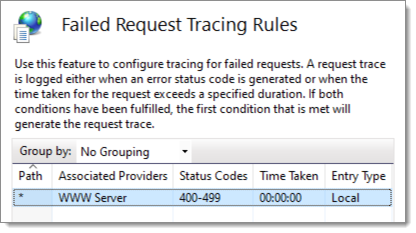
8. Selezioni la casella ***Status Code(s)***, quindi inserisca il tipo di codice di stato da tracciare. In questo caso, ***Status code(s)*** è impostato per monitorare tutto dai codici 400 a 599. Al termine, clicchi su ***Next***.
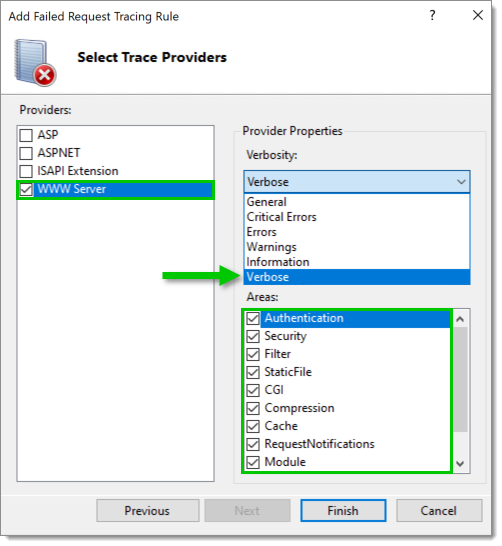
9. Selezioni i provider del tracciamento. Per ogni provider, imposti ***Verbosity*** su ***Verbose*** e selezioni tutte le ***Areas***. In questo caso, è stato selezionato il provider ***WWW Server***.
10. Clicchi su ***Finish***. La regola di tracciamento è ora definita.
---
# Agent Instructions
This documentation is published with GitBook. GitBook is the documentation platform designed so that both humans and AI agents can read, navigate, and reason over technical content effectively. Learn more at gitbook.com.
## Querying This Documentation
If you need additional information that is not directly available in this page, you can query the documentation dynamically by asking a question.
Perform an HTTP GET request on the current page URL with the `ask` query parameter, and the optional `goal` query parameter:
```
GET https://docs.devolutions.net/server/it/knowledge-base/troubleshooting-articles/failed-request-tracing-with-iis/configuration.md?ask=&goal=
```
`ask` is the immediate question: it should be specific, self-contained, and written in natural language.
`goal` is optional and describes the broader end goal you are ultimately trying to accomplish on behalf of the user. GitBook uses it to tailor the answer towards what is most useful for that goal.
The response will contain a direct answer to the question and relevant excerpts and sources from the documentation.
Use this mechanism when the answer is not explicitly present in the current page, you need clarification or additional context, or you want to retrieve related documentation sections.