> For the complete documentation index, see [llms.txt](https://docs.devolutions.net/llms.txt). Markdown versions of documentation pages are available by appending `.md` to page URLs; this page is available as [Markdown](https://docs.devolutions.net/server/it/knowledge-base/how-to-articles/enable-the-devolutions-server-log-files.md).
# Abilitare i file di log di Devolutions Server
Abiliti i file di log di Devolutions Server concedendo le autorizzazioni di modifica sulla cartella App\_Data e riavviando il server per generare i log DPS\_Main.
Il nostro team di assistenza clienti potrebbe chiederle di recuperare i file di log di Devolutions Server. Si trovano nella cartella App\_Data della web app di Devolutions Server.
I file necessari da questa posizione sono quelli che iniziano con "DPS\_Main" (**DPS\_Main\_001.log**, **DPS\_Main\_002.log**, ecc.). Se non sono presenti, molto probabilmente è perché l'***Application Pool Identity*** non può scrivere in quella cartella. Risolva questo problema concedendo a questa identità l'autorizzazione ***Modify*** sulla cartella App\_Data.
### Abilitare i file di log
1. Nella Devolutions Server Console selezioni il server desiderato dall'elenco.
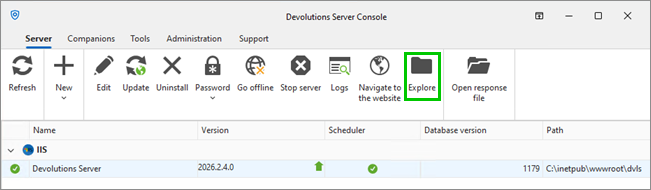
2. Nella scheda ***Server*** clicchi su ***Explore***. Questo aprirà la cartella di installazione.
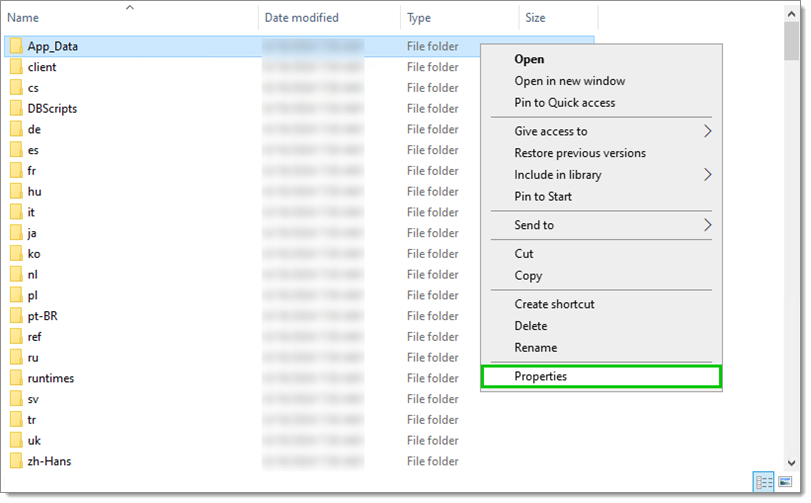
1. Clicchi con il tasto destro sulla cartella ***App\_Data*** e selezioni ***Properties***.
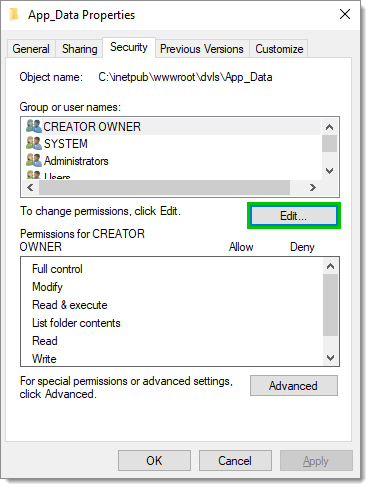
2. Nella scheda ***Security*** clicchi su ***Edit...***.
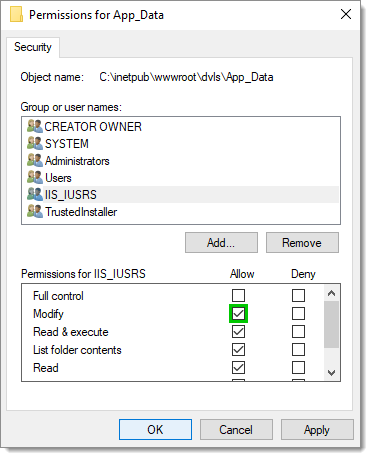
3. Selezioni ***IIS\_IUSRS***.
4. Selezioni ***Allow*** per l'autorizzazione ***Modify*** e clicchi su ***OK***.
5. Clicchi su ***OK*** nella finestra ***Properties***.
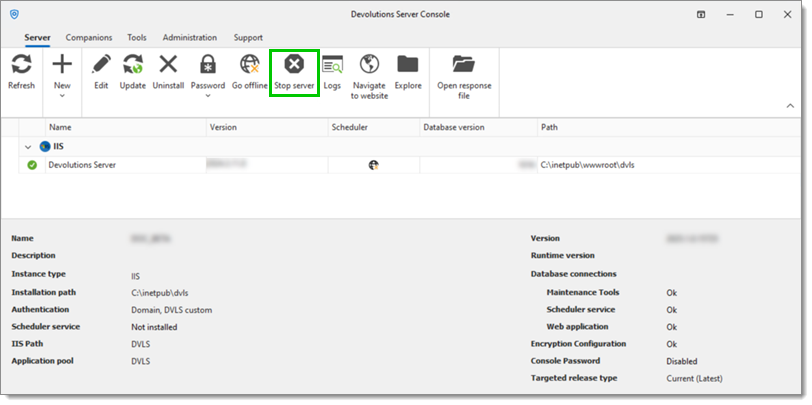
6. Nella Devolutions Server Console clicchi su ***Stop server***.
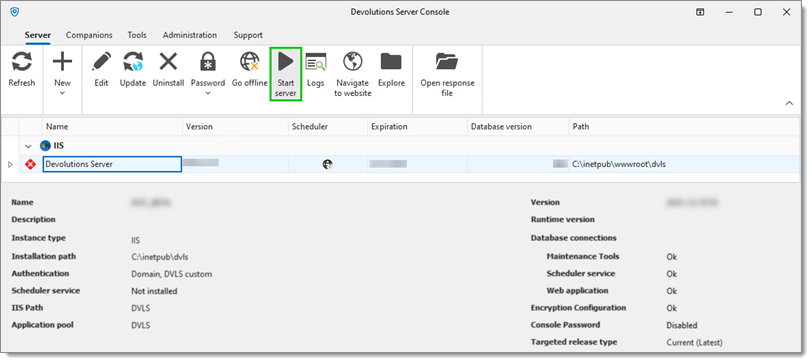
7. Attenda qualche secondo e poi clicchi su ***Start server***. Il riavvio del server creerà i file **DPS\_Main.log** e **DPS\_Main\_001.log** dopo un breve ritardo. È necessario eseguire azioni su Devolutions Server affinché i log vengano creati (accesso, ecc.).
{% hint style="info" %}
Quando si concede l'autorizzazione ***Modify*** al gruppo ***IIS\_IUSRS***, tutti gli utenti dei pool di applicazioni su quel server sono autorizzati ad accedere a questa directory. Se l'installazione utilizza un'identità del pool di applicazioni specifica per Devolutions Server, valuti di concedere le autorizzazioni esclusivamente a tale identità. In alternativa, potrebbe assegnare le autorizzazioni ***Modify*** all'account NETWORK SERVICE, comunemente utilizzato per i pool di applicazioni IIS, sebbene questo account potrebbe essere condiviso anche con altri servizi.
{% endhint %}
---
# Agent Instructions
This documentation is published with GitBook. GitBook is the documentation platform designed so that both humans and AI agents can read, navigate, and reason over technical content effectively. Learn more at gitbook.com.
## Querying This Documentation
If you need additional information that is not directly available in this page, you can query the documentation dynamically by asking a question.
Perform an HTTP GET request on the current page URL with the `ask` query parameter, and the optional `goal` query parameter:
```
GET https://docs.devolutions.net/server/it/knowledge-base/how-to-articles/enable-the-devolutions-server-log-files.md?ask=&goal=
```
`ask` is the immediate question: it should be specific, self-contained, and written in natural language.
`goal` is optional and describes the broader end goal you are ultimately trying to accomplish on behalf of the user. GitBook uses it to tailor the answer towards what is most useful for that goal.
The response will contain a direct answer to the question and relevant excerpts and sources from the documentation.
Use this mechanism when the answer is not explicitly present in the current page, you need clarification or additional context, or you want to retrieve related documentation sections.