> For the complete documentation index, see [llms.txt](https://docs.devolutions.net/llms.txt). Markdown versions of documentation pages are available by appending `.md` to page URLs; this page is available as [Markdown](https://docs.devolutions.net/server/it/devolutions-server-console/recovery-kit-generation.md).
# Generazione del kit di ripristino
Generi o recuperi un recovery kit di Devolutions Server localmente o tramite Azure Key Vault per ripristinare un'istanza o crearne una nuova da un backup.
Il ***Recovery kit*** è utile per creare una nuova istanza o nel caso in cui il suo Devolutions Server debba essere ripristinato. È possibile ***Generare*** un backup locale oppure utilizzare Azure Key Vault per archiviare il backup. Se un backup è già stato creato con Azure Key Vault, può ***Recuperarlo***.
{% hint style="info" %}
Per maggiori informazioni sulla creazione e la gestione di un account Azure Key Vault, consulti la [documentazione](https://learn.microsoft.com/en-us/azure/key-vault/) sul loro sito web ufficiale.
{% endhint %}
### Generare
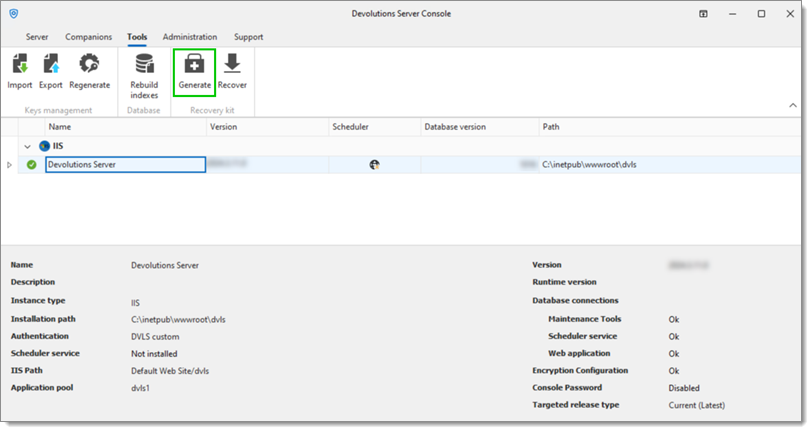
1. Nella Devolutions Server Console, vada alla scheda ***Tools***.
2. Clicchi su ***Generate***.
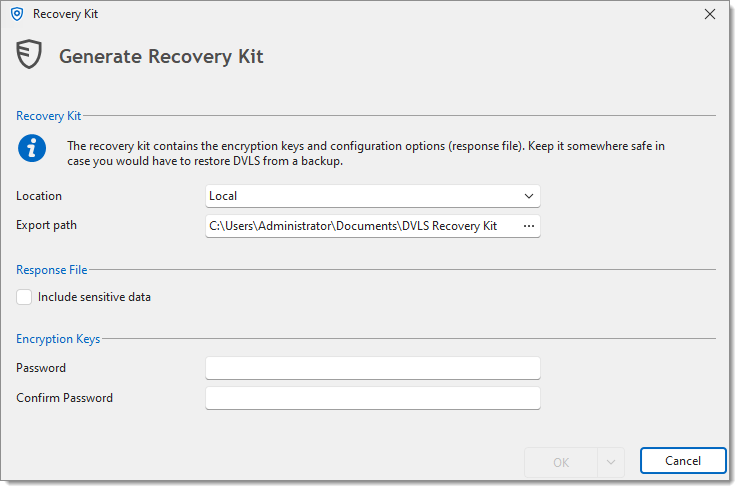
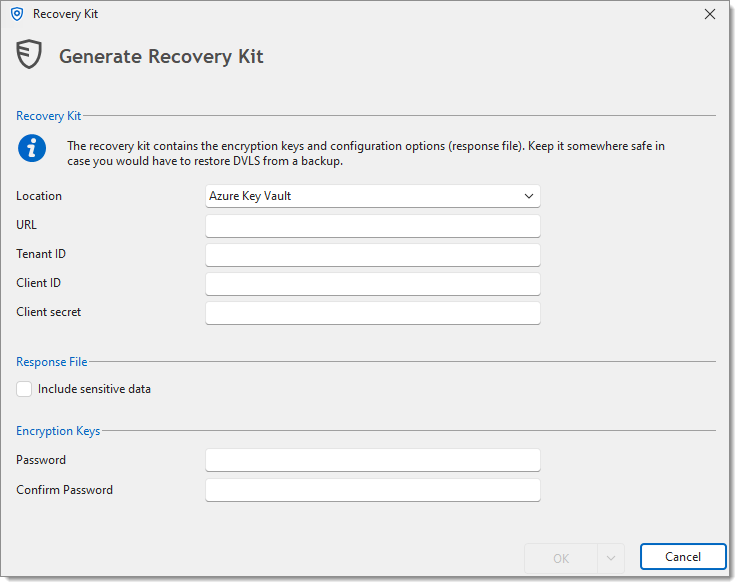
3. Selezioni la ***Location***;
* ***Local***
* ***Export path***: La cartella di destinazione in cui verrà salvato il backup ***Local***
* ***Azure Key Vault***
* ***URL***: L'URL del suo Azure Key Vault
* ***Tenant ID***: Il Tenant ID del suo Entra ID
* ***Client ID***: L'ID del suo Azure Key Vault
* ***Client secret***: Un secret dell'applicazione del suo Entra ID
4. Verifichi la sezione ***Response File***.
{% hint style="info" %}
Selezionando l'opzione ***Include sensitive data*** verranno incluse le password per le credenziali del database solo se si tratta di un database SQL, altrimenti non è possibile salvare alcuna password.
{% endhint %}
5. Inserisca la ***Password***, quindi inserisca la stessa nel campo ***Confirm Password***.
{% hint style="danger" %}
Se questa password viene persa, sarà impossibile utilizzare il backup.
{% endhint %}
6. Clicchi su ***OK*** per salvare questa configurazione e creare il backup.
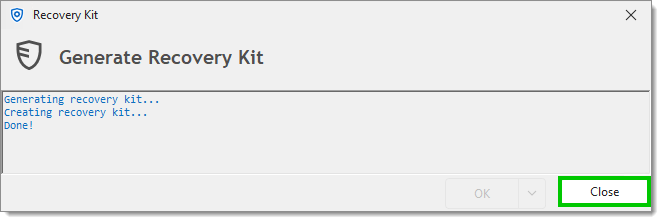
7. Clicchi su ***Close*** una volta completata la generazione.
{% hint style="info" %}
Il [response file](/server/it/devolutions-server-console/open-response-file.md) può anche essere creato separatamente dal recovery kit.
{% endhint %}
### Recuperare
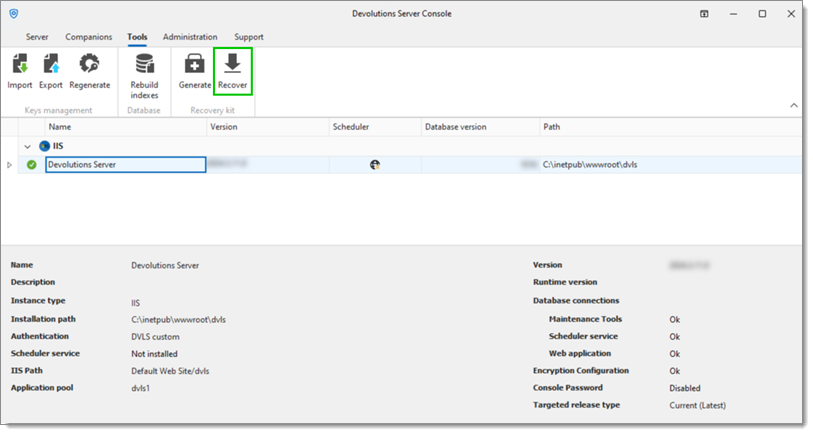
1. Nella Devolutions Server Console, vada alla scheda ***Tools***.
2. Clicchi su ***Recover***.
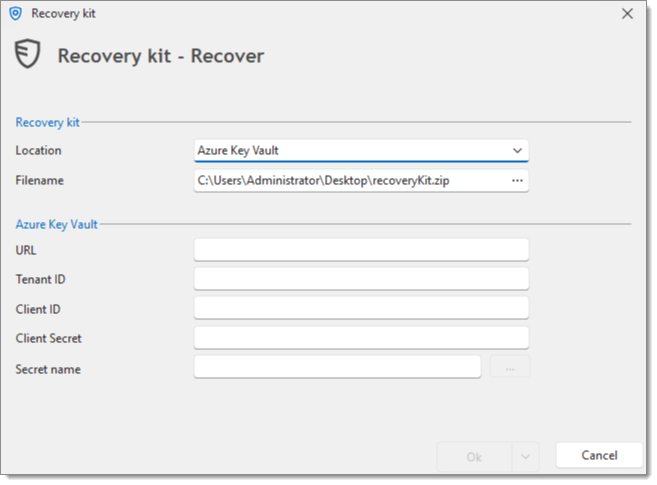
3. Il campo ***Filename*** serve a scegliere la cartella di destinazione in cui verrà salvato il file di backup di **Azure Key Vault** e a nominare tale file di backup.
Cliccando sul pulsante con i puntini di sospensione nel campo ***Filename*** si apre una finestra di dialogo Salva con nome.
4. Inserisca le informazioni corrette nella sezione Azure Key Vault;
* ***URL***: L'URL del suo Azure Key Vault
* ***Tenant ID***: Il Tenant ID del suo Entra ID
* ***Client ID***: L'ID del suo Azure Key Vault
* ***Client secret***: Un secret dell'applicazione del suo Entra ID
* ***Secret name***: Il nome del secret dell'applicazione
5. Clicchi su ***OK*** per recuperare il file zip di backup specifico.
{% hint style="info" %}
Un recovery kit creato con Azure Key Vault può essere recuperato direttamente da Azure per installare una nuova istanza.
{% endhint %}
---
# Agent Instructions
This documentation is published with GitBook. GitBook is the documentation platform designed so that both humans and AI agents can read, navigate, and reason over technical content effectively. Learn more at gitbook.com.
## Querying This Documentation
If you need additional information that is not directly available in this page, you can query the documentation dynamically by asking a question.
Perform an HTTP GET request on the current page URL with the `ask` query parameter, and the optional `goal` query parameter:
```
GET https://docs.devolutions.net/server/it/devolutions-server-console/recovery-kit-generation.md?ask=&goal=
```
`ask` is the immediate question: it should be specific, self-contained, and written in natural language.
`goal` is optional and describes the broader end goal you are ultimately trying to accomplish on behalf of the user. GitBook uses it to tailor the answer towards what is most useful for that goal.
The response will contain a direct answer to the question and relevant excerpts and sources from the documentation.
Use this mechanism when the answer is not explicitly present in the current page, you need clarification or additional context, or you want to retrieve related documentation sections.