> For the complete documentation index, see [llms.txt](https://docs.devolutions.net/llms.txt). Markdown versions of documentation pages are available by appending `.md` to page URLs; this page is available as [Markdown](https://docs.devolutions.net/server/es/knowledge-base/how-to-articles/recycle-devolutions-server-application-pool-nightly.md).
# Reciclar el grupo de aplicaciones de Devolutions Server cada noche
Configure el grupo de aplicaciones de IIS para Devolutions Server de modo que se recicle cada noche a una hora determinada en lugar de cada 29 horas, para evitar que el sitio no responda.
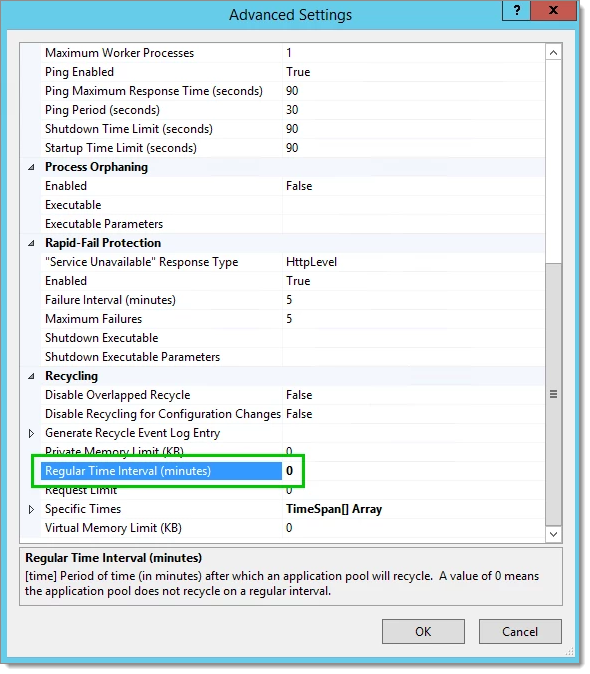
El valor predeterminado establecido en los parámetros ***Regular Time Interval*** de la configuración avanzada de un grupo de aplicaciones de IIS se utiliza para reciclar el grupo de aplicaciones cada 29 horas. En ocasiones, necesitamos reciclar el grupo de aplicaciones cada noche para evitar obtener una aplicación web que no responda.
1. Abra IIS Manager.
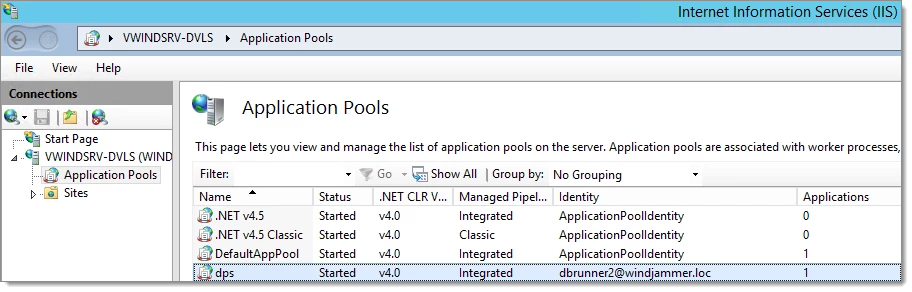
2. Expanda el árbol y seleccione el nodo ***Application Pools***.
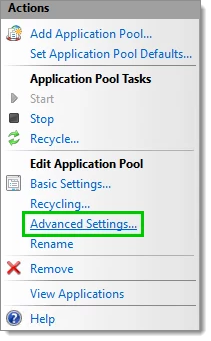
3. Seleccione el grupo de aplicaciones de Devolutions Server y abra el menú ***Advanced Settings*** desde el panel Actions situado a la derecha.
4. Desplace la lista hasta la parte inferior y establezca ***Regular Time Interval*** en el valor 0.
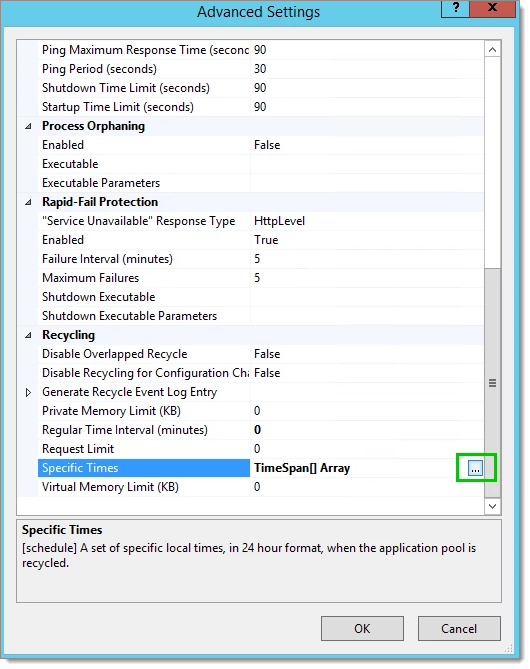
5. Seleccione el parámetro ***Specific Times*** y haga clic en el botón de puntos suspensivos.
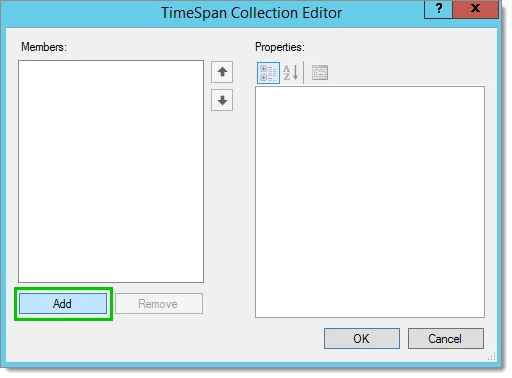
6. Haga clic en el botón ***Add*** del cuadro de diálogo ***TimeSpan Collection Editor*** para añadir una nueva entrada.
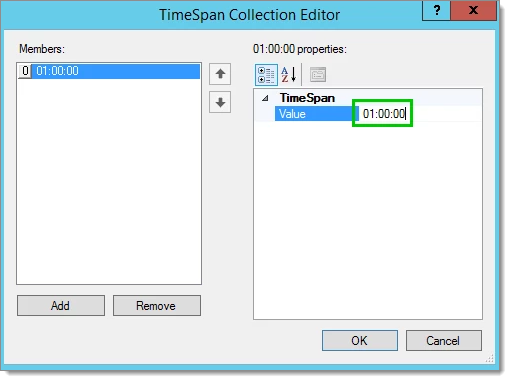
7. Establezca la hora a la que se reciclará el grupo de aplicaciones. Esta hora debe indicarse en formato de 24 horas.
8. Por último, haga clic en ***OK*** para guardar la modificación.
---
# Agent Instructions
This documentation is published with GitBook. GitBook is the documentation platform designed so that both humans and AI agents can read, navigate, and reason over technical content effectively. Learn more at gitbook.com.
## Querying This Documentation
If you need additional information that is not directly available in this page, you can query the documentation dynamically by asking a question.
Perform an HTTP GET request on the current page URL with the `ask` query parameter, and the optional `goal` query parameter:
```
GET https://docs.devolutions.net/server/es/knowledge-base/how-to-articles/recycle-devolutions-server-application-pool-nightly.md?ask=&goal=
```
`ask` is the immediate question: it should be specific, self-contained, and written in natural language.
`goal` is optional and describes the broader end goal you are ultimately trying to accomplish on behalf of the user. GitBook uses it to tailor the answer towards what is most useful for that goal.
The response will contain a direct answer to the question and relevant excerpts and sources from the documentation.
Use this mechanism when the answer is not explicitly present in the current page, you need clarification or additional context, or you want to retrieve related documentation sections.