> For the complete documentation index, see [llms.txt](https://docs.devolutions.net/llms.txt). Markdown versions of documentation pages are available by appending `.md` to page URLs; this page is available as [Markdown](https://docs.devolutions.net/server/es/knowledge-base/how-to-articles/prevent-sql-timeouts.md).
# Evitar tiempos de espera de SQL
Evite los tiempos de espera de SQL en Devolutions Server ajustando el tamaño del grupo de conexiones de la base de datos, el tiempo de espera de conexión y el número de reintentos de conexión.
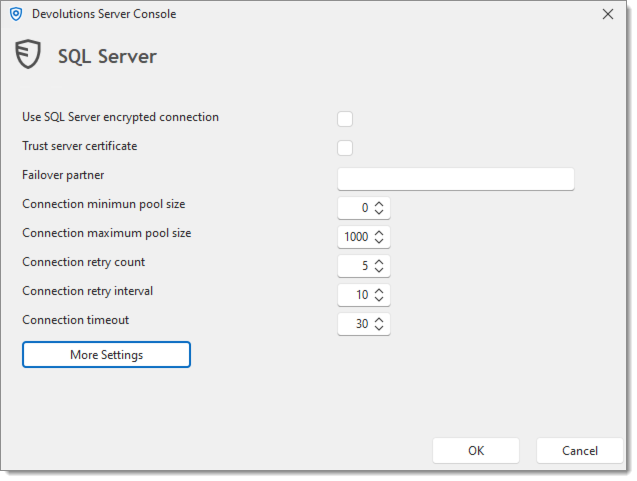
Gestionar muchas entradas en una sola operación o tener un número elevado de usuarios conectados podría provocar mensajes de error de tiempo de espera de SQL con Devolutions Server. La siguiente modificación en los parámetros avanzados de la base de datos podría ayudar a evitar los tiempos de espera de SQL.
1. El primero a considerar es el ***Tamaño máximo del grupo de conexiones***. Aumentar ese parámetro a 1000 en lugar del valor predeterminado de 100 ayudará a incrementar el número de conexiones posibles a la base de datos.
2. El segundo parámetro es el ***Tiempo de espera de conexión***, que puede aumentarse a 30 segundos. Esto hará que el sistema espere 30 segundos antes de generar una excepción.
3. El último es el ***Número de reintentos de conexión***, ya que repetirá cada retardo de ***Tiempo de espera de conexión*** antes de generar un error. Al establecerlo en 5, la instancia de Devolutions Server esperará 150 segundos antes de generar un tiempo de espera de SQL.
Para obtener más información sobre estos parámetros, consulte [Base de datos – Configuración avanzada](/server/es/devolutions-server-console/devolutions-server-settings/database/advanced-settings.md).
---
# Agent Instructions
This documentation is published with GitBook. GitBook is the documentation platform designed so that both humans and AI agents can read, navigate, and reason over technical content effectively. Learn more at gitbook.com.
## Querying This Documentation
If you need additional information that is not directly available in this page, you can query the documentation dynamically by asking a question.
Perform an HTTP GET request on the current page URL with the `ask` query parameter, and the optional `goal` query parameter:
```
GET https://docs.devolutions.net/server/es/knowledge-base/how-to-articles/prevent-sql-timeouts.md?ask=&goal=
```
`ask` is the immediate question: it should be specific, self-contained, and written in natural language.
`goal` is optional and describes the broader end goal you are ultimately trying to accomplish on behalf of the user. GitBook uses it to tailor the answer towards what is most useful for that goal.
The response will contain a direct answer to the question and relevant excerpts and sources from the documentation.
Use this mechanism when the answer is not explicitly present in the current page, you need clarification or additional context, or you want to retrieve related documentation sections.