> For the complete documentation index, see [llms.txt](https://docs.devolutions.net/llms.txt). Markdown versions of documentation pages are available by appending `.md` to page URLs; this page is available as [Markdown](https://docs.devolutions.net/server/es/knowledge-base/how-to-articles/identify-the-server-answering-on-a-high-availability-topology.md).
# Identificar el servidor que responde en una topología de alta disponibilidad
Identifique qué servidor responde a las solicitudes en una topología de alta disponibilidad o de balanceo de carga de Devolutions Server añadiendo un encabezado de respuesta HTTP personalizado.
Los siguientes pasos explican cómo determinar qué servidor responde al conectarse a la página web de Devolutions Server en una topología de alta disponibilidad/balanceo de carga.
1. Abra el Administrador de IIS en el servidor donde está alojado Devolutions Server.
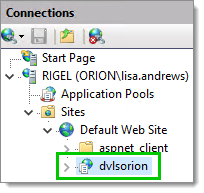
2. Expanda los nodos en el panel ***Conexiones*** y seleccione la aplicación web de Devolutions Server.
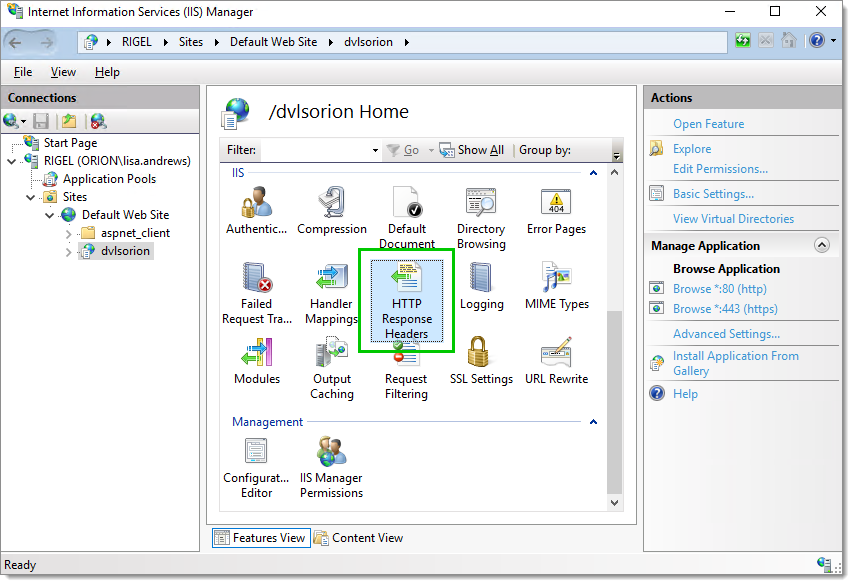
3. Abra ***Encabezados de respuesta HTTP***.
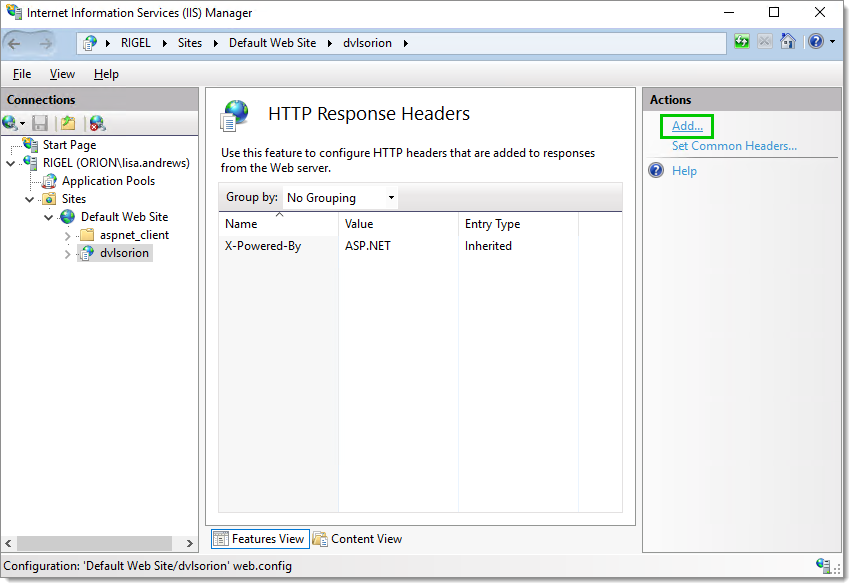
4. Haga clic en ***Agregar***.. en el panel ***Acciones*** para añadir un nuevo ***encabezado de respuesta HTTP***.
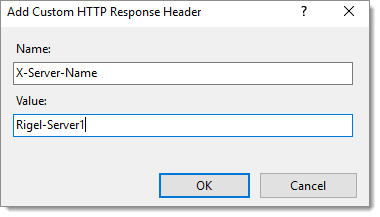
5. Introduzca un ***Nombre*** y un ***Valor*** que identifiquen el servidor. A continuación, haga clic en ***Aceptar*** para guardar esta información.
6. Repita los pasos 1 a 5 en cada servidor de su clúster de ***alta disponibilidad/balanceo de carga***. Es importante establecer un valor diferente para cada servidor, pero manteniendo el mismo ***Nombre***.
7. Abra su navegador favorito.
8. Abra las ***Herramientas de desarrollo*** en el navegador. Normalmente, la tecla ***F12*** abre las ***Herramientas de desarrollo*** en Google Chrome, Firefox o Microsoft Edge.
9. Navegue a su página web de Devolutions Server.
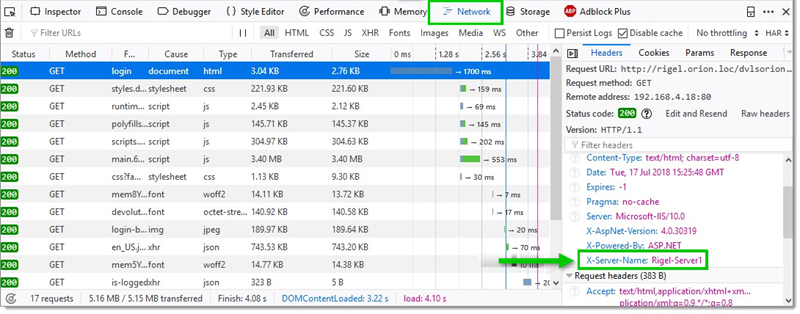
10. En Firefox, en la pestaña ***Red***, debería encontrar el valor del ***encabezado de respuesta HTTP personalizado*** del servidor del clúster que está respondiendo.
### Línea de comandos
```
%systemroot%\system32\inetsrv\APPCMD.EXE set config "Default Web Site" -section:system.webServer/httpProtocol /+"customHeaders.[name='X-Server-Name',value='node1']" /commit:apphost
```
---
# Agent Instructions
This documentation is published with GitBook. GitBook is the documentation platform designed so that both humans and AI agents can read, navigate, and reason over technical content effectively. Learn more at gitbook.com.
## Querying This Documentation
If you need additional information that is not directly available in this page, you can query the documentation dynamically by asking a question.
Perform an HTTP GET request on the current page URL with the `ask` query parameter, and the optional `goal` query parameter:
```
GET https://docs.devolutions.net/server/es/knowledge-base/how-to-articles/identify-the-server-answering-on-a-high-availability-topology.md?ask=&goal=
```
`ask` is the immediate question: it should be specific, self-contained, and written in natural language.
`goal` is optional and describes the broader end goal you are ultimately trying to accomplish on behalf of the user. GitBook uses it to tailor the answer towards what is most useful for that goal.
The response will contain a direct answer to the question and relevant excerpts and sources from the documentation.
Use this mechanism when the answer is not explicitly present in the current page, you need clarification or additional context, or you want to retrieve related documentation sections.