> For the complete documentation index, see [llms.txt](https://docs.devolutions.net/llms.txt). Markdown versions of documentation pages are available by appending `.md` to page URLs; this page is available as [Markdown](https://docs.devolutions.net/server/es/knowledge-base/how-to-articles/enable-the-devolutions-server-log-files.md).
# Habilitar los ficheros de registro de Devolutions Server
Habilite los ficheros de registro de Devolutions Server concediendo permisos de modificación (Modify) en la carpeta App\_Data y reiniciando el servidor para generar los registros DPS\_Main.
Es posible que nuestro equipo de atención al cliente le pida los ficheros de registro de Devolutions Server. Se encuentran en la carpeta App\_Data de la aplicación web de Devolutions Server.
Los ficheros necesarios de esta ubicación son los que empiezan por "DPS\_Main" (**DPS\_Main\_001.log**, **DPS\_Main\_002.log**, etc.). Si no están presentes, lo más probable es que la ***Application Pool Identity*** no pueda escribir en esa carpeta. Resuelva este problema concediendo a esa identidad el permiso ***Modify*** en la carpeta App\_Data.
### Habilitar los ficheros de registro
1. En la Devolutions Server Console, seleccione el servidor deseado de la lista.
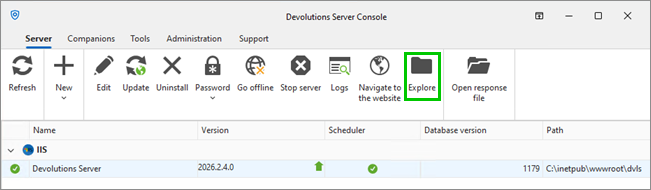
2. En la pestaña ***Server***, haga clic en ***Explore***. Se abrirá la carpeta de instalación.
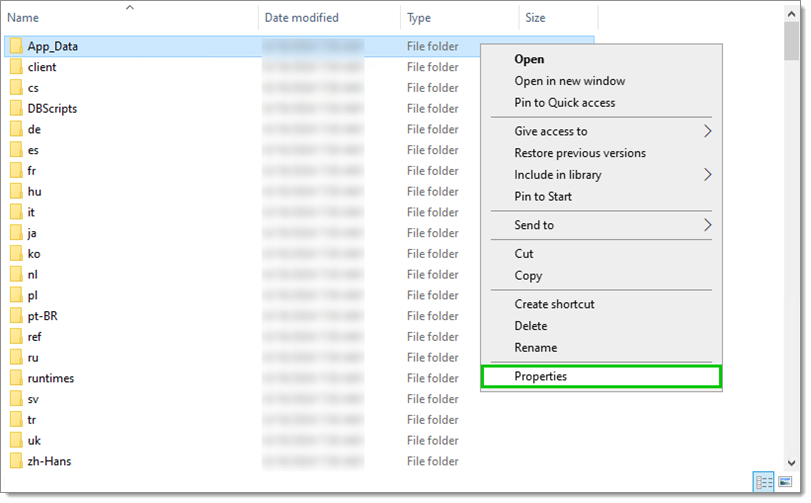
1. Haga clic con el botón derecho en la carpeta ***App\_Data*** y seleccione ***Propiedades***.
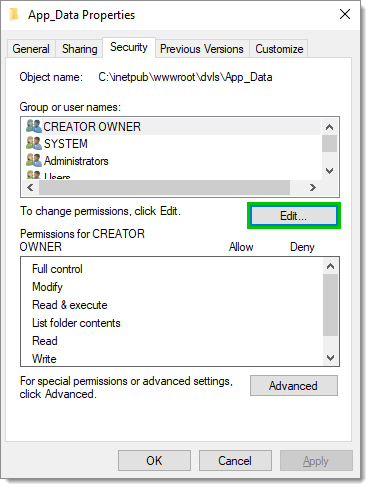
2. En la pestaña ***Seguridad***, haga clic en ***Editar...***.
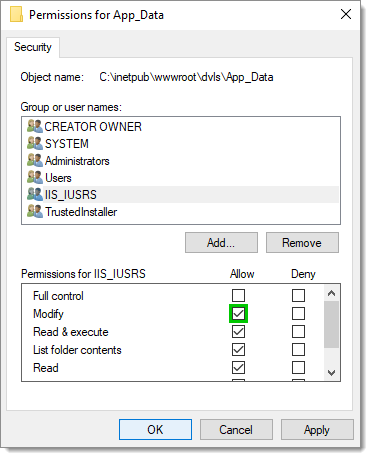
3. Seleccione ***IIS\_IUSRS***.
4. ***Permita*** el permiso ***Modificar*** y haga clic en ***Aceptar***.
5. Haga clic en ***Aceptar*** en la ventana ***Propiedades***.
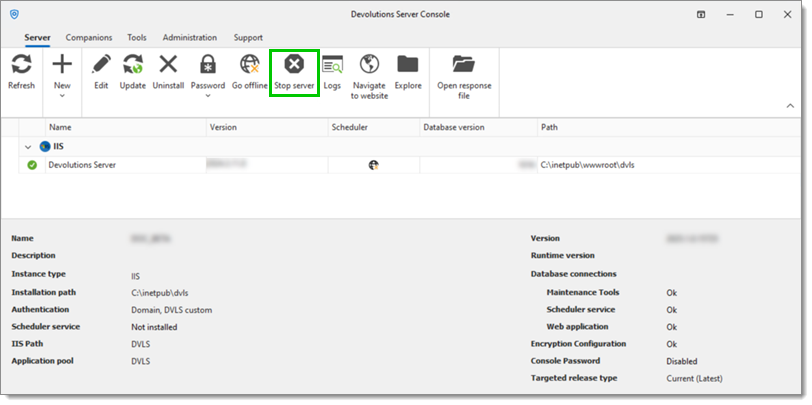
6. En la Devolutions Server Console, haga clic en ***Stop server***.
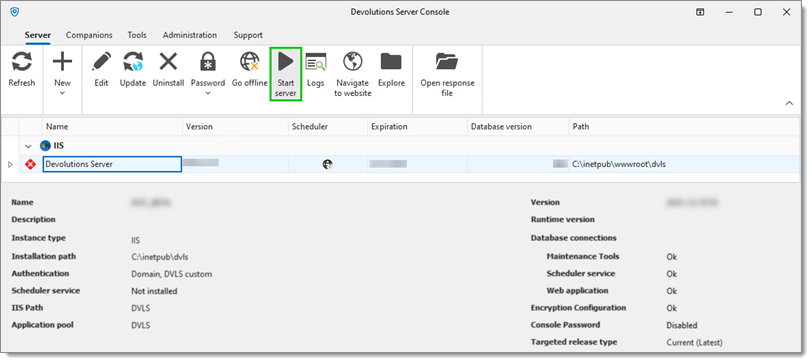
7. Espere unos segundos y luego haga clic en ***Start server***. Al reiniciar el servidor se crearán los ficheros **DPS\_Main.log** y **DPS\_Main\_001.log** tras un breve retardo. Es necesario realizar acciones en Devolutions Server para que se creen los registros (iniciar sesión, etc.).
{% hint style="info" %}
Al conceder el permiso ***Modificar*** al grupo ***IIS\_IUSRS***, se permite el acceso a este directorio a todos los usuarios de los grupos de aplicaciones de ese servidor. Si la instalación utiliza una identidad de grupo de aplicaciones específica para Devolutions Server, considere conceder los permisos exclusivamente a esa identidad. Como alternativa, podría asignar permisos de ***Modificar*** a la cuenta NETWORK SERVICE, que se utiliza habitualmente para los grupos de aplicaciones de IIS, aunque esta cuenta también podría compartirse con otros servicios.
{% endhint %}
---
# Agent Instructions
This documentation is published with GitBook. GitBook is the documentation platform designed so that both humans and AI agents can read, navigate, and reason over technical content effectively. Learn more at gitbook.com.
## Querying This Documentation
If you need additional information that is not directly available in this page, you can query the documentation dynamically by asking a question.
Perform an HTTP GET request on the current page URL with the `ask` query parameter, and the optional `goal` query parameter:
```
GET https://docs.devolutions.net/server/es/knowledge-base/how-to-articles/enable-the-devolutions-server-log-files.md?ask=&goal=
```
`ask` is the immediate question: it should be specific, self-contained, and written in natural language.
`goal` is optional and describes the broader end goal you are ultimately trying to accomplish on behalf of the user. GitBook uses it to tailor the answer towards what is most useful for that goal.
The response will contain a direct answer to the question and relevant excerpts and sources from the documentation.
Use this mechanism when the answer is not explicitly present in the current page, you need clarification or additional context, or you want to retrieve related documentation sections.