> For the complete documentation index, see [llms.txt](https://docs.devolutions.net/llms.txt). Markdown versions of documentation pages are available by appending `.md` to page URLs; this page is available as [Markdown](https://docs.devolutions.net/server/es/devolutions-server-console/recovery-kit-generation.md).
# Generación del kit de recuperación
Genere o recupere un kit de recuperación de Devolutions Server localmente o a través de Azure Key Vault para restaurar una instancia o crear una nueva a partir de una copia de seguridad.
El ***Kit de recuperación*** es útil para crear una nueva instancia o si su Devolutions Server debe restaurarse. Es posible ***Generar*** una copia de seguridad local o usar Azure Key Vault para almacenar la copia de seguridad. Si ya se ha creado una copia de seguridad con Azure Key Vault, puede ***Recuperarla***.
{% hint style="info" %}
Para obtener más información sobre la creación y gestión de una cuenta de Azure Key Vault, consulte la [documentación](https://learn.microsoft.com/en-us/azure/key-vault/) en su sitio web oficial.
{% endhint %}
### Generar
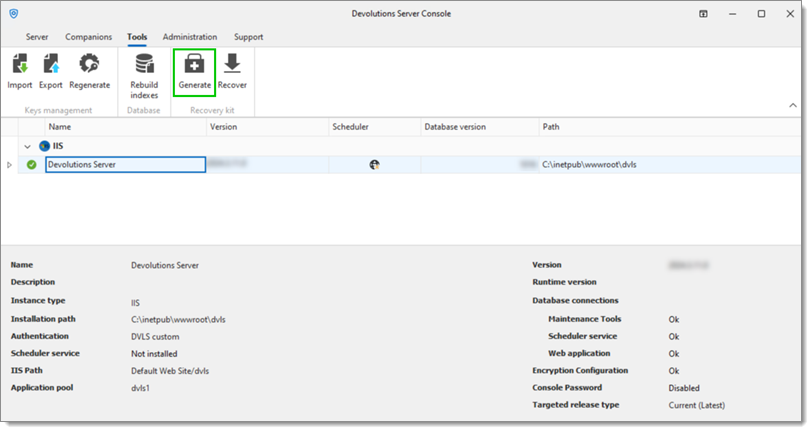
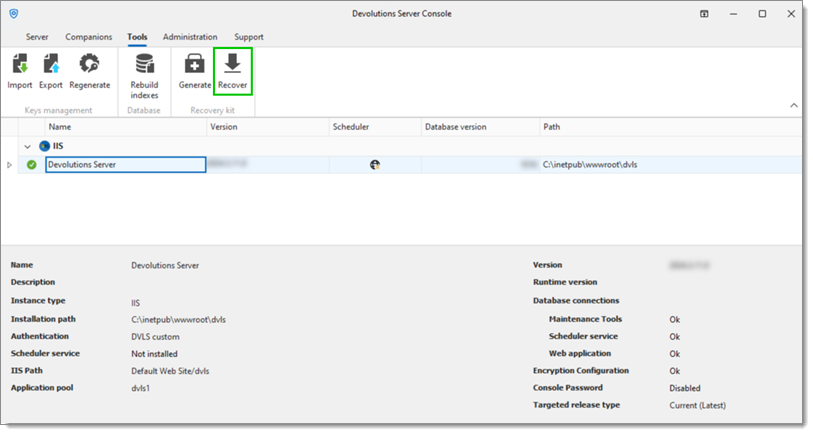
1. En la Devolutions Server Console, vaya a la pestaña ***Herramientas***.
2. Haga clic en ***Generar***.
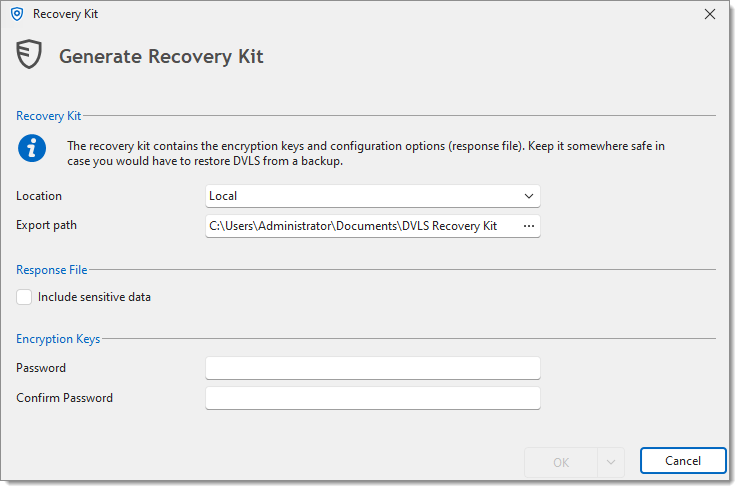
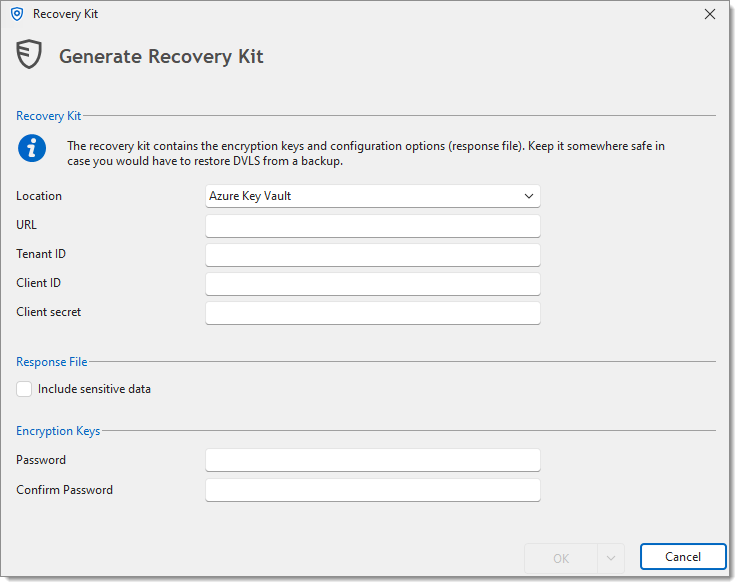
3. Seleccione la ***Ubicación***;
* ***Local***
* ***Ruta de exportación***: La carpeta de destino donde se guardará la copia de seguridad ***Local***
* ***Azure Key Vault***
* ***URL***: La URL de su Azure Key Vault
* ***Tenant ID***: El Tenant ID de su Entra ID
* ***Client ID***: El ID de su Azure Key Vault
* ***Client secret***: Un secreto de aplicación de su Entra ID
4. Verifique la sección ***Fichero de respuesta***.
{% hint style="info" %}
Marcar la opción ***Incluir datos sensibles*** incluirá las contraseñas de las credenciales de la base de datos solo si es una base de datos SQL; de lo contrario, no se podrá guardar ninguna contraseña.
{% endhint %}
5. Introduzca la ***Contraseña*** y, a continuación, introduzca la misma en el campo ***Confirmar contraseña***.
{% hint style="danger" %}
Si se pierde esta contraseña, será imposible utilizar la copia de seguridad.
{% endhint %}
6. Haga clic en ***OK*** para guardar esta configuración y crear la copia de seguridad.
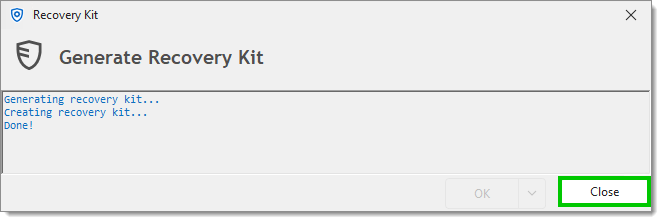
7. Haga clic en ***Cerrar*** una vez finalizada la generación.
{% hint style="info" %}
El [fichero de respuesta](/server/es/devolutions-server-console/open-response-file.md) también puede crearse por separado del kit de recuperación.
{% endhint %}
### Recuperar
1. En la Devolutions Server Console, vaya a la pestaña ***Herramientas***.
2. Haga clic en ***Recuperar***.
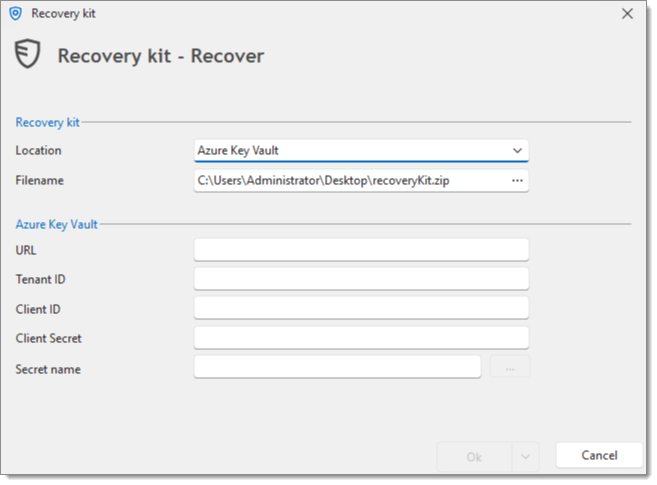
3. El campo ***Nombre de fichero*** sirve para elegir la carpeta de destino donde se guardará el fichero de copia de seguridad de **Azure Key Vault**, así como para nombrar dicho fichero de copia de seguridad.
Al hacer clic en el botón de puntos suspensivos en el campo ***Nombre de fichero*** se abre un cuadro de diálogo Guardar como.
4. Introduzca la información correcta en la sección de Azure Key Vault;
* ***URL***: La URL de su Azure Key Vault
* ***Tenant ID***: El Tenant ID de su Entra ID
* ***Client ID***: El ID de su Azure Key Vault
* ***Client secret***: Un secreto de aplicación de su Entra ID
* ***Secret name***: El nombre del secreto de aplicación
5. Haga clic en ***OK*** para recuperar el fichero zip de copia de seguridad específico.
{% hint style="info" %}
Un kit de recuperación creado con Azure Key Vault puede recuperarse directamente desde Azure para instalar una nueva instancia.
{% endhint %}
---
# Agent Instructions
This documentation is published with GitBook. GitBook is the documentation platform designed so that both humans and AI agents can read, navigate, and reason over technical content effectively. Learn more at gitbook.com.
## Querying This Documentation
If you need additional information that is not directly available in this page, you can query the documentation dynamically by asking a question.
Perform an HTTP GET request on the current page URL with the `ask` query parameter, and the optional `goal` query parameter:
```
GET https://docs.devolutions.net/server/es/devolutions-server-console/recovery-kit-generation.md?ask=&goal=
```
`ask` is the immediate question: it should be specific, self-contained, and written in natural language.
`goal` is optional and describes the broader end goal you are ultimately trying to accomplish on behalf of the user. GitBook uses it to tailor the answer towards what is most useful for that goal.
The response will contain a direct answer to the question and relevant excerpts and sources from the documentation.
Use this mechanism when the answer is not explicitly present in the current page, you need clarification or additional context, or you want to retrieve related documentation sections.