> For the complete documentation index, see [llms.txt](https://docs.devolutions.net/llms.txt). Markdown versions of documentation pages are available by appending `.md` to page URLs; this page is available as [Markdown](https://docs.devolutions.net/server/de/knowledge-base/how-to-articles/identify-the-server-answering-on-a-high-availability-topology.md).
# Den antwortenden Server in einer Hochverfügbarkeitstopologie identifizieren
Identifizieren Sie mithilfe eines benutzerdefinierten HTTP-Antwort-Headers, welcher Server die Anfragen in einer Devolutions Server-Topologie mit Hochverfügbarkeit oder Lastenausgleich beantwortet.
Die folgenden Schritte erklären, wie Sie festlegen, welcher Server antwortet, wenn Sie sich in einer Topologie mit Hochverfügbarkeit/Lastenausgleich mit der Devolutions Server-Webseite verbinden.
1. Öffnen Sie den IIS Manager auf dem Server, auf dem Devolutions Server gehostet wird.
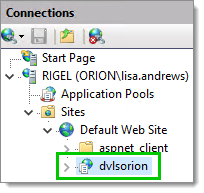
2. Erweitern Sie die Knoten im Bereich ***Connections*** und wählen Sie die Devolutions Server-Webanwendung aus.
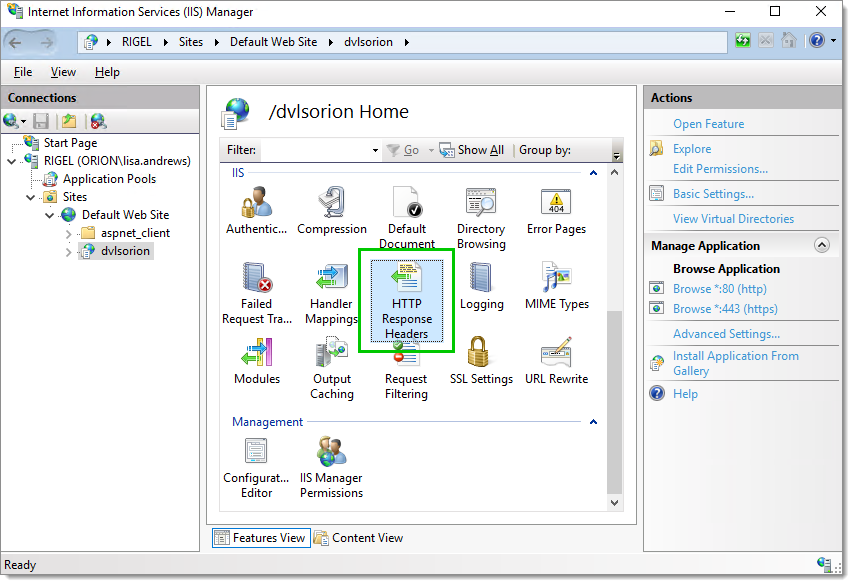
3. Öffnen Sie die ***HTTP Response Headers***.
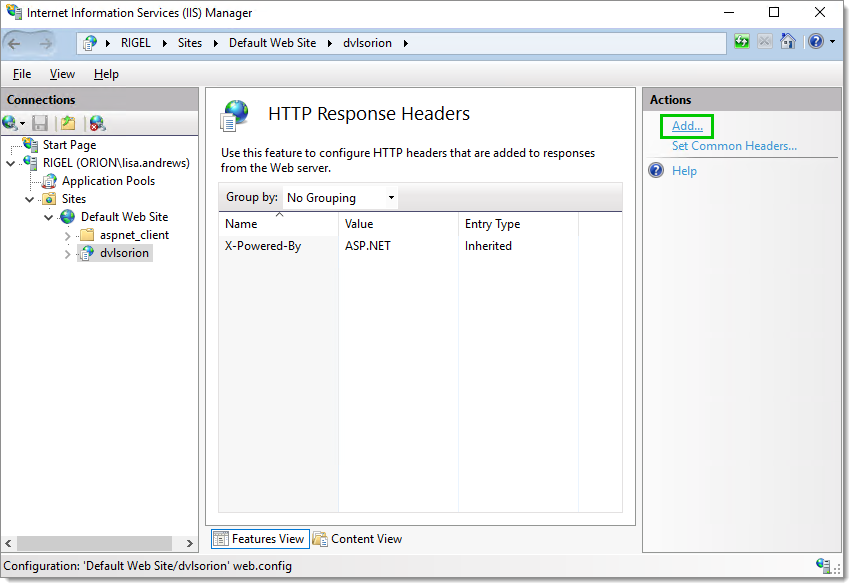
4. Klicken Sie im Bereich ***Actions*** auf ***Add***.., um einen neuen ***HTTP Response Header*** hinzuzufügen.
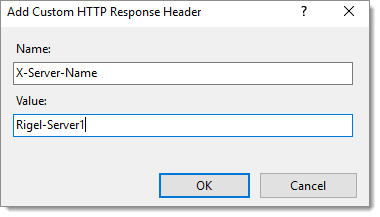
5. Geben Sie einen ***Name*** und einen ***Value*** ein, der den Server identifiziert. Klicken Sie anschließend auf ***OK***, um diese Informationen zu speichern.
6. Wiederholen Sie die Schritte 1 bis 5 auf jedem Server Ihres ***High Availability/Load Balancing***-Clusters. Es ist wichtig, für jeden Server einen anderen Wert festzulegen, jedoch denselben ***Name*** beizubehalten.
7. Öffnen Sie Ihren bevorzugten Browser.
8. Öffnen Sie die ***Developer Tools*** im Browser. Normalerweise öffnet die Taste ***F12*** die ***Developer Tools*** in Google Chrome, Firefox oder Microsoft Edge.
9. Navigieren Sie zu Ihrer Devolutions Server-Webseite.
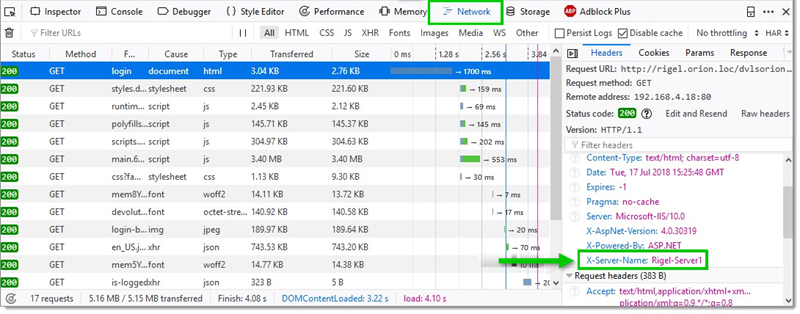
10. Wenn Sie Firefox verwenden, sollten Sie auf der Registerkarte ***Network*** den Wert des ***Custom HTTP Response Header*** des antwortenden Servers des Clusters finden.
### Befehlszeile
```
%systemroot%\system32\inetsrv\APPCMD.EXE set config "Default Web Site" -section:system.webServer/httpProtocol /+"customHeaders.[name='X-Server-Name',value='node1']" /commit:apphost
```
---
# Agent Instructions
This documentation is published with GitBook. GitBook is the documentation platform designed so that both humans and AI agents can read, navigate, and reason over technical content effectively. Learn more at gitbook.com.
## Querying This Documentation
If you need additional information that is not directly available in this page, you can query the documentation dynamically by asking a question.
Perform an HTTP GET request on the current page URL with the `ask` query parameter, and the optional `goal` query parameter:
```
GET https://docs.devolutions.net/server/de/knowledge-base/how-to-articles/identify-the-server-answering-on-a-high-availability-topology.md?ask=&goal=
```
`ask` is the immediate question: it should be specific, self-contained, and written in natural language.
`goal` is optional and describes the broader end goal you are ultimately trying to accomplish on behalf of the user. GitBook uses it to tailor the answer towards what is most useful for that goal.
The response will contain a direct answer to the question and relevant excerpts and sources from the documentation.
Use this mechanism when the answer is not explicitly present in the current page, you need clarification or additional context, or you want to retrieve related documentation sections.