> For the complete documentation index, see [llms.txt](https://docs.devolutions.net/llms.txt). Markdown versions of documentation pages are available by appending `.md` to page URLs; this page is available as [Markdown](https://docs.devolutions.net/server/de/knowledge-base/how-to-articles/enable-the-devolutions-server-log-files.md).
# Die Devolutions Server-Protokolldateien aktivieren
Aktivieren Sie die Protokolldateien von Devolutions Server, indem Sie Änderungsberechtigungen für den Ordner App\_Data erteilen und den Server neu starten, um DPS\_Main-Protokolle zu erzeugen.
Unser Kundensupport-Team kann Sie bitten, die Protokolldateien von Devolutions Server bereitzustellen. Diese befinden sich im Ordner App\_Data der Devolutions Server-Webanwendung.
Die von diesem Speicherort benötigten Dateien sind diejenigen, die mit "DPS\_Main" beginnen (**DPS\_Main\_001.log**, **DPS\_Main\_002.log** usw.). Falls sie nicht vorhanden sind, liegt das höchstwahrscheinlich daran, dass die ***Application Pool Identity*** nicht in diesem Ordner schreiben kann. Beheben Sie dieses Problem, indem Sie dieser Identität die Berechtigung ***Ändern*** für den Ordner App\_Data erteilen.
### Protokolldateien aktivieren
1. Wählen Sie in der Devolutions Server Console den gewünschten Server aus der Liste aus.
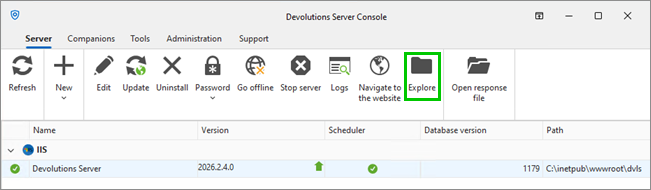
2. Klicken Sie im Tab ***Server*** auf ***Explore***. Dadurch wird der Installationsordner geöffnet.
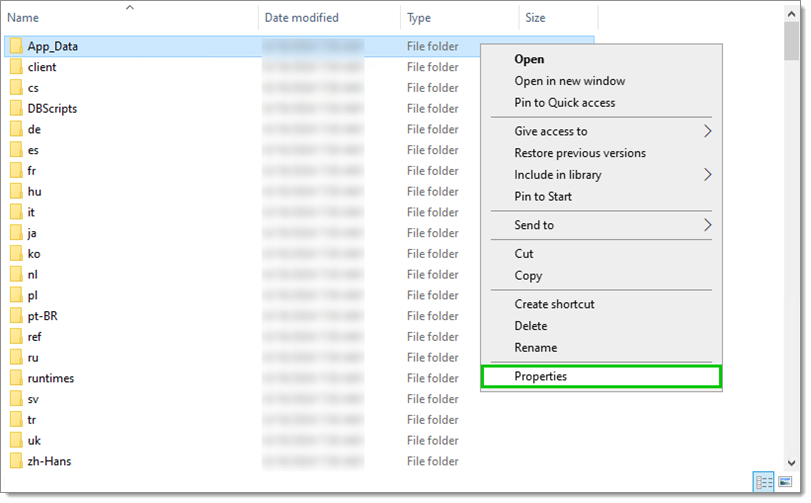
1. Klicken Sie mit der rechten Maustaste auf den Ordner ***App\_Data*** und wählen Sie ***Eigenschaften***.
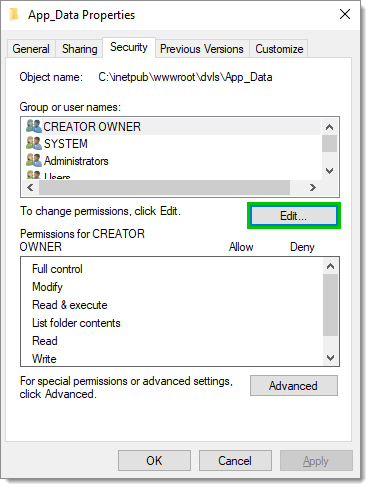
2. Klicken Sie im Tab ***Sicherheit*** auf ***Bearbeiten...***.
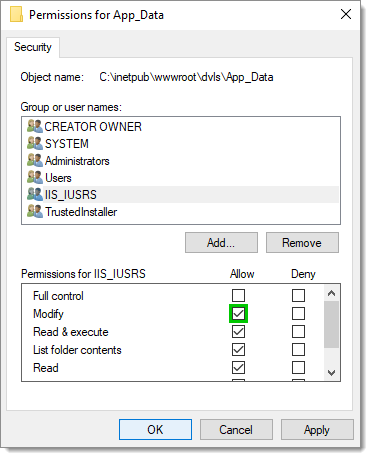
3. Wählen Sie ***IIS\_IUSRS*** aus.
4. ***Erlauben*** Sie die Berechtigung ***Ändern*** und klicken Sie auf ***OK***.
5. Klicken Sie im Fenster ***Eigenschaften*** auf ***OK***.
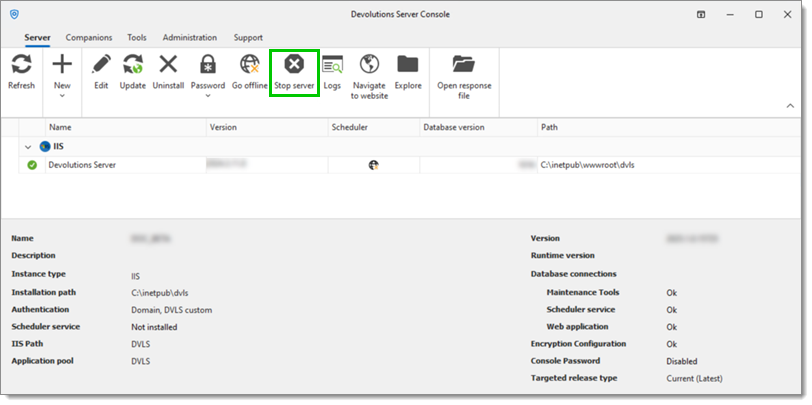
6. Klicken Sie in der Devolutions Server Console auf ***Stop server***.
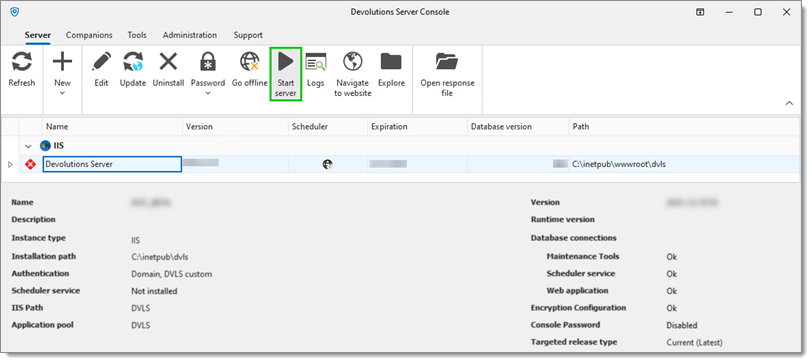
7. Warten Sie einige Sekunden und klicken Sie dann auf ***Start server***. Durch den Neustart des Servers werden die Dateien **DPS\_Main.log** und **DPS\_Main\_001.log** nach kurzer Verzögerung erstellt. Damit Protokolle erstellt werden, müssen Aktionen auf dem Devolutions Server durchgeführt werden (Anmelden usw.).
{% hint style="info" %}
Wenn Sie der Gruppe ***IIS\_IUSRS*** die Berechtigung ***Ändern*** erteilen, erhalten alle Benutzer von Anwendungspools auf diesem Server Zugriff auf dieses Verzeichnis. Wenn die Installation eine spezifische Anwendungspool-Identität für Devolutions Server verwendet, sollten Sie in Erwägung ziehen, die Berechtigungen ausschließlich dieser Identität zu erteilen. Alternativ könnten Sie die Berechtigung ***Ändern*** dem Konto NETWORK SERVICE zuweisen, das häufig für IIS-Anwendungspools verwendet wird, wobei dieses Konto möglicherweise auch mit anderen Diensten geteilt wird.
{% endhint %}
---
# Agent Instructions
This documentation is published with GitBook. GitBook is the documentation platform designed so that both humans and AI agents can read, navigate, and reason over technical content effectively. Learn more at gitbook.com.
## Querying This Documentation
If you need additional information that is not directly available in this page, you can query the documentation dynamically by asking a question.
Perform an HTTP GET request on the current page URL with the `ask` query parameter, and the optional `goal` query parameter:
```
GET https://docs.devolutions.net/server/de/knowledge-base/how-to-articles/enable-the-devolutions-server-log-files.md?ask=&goal=
```
`ask` is the immediate question: it should be specific, self-contained, and written in natural language.
`goal` is optional and describes the broader end goal you are ultimately trying to accomplish on behalf of the user. GitBook uses it to tailor the answer towards what is most useful for that goal.
The response will contain a direct answer to the question and relevant excerpts and sources from the documentation.
Use this mechanism when the answer is not explicitly present in the current page, you need clarification or additional context, or you want to retrieve related documentation sections.