> For the complete documentation index, see [llms.txt](https://docs.devolutions.net/llms.txt). Markdown versions of documentation pages are available by appending `.md` to page URLs; this page is available as [Markdown](https://docs.devolutions.net/server/de/devolutions-server-console/recovery-kit-generation.md).
# Erstellung des Wiederherstellungskits
Generieren oder wiederherstellen Sie ein Devolutions Server-Recovery-Kit lokal oder über Azure Key Vault, um eine Instanz wiederherzustellen oder eine neue aus einem Backup zu erstellen.
Das ***Recovery kit*** ist nützlich, um eine neue Instanz zu erstellen oder wenn Ihr Devolutions Server wiederhergestellt werden muss. Es ist möglich, ein lokales Backup zu ***Generieren*** oder Azure Key Vault zum Speichern des Backups zu verwenden. Wenn bereits ein Backup mit Azure Key Vault erstellt wurde, können Sie es ***Wiederherstellen***.
{% hint style="info" %}
Um mehr über das Erstellen und Verwalten eines Azure Key Vault-Kontos zu erfahren, konsultieren Sie bitte die [Dokumentation](https://learn.microsoft.com/en-us/azure/key-vault/) auf deren offizieller Website.
{% endhint %}
### Generieren
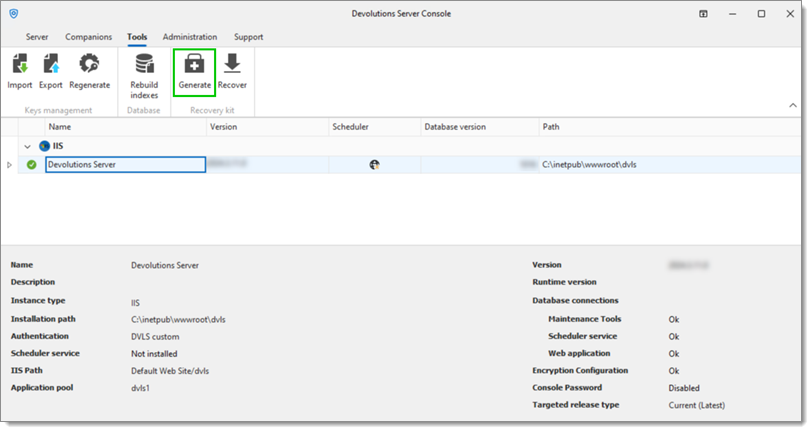
1. Gehen Sie in der Devolutions Server Console zur Registerkarte ***Tools***.
2. Klicken Sie auf ***Generate***.
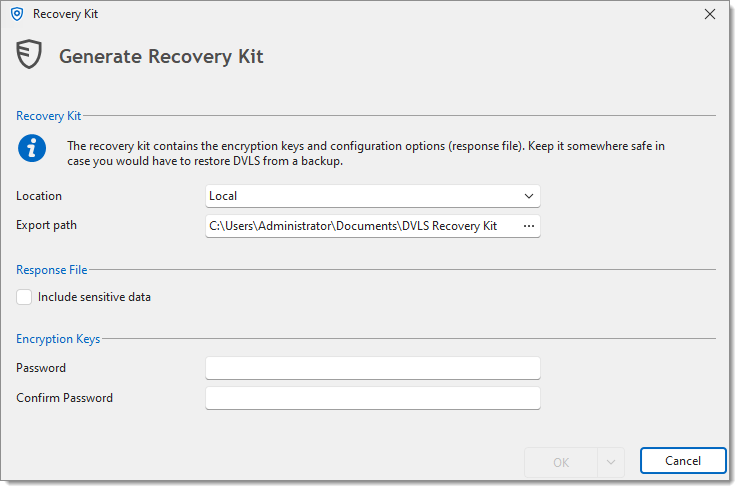
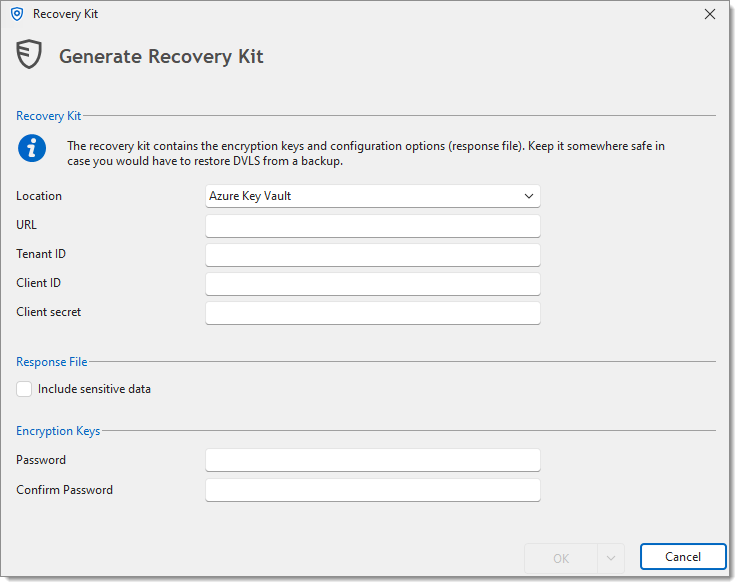
3. Wählen Sie den ***Location*** aus;
* ***Local***
* ***Export path***: Der Zielordner, in dem das ***Local***-Backup gespeichert wird
* ***Azure Key Vault***
* ***URL***: Die URL zu Ihrem Azure Key Vault
* ***Tenant ID***: Die Tenant ID aus Ihrer Entra ID
* ***Client ID***: Die ID Ihres Azure Key Vault
* ***Client secret***: Ein Anwendungsgeheimnis aus Ihrer Entra ID
4. Überprüfen Sie den Abschnitt ***Response File***.
{% hint style="info" %}
Wenn die Option ***Include sensitive data*** aktiviert ist, werden Passwörter für die Datenbank-Anmeldeinformationen nur dann einbezogen, wenn es sich um eine SQL-Datenbank handelt, andernfalls können keine Passwörter gespeichert werden.
{% endhint %}
5. Geben Sie das ***Password*** ein und geben Sie dann dasselbe im Feld ***Confirm Password*** ein.
{% hint style="danger" %}
Wenn dieses Passwort verloren geht, ist es unmöglich, das Backup zu verwenden.
{% endhint %}
6. Klicken Sie auf ***OK***, um diese Konfiguration zu speichern und das Backup zu erstellen.
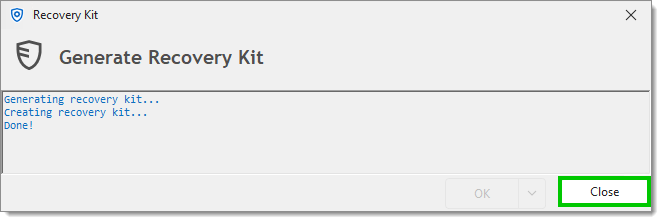
7. Klicken Sie auf ***Close***, sobald die Generierung abgeschlossen ist.
{% hint style="info" %}
Die [Antwortdatei](/server/de/devolutions-server-console/open-response-file.md) kann auch separat vom Recovery-Kit erstellt werden.
{% endhint %}
### Wiederherstellen
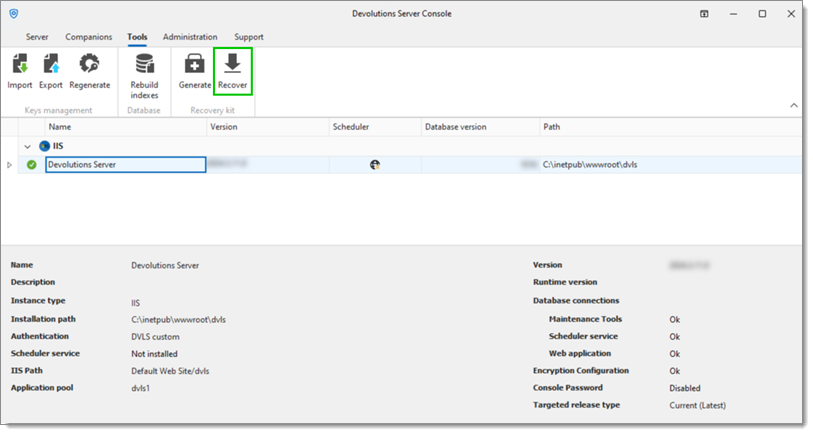
1. Gehen Sie in der Devolutions Server Console zur Registerkarte ***Tools***.
2. Klicken Sie auf ***Recover***.
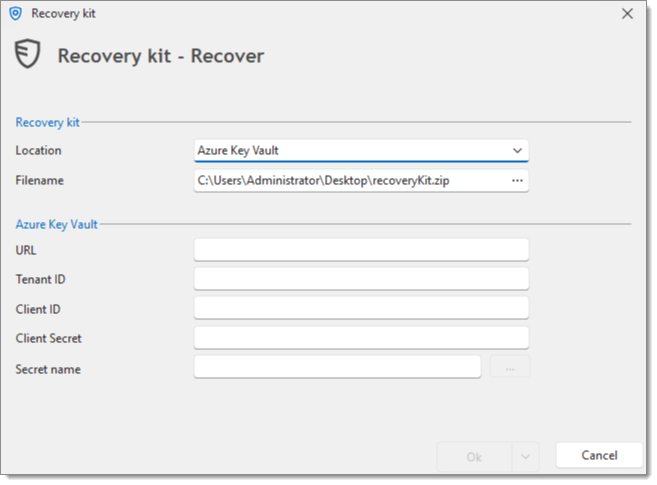
3. Das Feld ***Filename*** dient dazu, den Zielordner auszuwählen, in dem die **Azure Key Vault**-Backup-Datei gespeichert wird, sowie diese Backup-Datei zu benennen.
Ein Klick auf die Auslassungsschaltfläche im Feld ***Filename*** öffnet ein Speichern-unter-Dialogfenster.
4. Geben Sie die korrekten Informationen im Abschnitt Azure Key Vault ein;
* ***URL***: Die URL zu Ihrem Azure Key Vault
* ***Tenant ID***: Die Tenant ID aus Ihrer Entra ID
* ***Client ID***: Die ID Ihres Azure Key Vault
* ***Client secret***: Ein Anwendungsgeheimnis aus Ihrer Entra ID
* ***Secret name***: Der Name des Anwendungsgeheimnisses
5. Klicken Sie auf ***OK***, um die spezifische Backup-ZIP-Datei wiederherzustellen.
{% hint style="info" %}
Ein mit Azure Key Vault erstelltes Recovery-Kit kann direkt aus Azure abgerufen werden, um eine neue Instanz zu installieren.
{% endhint %}
---
# Agent Instructions
This documentation is published with GitBook. GitBook is the documentation platform designed so that both humans and AI agents can read, navigate, and reason over technical content effectively. Learn more at gitbook.com.
## Querying This Documentation
If you need additional information that is not directly available in this page, you can query the documentation dynamically by asking a question.
Perform an HTTP GET request on the current page URL with the `ask` query parameter, and the optional `goal` query parameter:
```
GET https://docs.devolutions.net/server/de/devolutions-server-console/recovery-kit-generation.md?ask=&goal=
```
`ask` is the immediate question: it should be specific, self-contained, and written in natural language.
`goal` is optional and describes the broader end goal you are ultimately trying to accomplish on behalf of the user. GitBook uses it to tailor the answer towards what is most useful for that goal.
The response will contain a direct answer to the question and relevant excerpts and sources from the documentation.
Use this mechanism when the answer is not explicitly present in the current page, you need clarification or additional context, or you want to retrieve related documentation sections.