> For the complete documentation index, see [llms.txt](https://docs.devolutions.net/llms.txt). Markdown versions of documentation pages are available by appending `.md` to page URLs; this page is available as [Markdown](https://docs.devolutions.net/rdm/workspaces/offline-mode/offline-read-and-write.md).
# Offline read and write
The ***Read/Write*** offline mode allows the user to add, edit and delete entries while the workspace is offline. Those changes are saved locally and synchronized with the workspace once it is back online.
See [Offline mode](https://docs.devolutions.net/rdm/workspaces/offline-mode/) to know which permissions to grant in order for this to work for each workspace.
{% hint style="info" %}
Some functionalities are not available while offline, but the [user vault](https://docs.devolutions.net/rdm/user-interface/navigation-pane/user-vault/) is still accessible.
{% endhint %}
### Offline edits workflow
1. Connect to the workspace, and click on ***File – Go offline***.
2. Make the desired edits and save them. Go back online by clicking on ***File – Go online*** once the changes are completed.
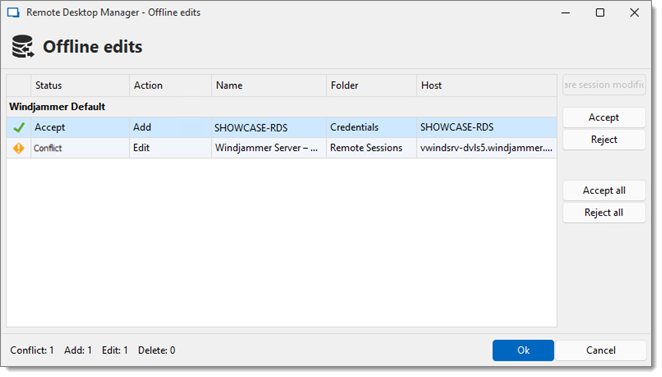
3. Accept or reject the offline changes in the ***Offline edits*** window. The ***Compare session modifications*** button allows for a side-by-side comparison of the changes.
4. Click on ***Ok*** once the changes have been accepted or rejected to satisfaction.ve
{% hint style="warning" %}
When conflicts occur, the user causing them must decide to accept or reject the changes. The different versions of the entry can be compared to view which changes has been made.
{% endhint %}
### Compare versions of an entry
Click the ***Compare session modifications*** button to compare the versions of a conflicted entry. Analyze the XML structure of the entry to decide to ***Accept*** or ***Reject*** the changes.
The content on the left represents the entry retrieved online, and the content on the right represents the local version of the entry edited in Offline mode.
---
# Agent Instructions
This documentation is published with GitBook. GitBook is the documentation platform designed so that both humans and AI agents can read, navigate, and reason over technical content effectively. Learn more at gitbook.com.
## Querying This Documentation
If you need additional information that is not directly available in this page, you can query the documentation dynamically by asking a question.
Perform an HTTP GET request on the current page URL with the `ask` query parameter:
```
GET https://docs.devolutions.net/rdm/workspaces/offline-mode/offline-read-and-write.md?ask=
```
The question should be specific, self-contained, and written in natural language.
The response will contain a direct answer to the question and relevant excerpts and sources from the documentation.
Use this mechanism when the answer is not explicitly present in the current page, you need clarification or additional context, or you want to retrieve related documentation sections.