> For the complete documentation index, see [llms.txt](https://docs.devolutions.net/llms.txt). Markdown versions of documentation pages are available by appending `.md` to page URLs; this page is available as [Markdown](https://docs.devolutions.net/rdm/it/ribbon-menu-bar/view/tab-groups.md).
# Gruppi di schede
Esplori i gruppi di schede attivi in una finestra ancorata con la funzionalità Gruppi di schede di Remote Desktop Manager per organizzare e gestire più schede di sessione aperte.
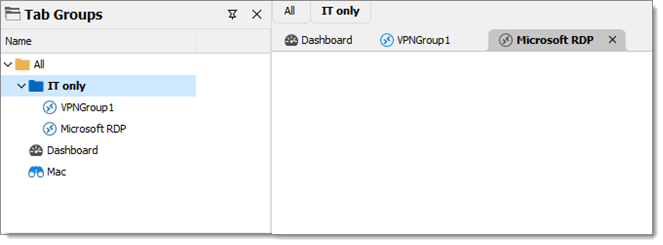
La funzionalità ***Gruppi di schede*** apre una finestra ancorata che mostra una vista ad albero dei vari gruppi di schede. È possibile selezionare più schede contemporaneamente facendo clic con Shift premuto oppure selezionarle tutte con la scorciatoia Ctrl+A. Facendo clic con il pulsante destro del mouse su una o più schede vengono visualizzate altre opzioni.
Gli altri gruppi di schede appariranno solo se è attiva una sessione che fa parte di un gruppo di schede (diverso dalla scheda ***Tutti***).
Sebbene sia ancorato per impostazione predefinita, il riquadro ***Gruppi di schede*** può essere trasformato in finestra, trascinato e ancorato in qualsiasi punto di Remote Desktop Manager.
Per sapere come creare un gruppo di schede, consulti [***Barra dei gruppi di schede***](/rdm/it/ribbon-menu-bar/view/tab-groups/tab-group-bar.md).
#### Vedere anche
* [Devolutions Academy – Manage tabs using tab groups](https://academy.devolutions.net/student/page/2641980-manage-tabs-using-tab-groups?sid=5e1ad270-9ecb-41cb-9d9d-6de6d80f4a3b\&sid_i=3)
---
# Agent Instructions
This documentation is published with GitBook. GitBook is the documentation platform designed so that both humans and AI agents can read, navigate, and reason over technical content effectively. Learn more at gitbook.com.
## Querying This Documentation
If you need additional information that is not directly available in this page, you can query the documentation dynamically by asking a question.
Perform an HTTP GET request on the current page URL with the `ask` query parameter, and the optional `goal` query parameter:
```
GET https://docs.devolutions.net/rdm/it/ribbon-menu-bar/view/tab-groups.md?ask=&goal=
```
`ask` is the immediate question: it should be specific, self-contained, and written in natural language.
`goal` is optional and describes the broader end goal you are ultimately trying to accomplish on behalf of the user. GitBook uses it to tailor the answer towards what is most useful for that goal.
The response will contain a direct answer to the question and relevant excerpts and sources from the documentation.
Use this mechanism when the answer is not explicitly present in the current page, you need clarification or additional context, or you want to retrieve related documentation sections.