> For the complete documentation index, see [llms.txt](https://docs.devolutions.net/llms.txt). Markdown versions of documentation pages are available by appending `.md` to page URLs; this page is available as [Markdown](https://docs.devolutions.net/rdm/it/knowledge-base/how-to-articles/vpn-routing.md).
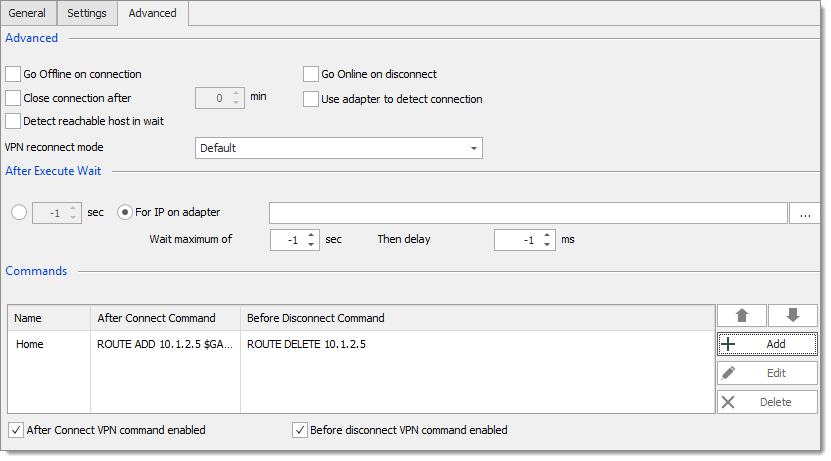
# Routing VPN
Automatizzi il routing VPN in Remote Desktop Manager eseguendo comandi post-connessione e pre-disconnessione per aggiungere automaticamente le route.
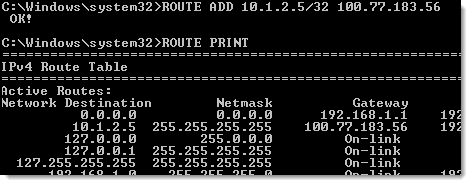
Stabilire una connessione VPN utilizzando Remote Desktop Manager è semplice. Purtroppo, l'aggiunta delle route deve essere effettuata manualmente. Attenda che l'adattatore si connetta, individui l'IP, quindi aggiunga le route desiderate. Anche utilizzando uno script (come uno script PowerShell), resta un'attività ridondante e dispendiosa in termini di tempo.
### Soluzione
Questa funzionalità fa parte di un concetto più ampio chiamato Comandi VPN. Consente di eseguire qualsiasi tipo di script o eseguibile dopo la connessione VPN e prima della disconnessione VPN.
### Flusso di lavoro
1. Configuri la VPN in modo che attenda finché l'adattatore non si connette e riceve un IP assegnato (utilizzeremo l'IP dell'adattatore per definire le route).
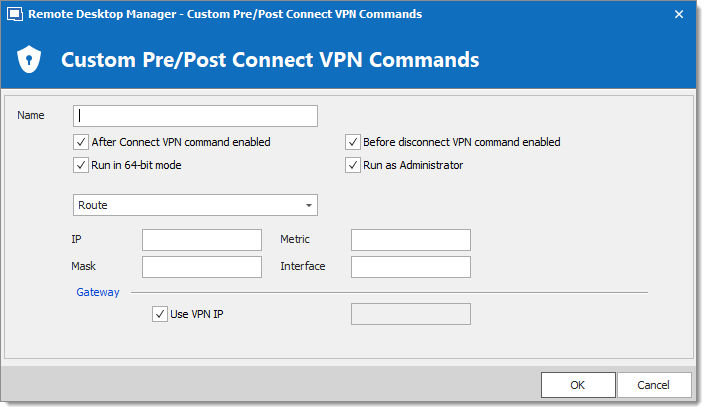
2. Clicchi su ***Aggiungi*** per visualizzare la finestra di dialogo ***Comandi***.
3. Crei una definizione di route selezionando il pulsante di opzione ***Route (Aggiungi/Rimuovi)***.
4. Imposti l'IP e tutte le altre informazioni richieste.
---
# Agent Instructions
This documentation is published with GitBook. GitBook is the documentation platform designed so that both humans and AI agents can read, navigate, and reason over technical content effectively. Learn more at gitbook.com.
## Querying This Documentation
If you need additional information that is not directly available in this page, you can query the documentation dynamically by asking a question.
Perform an HTTP GET request on the current page URL with the `ask` query parameter, and the optional `goal` query parameter:
```
GET https://docs.devolutions.net/rdm/it/knowledge-base/how-to-articles/vpn-routing.md?ask=&goal=
```
`ask` is the immediate question: it should be specific, self-contained, and written in natural language.
`goal` is optional and describes the broader end goal you are ultimately trying to accomplish on behalf of the user. GitBook uses it to tailor the answer towards what is most useful for that goal.
The response will contain a direct answer to the question and relevant excerpts and sources from the documentation.
Use this mechanism when the answer is not explicitly present in the current page, you need clarification or additional context, or you want to retrieve related documentation sections.