> For the complete documentation index, see [llms.txt](https://docs.devolutions.net/llms.txt). Markdown versions of documentation pages are available by appending `.md` to page URLs; this page is available as [Markdown](https://docs.devolutions.net/rdm/it/knowledge-base/how-to-articles/tunnel-local-webcam-through-rdp-sessions.md).
# Incanalare la webcam locale tramite le sessioni RDP
Effettui il tunneling di una webcam locale attraverso una sessione RDP in Remote Desktop Manager utilizzando RemoteFX o il reindirizzamento Plug and Play.
Remote Desktop Manager consente di effettuare il tunneling di una webcam locale attraverso una sessione RDP.
{% hint style="info" %}
L'opzione di reindirizzamento della webcam reindirizzerà tutte le webcam collegate. In futuro aggiungeremo un modo per specificare quale webcam desidera condividere inserendone il deviceID (solo per le sessioni esterne).
{% endhint %}
{% hint style="warning" %}
Abbiamo apportato una correzione che impediva il reindirizzamento di alcune webcam. Sospettiamo che il problema fosse causato dal reindirizzamento RemoteFX, che non è supportato da tutte le webcam. Purtroppo RemoteFX sembra essere necessario per ActiveX (che utilizziamo per le sessioni incorporate), quindi questa correzione si applicherà solo alle sessioni esterne.
{% endhint %}
1. Imposti i seguenti criteri di gruppo sia sul client RDP sia sul computer locale:
* ***Attivato***: Consenti il reindirizzamento RDP di altri dispositivi USB RemoteFX supportati da questo computer.
* ***Disattivato***: Non consentire il reindirizzamento dei dispositivi Plug and Play supportati.
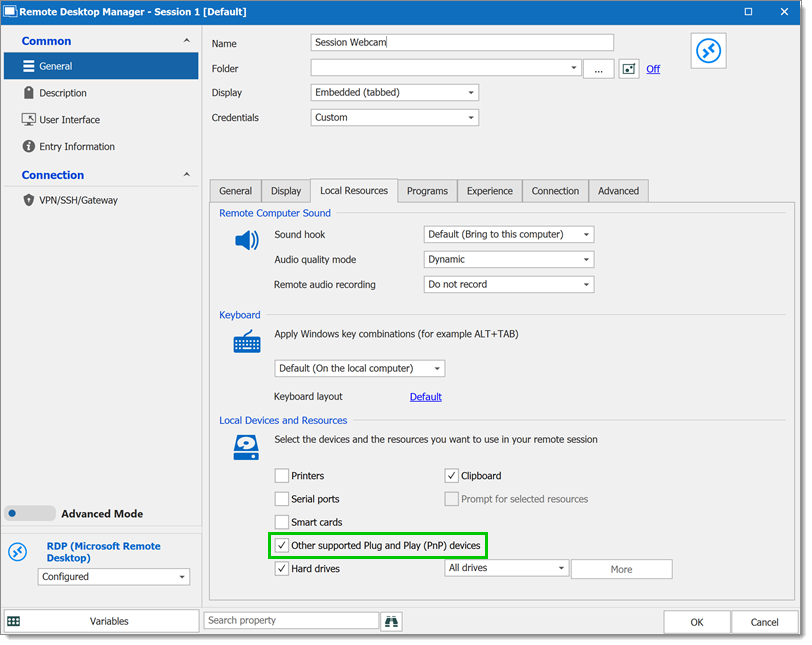
2. Per le sessioni incorporate, dovrà solo attivare l'opzione ***Altri dispositivi Plug and Play (PnP) supportati*** nella sezione ***Proprietà - Generale - Risorse locali - Dispositivi e risorse locali*** della voce RDP.
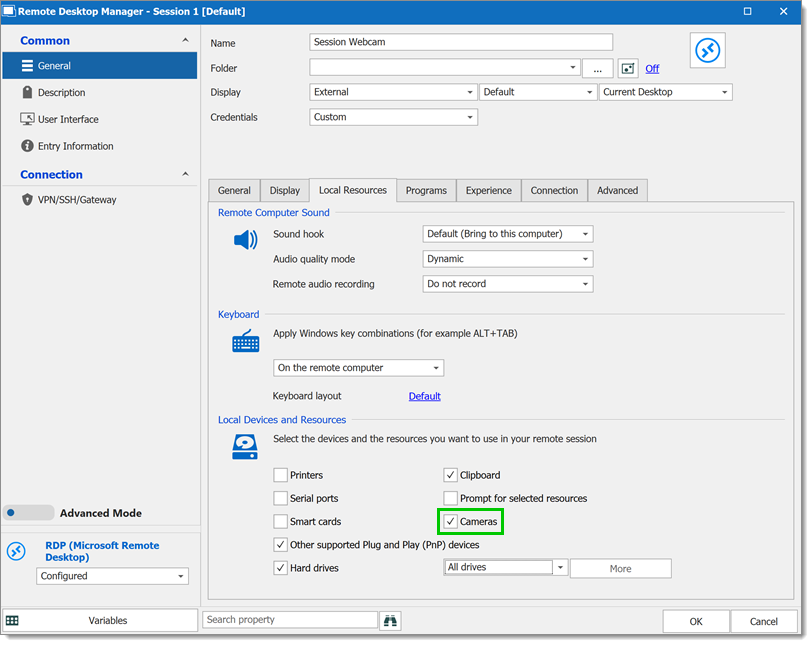
3. Per le sessioni esterne è presente un'opzione separata per il reindirizzamento delle fotocamere. Dovrà inoltre assicurarsi che le richieste WMI siano abilitate sul suo computer locale.
---
# Agent Instructions
This documentation is published with GitBook. GitBook is the documentation platform designed so that both humans and AI agents can read, navigate, and reason over technical content effectively. Learn more at gitbook.com.
## Querying This Documentation
If you need additional information that is not directly available in this page, you can query the documentation dynamically by asking a question.
Perform an HTTP GET request on the current page URL with the `ask` query parameter, and the optional `goal` query parameter:
```
GET https://docs.devolutions.net/rdm/it/knowledge-base/how-to-articles/tunnel-local-webcam-through-rdp-sessions.md?ask=&goal=
```
`ask` is the immediate question: it should be specific, self-contained, and written in natural language.
`goal` is optional and describes the broader end goal you are ultimately trying to accomplish on behalf of the user. GitBook uses it to tailor the answer towards what is most useful for that goal.
The response will contain a direct answer to the question and relevant excerpts and sources from the documentation.
Use this mechanism when the answer is not explicitly present in the current page, you need clarification or additional context, or you want to retrieve related documentation sections.