> For the complete documentation index, see [llms.txt](https://docs.devolutions.net/llms.txt). Markdown versions of documentation pages are available by appending `.md` to page URLs; this page is available as [Markdown](https://docs.devolutions.net/rdm/it/knowledge-base/how-to-articles/sealed-entries.md).
# Voci sigillate
Sigilli le voci in Remote Desktop Manager per proteggere i dati sensibili dagli utenti con privilegi più elevati e avvisare gli amministratori dei tentativi di accesso.
Le voci sigillate impediscono che le informazioni sensibili siano accessibili agli utenti con privilegi più elevati e possono essere utilizzate in caso di emergenza. Quando viene effettuato un tentativo di accesso a una voce sigillata, il sistema mostra un messaggio di conferma all'utente, indicando che la voce è protetta. Inoltre, viene inviata una notifica agli amministratori, avvisandoli del tentativo di accesso.
{% hint style="info" %}
La voce sigillata deve essere creata in uno [spazio di lavoro Devolutions Server](/rdm/it/concepts/basic-concepts/workspaces.md).
{% endhint %}
### Sigillare la voce
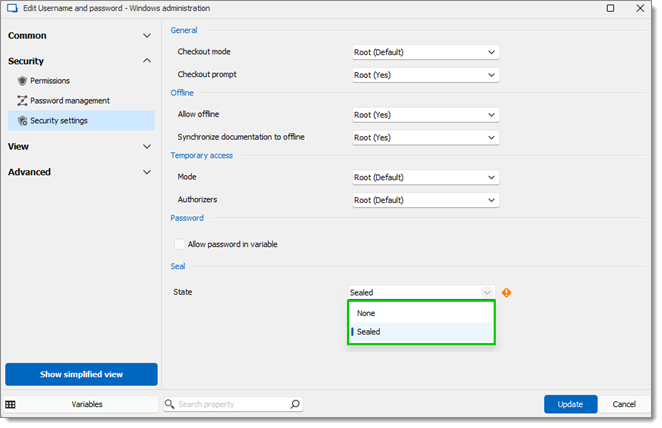
1. Vada alle proprietà della voce.
2. Clicchi su ***Impostazioni di sicurezza***.
3. Selezioni ***Sigillata*** sotto ***Stato del sigillo***.
4. Clicchi su ***Aggiorna*** per salvare.
### Tentativi di accesso
Rimuovere il sigillo da una voce invia una notifica agli amministratori, fornendo i dettagli sul tentativo di accesso. Questi includono l'identità dell'utente che tenta l'accesso, l'ora e la data del tentativo e il nome della cassaforte.
### API REST di Devolutions Server e voci sigillate
I dettagli di una voce possono essere recuperati tramite l'API REST. Devolutions Server risponderà con un messaggio di errore di voce sigillata se qualcuno tenta di accedere a una voce sigillata a livello programmatico.
#### Vedi anche
* [Blog Devolutions - Spotlight on layered protection with sealed entries](https://blog.devolutions.net/2024/07/inside-20242-layered-protection-with-sealed-entries/)
---
# Agent Instructions
This documentation is published with GitBook. GitBook is the documentation platform designed so that both humans and AI agents can read, navigate, and reason over technical content effectively. Learn more at gitbook.com.
## Querying This Documentation
If you need additional information that is not directly available in this page, you can query the documentation dynamically by asking a question.
Perform an HTTP GET request on the current page URL with the `ask` query parameter, and the optional `goal` query parameter:
```
GET https://docs.devolutions.net/rdm/it/knowledge-base/how-to-articles/sealed-entries.md?ask=&goal=
```
`ask` is the immediate question: it should be specific, self-contained, and written in natural language.
`goal` is optional and describes the broader end goal you are ultimately trying to accomplish on behalf of the user. GitBook uses it to tailor the answer towards what is most useful for that goal.
The response will contain a direct answer to the question and relevant excerpts and sources from the documentation.
Use this mechanism when the answer is not explicitly present in the current page, you need clarification or additional context, or you want to retrieve related documentation sections.