> For the complete documentation index, see [llms.txt](https://docs.devolutions.net/llms.txt). Markdown versions of documentation pages are available by appending `.md` to page URLs; this page is available as [Markdown](https://docs.devolutions.net/rdm/it/knowledge-base/how-to-articles/run-as-another-user/built-in-runas.md).

# RunAs integrato

{% hint style="info" %}
Questo articolo descrive il metodo integrato per utilizzare \`RunAs\`. Per i tipi di sessione che non supportano ancora il metodo integrato può seguire i passaggi manuali descritti in [RunAs manuale](/rdm/it/knowledge-base/how-to-articles/running-remote-desktop-manager-as-another-user.md).
{% endhint %}

### Impostazioni

#### Tipi supportati

I seguenti tipi supportano attualmente ***Run As***:

| Opzione                | Descrizione                                                                                      |
| ---------------------- | ------------------------------------------------------------------------------------------------ |
| Sessione               | <ul><li>Command Line</li><li>PowerShell</li></ul>                                                |
| Macro/Script/Strumenti | <ul><li>Command Line</li><li>PowerShell Local</li><li>PowerShell Remote</li><li>PSExec</li></ul> |
| Add-on di sessione     | <ul><li>SQL Server Management Studio</li></ul>                                                   |

### Sessione

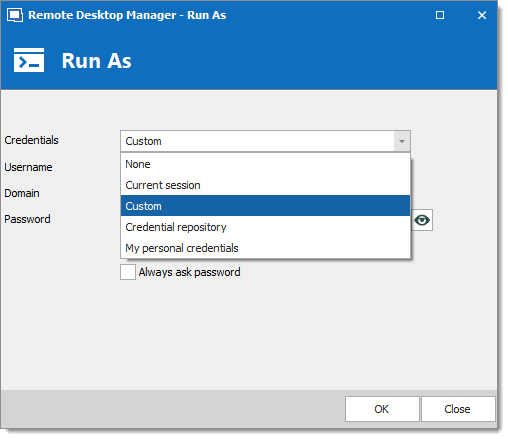
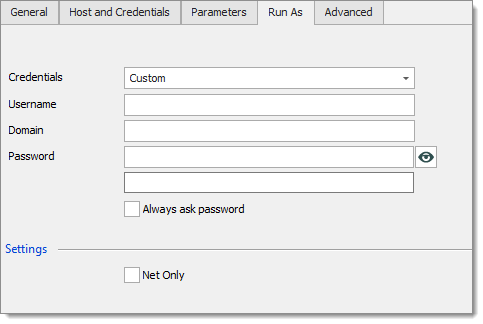
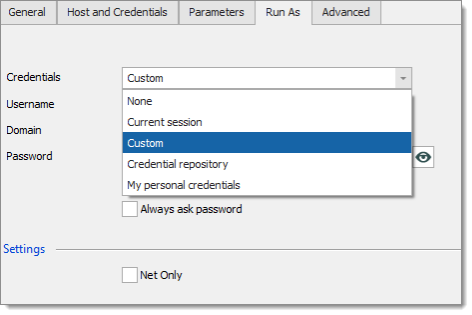
Le sessioni che supportano Run As dispongono di una scheda Run As in cui specificare quali credenziali utilizzare all'avvio con Run As.

<figure><img src="https://cdnweb.devolutions.net/docs/docs_en_kb_KB4566.png" alt=""><figcaption></figcaption></figure>

<table><thead><tr><th width="278">Opzione</th><th>Descrizione</th></tr></thead><tbody><tr><td>Nessuno</td><td>Non viene eseguito alcun Run As.</td></tr><tr><td>Sessione corrente</td><td>Utilizza le stesse credenziali definite nella sessione.</td></tr><tr><td>Credenziali personalizzate</td><td>Utilizza le credenziali personalizzate specificate.</td></tr><tr><td>Repository di credenziali</td><td>Utilizza una voce di credenziali collegata.</td></tr><tr><td>Utilizza le mie credenziali personali</td><td>Utilizza una voce di credenziali personali collegata.</td></tr></tbody></table>

### Macro/Script/Strumenti

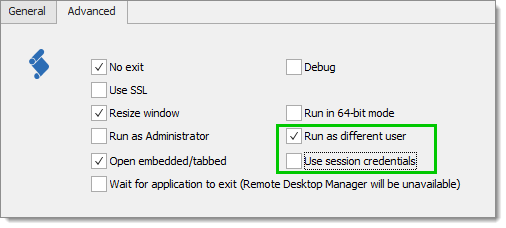
Con i tipi di sessione strumenti è sufficiente specificare ***Run as different user*** nella scheda ***Advanced***. Al momento dell'esecuzione le credenziali verranno risolte e utilizzate per avviare le Windows Credentials, a meno che non selezioni ***Use session credentials***, nel qual caso verranno utilizzate quelle attive per la sessione.

<figure><img src="https://cdnweb.devolutions.net/docs/docs_en_kb_KB4567.png" alt=""><figcaption></figcaption></figure>

Con i tipi di sessione strumenti è sufficiente specificare ***Run as different user***. Al momento dell'esecuzione le credenziali verranno risolte e utilizzate per avviare il processo Run As.

### Add-on di sessione

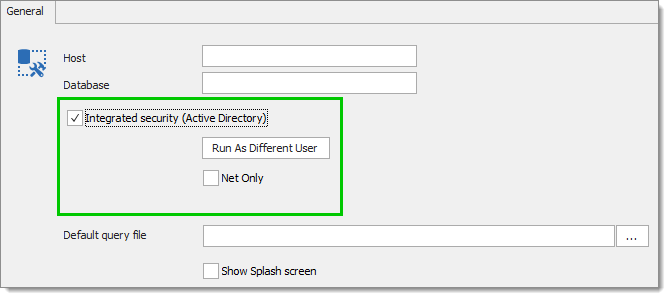
SQL Server Management Studio supporta Run As. Lo configuri come configurerebbe una normale sessione.

<figure><img src="https://cdnweb.devolutions.net/docs/docs_en_kb_KB4568.png" alt=""><figcaption></figcaption></figure>

Clicchi su ***Run as different user*** per modificare le impostazioni di ***Run As***.

<figure><img src="https://cdnweb.devolutions.net/docs/docs_en_kb_KB4569.png" alt=""><figcaption></figcaption></figure>

### Note

Run as Different User e Run As Administrator si escludono a vicenda.

Run as Different User non consente Shell Execute

#### Esempio: sessione Command Line con Run as different user nello stesso workgroup/dominio

1. Crei una nuova sessione Command Line.
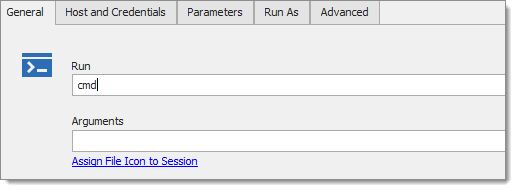
2. Imposti il comando su ***CMD***.

   <figure><img src="https://cdnweb.devolutions.net/docs/docs_en_kb_KB4570.png" alt=""><figcaption></figcaption></figure>
3. Specifichi le credenziali ***Run As***.

   <figure><img src="https://cdnweb.devolutions.net/docs/docs_en_kb_KB4571.png" alt=""><figcaption></figcaption></figure>
4. Salvi la sessione.
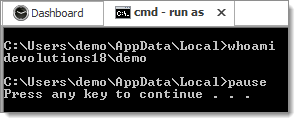
5. Esegua la sessione Command Line.

   <figure><img src="https://cdnweb.devolutions.net/docs/docs_en_kb_KB4572.png" alt=""><figcaption></figcaption></figure>


---

# Agent Instructions
This documentation is published with GitBook. GitBook is the documentation platform designed so that both humans and AI agents can read, navigate, and reason over technical content effectively. Learn more at gitbook.com.

## Querying This Documentation
If you need additional information that is not directly available in this page, you can query the documentation dynamically by asking a question.

Perform an HTTP GET request on the current page URL with the `ask` query parameter, and the optional `goal` query parameter:

```
GET https://docs.devolutions.net/rdm/it/knowledge-base/how-to-articles/run-as-another-user/built-in-runas.md?ask=<question>&goal=<endgoal>
```

`ask` is the immediate question: it should be specific, self-contained, and written in natural language.
`goal` is optional and describes the broader end goal you are ultimately trying to accomplish on behalf of the user. GitBook uses it to tailor the answer towards what is most useful for that goal.

The response will contain a direct answer to the question and relevant excerpts and sources from the documentation.

Use this mechanism when the answer is not explicitly present in the current page, you need clarification or additional context, or you want to retrieve related documentation sections.