> For the complete documentation index, see [llms.txt](https://docs.devolutions.net/llms.txt). Markdown versions of documentation pages are available by appending `.md` to page URLs; this page is available as [Markdown](https://docs.devolutions.net/rdm/it/knowledge-base/how-to-articles/rdp-session-entry/rdp-reconnect-mode.md).

# Modalità di riconnessione RDP

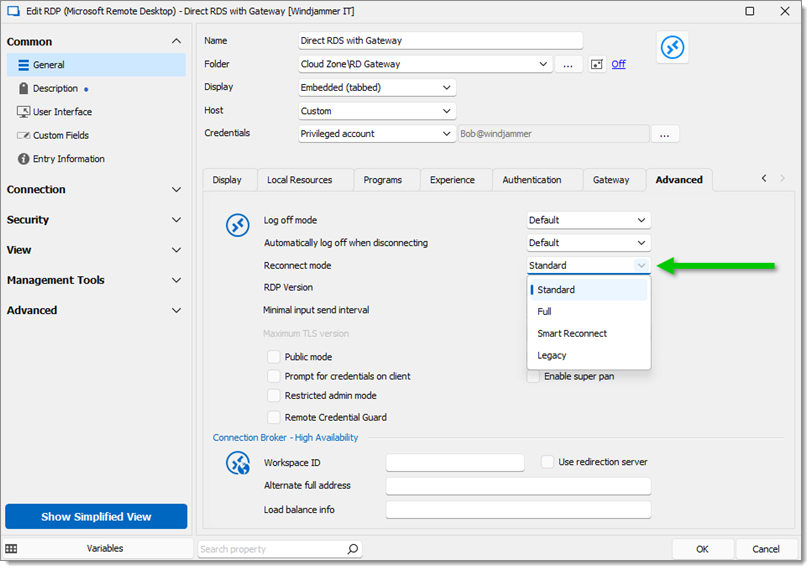
La ***Modalità di riconnessione*** è disponibile per le voci ***Microsoft Remote Desktop***. Si trova in ***Proprietà – Comune – Generale – Avanzate***. Per impostazione predefinita, è selezionata l'opzione ***Standard***.

<figure><img src="https://cdnweb.devolutions.net/docs/docs_en_kb_KB0125.png" alt=""><figcaption></figcaption></figure>

* ***Standard***: l'opzione ***Modalità di riconnessione Standard*** nella voce punta alle impostazioni in ***File – Impostazioni – Tipi di voce – Desktop remoto – Sessioni – Remote Desktop (RDP) – Modalità di riconnessione***. Se anche lì è impostata su ***Standard***, utilizza lo stesso metodo di ***Legacy***.
* ***Full***: chiude completamente la scheda e riapre la connessione.
* ***Smart Reconnect***: questa opzione utilizza la funzionalità di riconnessione ActiveX. Su RDP 8.1+, ridimensiona lo schermo se non è necessaria una riconnessione.

  <div data-gb-custom-block data-tag="hint" data-style="info" class="hint hint-info"><p>È consigliabile modificare la <em><strong>Modalità di ridimensionamento dello schermo</strong></em> in <em><strong>Smart Reconnect</strong></em> , invece di selezionarla nel menu <em><strong>Modalità di riconnessione</strong></em>. L'opzione <em><strong>Modalità di ridimensionamento dello schermo</strong></em> si trova nella scheda <em><strong>Visualizzazione</strong></em> dello stesso menu delle proprietà.</p></div>
* ***Legacy***: questa opzione richiama il metodo di disconnessione e poi quello di connessione dell'ActiveX.


---

# Agent Instructions
This documentation is published with GitBook. GitBook is the documentation platform designed so that both humans and AI agents can read, navigate, and reason over technical content effectively. Learn more at gitbook.com.

## Querying This Documentation
If you need additional information that is not directly available in this page, you can query the documentation dynamically by asking a question.

Perform an HTTP GET request on the current page URL with the `ask` query parameter, and the optional `goal` query parameter:

```
GET https://docs.devolutions.net/rdm/it/knowledge-base/how-to-articles/rdp-session-entry/rdp-reconnect-mode.md?ask=<question>&goal=<endgoal>
```

`ask` is the immediate question: it should be specific, self-contained, and written in natural language.
`goal` is optional and describes the broader end goal you are ultimately trying to accomplish on behalf of the user. GitBook uses it to tailor the answer towards what is most useful for that goal.

The response will contain a direct answer to the question and relevant excerpts and sources from the documentation.

Use this mechanism when the answer is not explicitly present in the current page, you need clarification or additional context, or you want to retrieve related documentation sections.