> For the complete documentation index, see [llms.txt](https://docs.devolutions.net/llms.txt). Markdown versions of documentation pages are available by appending `.md` to page URLs; this page is available as [Markdown](https://docs.devolutions.net/rdm/it/knowledge-base/how-to-articles/locate-the-configuration-file.md).
# Individuare il file di configurazione
Individui il file di configurazione di Remote Desktop Manager su disco o tramite File Impostazioni Avanzate per inviarlo al personale di supporto Devolutions.
In alcuni casi, il team Devolutions avrà bisogno del suo file di configurazione per aiutare a riprodurre un problema particolare.
{% hint style="danger" %}
Tenga presente che, se memorizza le password dei suoi spazi di lavoro e/o del suo Devolutions Account, il nostro team di assistenza clienti sarà in grado di decifrarle. Se desidera inviare una versione depurata della sua configurazione, consulti [Inviare una copia depurata del file di configurazione](/rdm/it/knowledge-base/how-to-articles/send-a-sanitized-copy-of-your-configuration-file.md).
{% endhint %}
### Trovare e inviare il file di configurazione
#### Metodo 1 - Utilizzo di Remote Desktop Manager
1. In Remote Desktop Manager, apra ***File – Impostazioni – Avanzate***.
2. Vada alla scheda ***Informazioni***, vedrà un collegamento ipertestuale blu, lo prema per aprire Esplora risorse di Windows con il file corretto selezionato.
#### Metodo 2 - Utilizzo del file systemTenga presente che questo esempio presuppone che Remote Desktop Manager sia stato installato con le impostazioni predefinite.
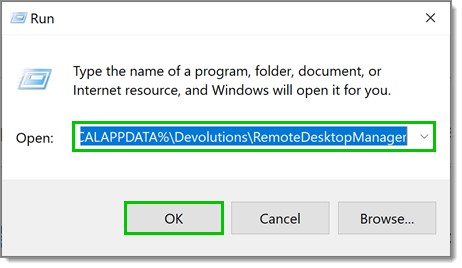
1. Prema Windows+R.
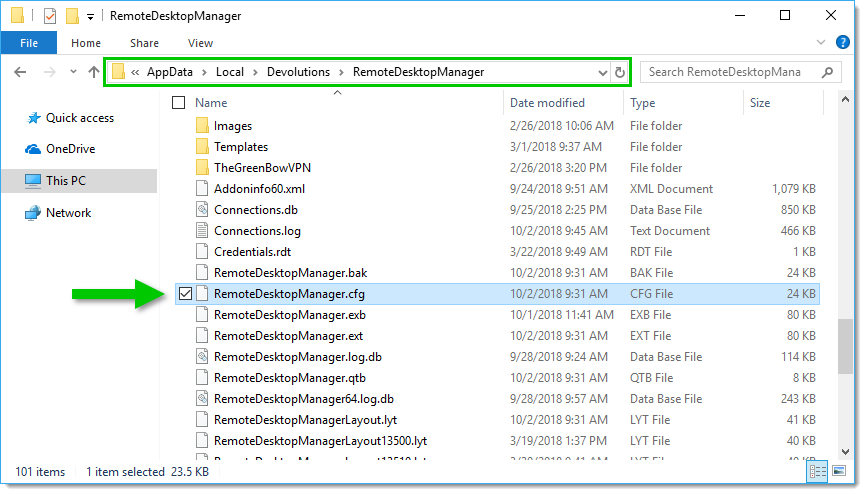
2. Digiti "**%LOCALAPPDATA%\Devolutions\RemoteDesktopManager**" nella finestra ***Esegui*** e prema ***OK***.
3. Nella cartella, individui il file **RemoteDesktopManager.cfg**.
4. Contatti il nostro team di assistenza clienti all'indirizzo per ottenere un link sicuro per caricare il file.
---
# Agent Instructions
This documentation is published with GitBook. GitBook is the documentation platform designed so that both humans and AI agents can read, navigate, and reason over technical content effectively. Learn more at gitbook.com.
## Querying This Documentation
If you need additional information that is not directly available in this page, you can query the documentation dynamically by asking a question.
Perform an HTTP GET request on the current page URL with the `ask` query parameter, and the optional `goal` query parameter:
```
GET https://docs.devolutions.net/rdm/it/knowledge-base/how-to-articles/locate-the-configuration-file.md?ask=&goal=
```
`ask` is the immediate question: it should be specific, self-contained, and written in natural language.
`goal` is optional and describes the broader end goal you are ultimately trying to accomplish on behalf of the user. GitBook uses it to tailor the answer towards what is most useful for that goal.
The response will contain a direct answer to the question and relevant excerpts and sources from the documentation.
Use this mechanism when the answer is not explicitly present in the current page, you need clarification or additional context, or you want to retrieve related documentation sections.