> For the complete documentation index, see [llms.txt](https://docs.devolutions.net/llms.txt). Markdown versions of documentation pages are available by appending `.md` to page URLs; this page is available as [Markdown](https://docs.devolutions.net/rdm/it/knowledge-base/how-to-articles/convert-a-website-legacy-entry-to-a-website-entry.md).
# Convertire una voce sito web (legacy) in una voce sito web
Converta le voci Website legacy nel tipo di voce Website in Remote Desktop Manager utilizzando la conversione in blocco delle azioni speciali.
Segua i passaggi seguenti per convertire la sua voce ***Website (legacy)*** nel tipo di voce ***Website*** in Remote Desktop Manager utilizzando [***Special actions***](/rdm/it/ribbon-menu-bar/edit/edit-special-actions.md).
{% hint style="info" %}
Per convertire più voci contemporaneamente, può eseguire una conversione in blocco cercando per ***Connection type*** con la funzionalità ***Advanced Search***. Se le sue voci si trovano in più casseforti, può effettuare la ricerca utilizzando il tipo di connessione più ampio ***Information*** per includere le voci ***Website (legacy)***. Noti che questo restituirà anche altre voci di tipo information, quindi potrebbe essere necessario un filtraggio aggiuntivo. Si assicuri innanzitutto che la sua o le sue casseforti contengano voci ***Website (legacy)***, altrimenti il tipo di voce non comparirà tra le opzioni di ricerca. Visiti [Batch Edit](/rdm/it/ribbon-menu-bar/edit/batch-edit.md) per maggiori informazioni.
{% endhint %}
1. Selezioni la voce che desidera convertire nel ***riquadro di navigazione***. È possibile selezionare più voci contemporaneamente, a condizione che siano dello stesso tipo.
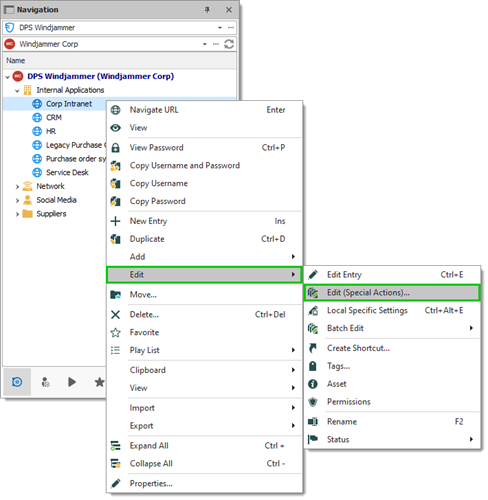
2. Faccia clic con il pulsante destro del mouse sulla voce e selezioni ***Edit – Edit (special actions)***. In alternativa, può utilizzare la ***barra multifunzione*** facendo clic su ***Edit (Special Actions)*** nella sezione ***Batch*** della scheda ***Edit***.
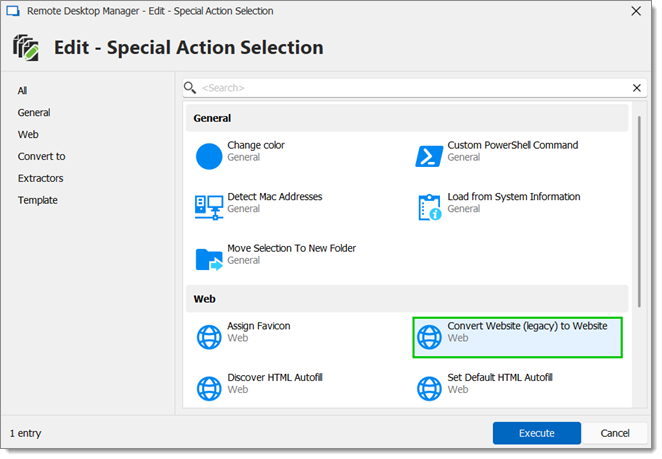
3. Nella sezione ***Web***, selezioni ***Convert website (legacy)*** in ***Website*** e faccia clic su ***Ok***.
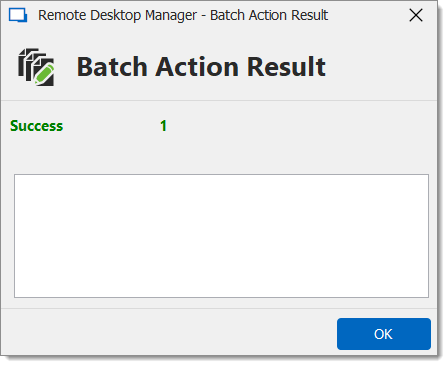
4. Faccia clic su ***OK*** nella finestra ***Batch action result***.
La sua voce è ora stata convertita.
---
# Agent Instructions
This documentation is published with GitBook. GitBook is the documentation platform designed so that both humans and AI agents can read, navigate, and reason over technical content effectively. Learn more at gitbook.com.
## Querying This Documentation
If you need additional information that is not directly available in this page, you can query the documentation dynamically by asking a question.
Perform an HTTP GET request on the current page URL with the `ask` query parameter, and the optional `goal` query parameter:
```
GET https://docs.devolutions.net/rdm/it/knowledge-base/how-to-articles/convert-a-website-legacy-entry-to-a-website-entry.md?ask=&goal=
```
`ask` is the immediate question: it should be specific, self-contained, and written in natural language.
`goal` is optional and describes the broader end goal you are ultimately trying to accomplish on behalf of the user. GitBook uses it to tailor the answer towards what is most useful for that goal.
The response will contain a direct answer to the question and relevant excerpts and sources from the documentation.
Use this mechanism when the answer is not explicitly present in the current page, you need clarification or additional context, or you want to retrieve related documentation sections.