> For the complete documentation index, see [llms.txt](https://docs.devolutions.net/llms.txt). Markdown versions of documentation pages are available by appending `.md` to page URLs; this page is available as [Markdown](https://docs.devolutions.net/rdm/it/knowledge-base/how-to-articles/configure-sql-server-for-protected-users-with-integrated-security.md).
# Configurare SQL Server per utenti protetti con sicurezza integrata
Configuri gli SPN di SQL Server per l'autenticazione Kerberos in modo che i Protected Users possano connettersi tramite la sicurezza integrata di Remote Desktop Manager.
Ecco i passaggi per configurare il suo SQL Server in modo da consentire ai suoi ***Protected Users*** di connettersi al database utilizzando il metodo di autenticazione Integrated Security.
Secondo Microsoft, ***Protected Users*** blocca l'uso degli [hash NTLM](https://docs.microsoft.com/en-us/windows-server/security/credentials-protection-and-management/protected-users-security-group#domain-controller-protections-for-protected-users). È tuttavia possibile configurare SQL Server per utilizzare anche [Kerberos per Integrated Security](https://docs.microsoft.com/en-us/sql/database-engine/configure-windows/register-a-service-principal-name-for-kerberos-connections). Questa funzionalità è supportata nativamente da Remote Desktop Manager.
Perché SQL Server supporti l'autenticazione Kerberos, è necessario creare gli SPN. Per impostazione predefinita, il servizio viene eseguito con account che non dispongono delle autorizzazioni necessarie. All'avvio di SQL Server potrebbero comparire i seguenti messaggi (è possibile consultare i log in SSMS in ***Management SQL Server Logs***): "The SQL Server Network Interface library could not register the Service Principal Name (SPN) for the SQL Server service."
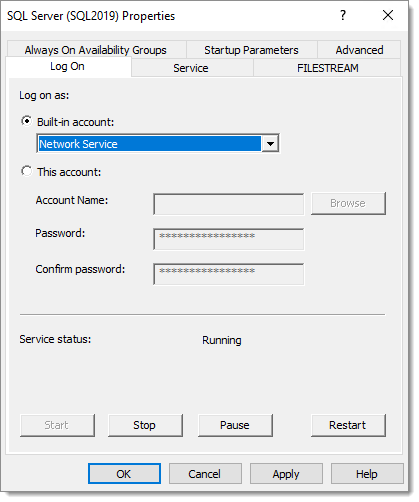
Sarà necessario configurare il servizio SQL Server per l'esecuzione con ***Network Service***, poiché dispone delle [autorizzazioni necessarie](https://docs.microsoft.com/en-us/sql/database-engine/configure-windows/register-a-service-principal-name-for-kerberos-connections?view=sql-server-ver15#Permissions). Secondo [questo articolo](https://dba.stackexchange.com/questions/180064/what-should-my-spn-entries-look-like-for-each-sql-instance/180147#180147), è anche possibile concedere a un account di servizio le autorizzazioni per creare gli SPN. Sarà inoltre necessario modificare l'account in SQL Server Configuration Manager.
Tuttavia, SQL Server potrebbe continuare a segnalare l'impossibilità di registrare gli SPN. È possibile utilizzare [Microsoft Kerberos Configuration Manager for SQL Server](https://www.microsoft.com/en-ca/download/details.aspx?id=39046) per correggere gli SPN. Mostra pulsanti cliccabili nelle colonne Action.
Dopo aver riavviato il servizio SQL Server, dovrebbe vedere nei log “The SQL Server Network Interface library successfully registered the Service Principal Name (SPN) \[ **MSSQLSvc/vdownsrv-sql3.downhill.loc:1433** ] for the SQL Server service.”
A questo punto la connessione dovrebbe funzionare nuovamente in Remote Desktop Manager.
---
# Agent Instructions
This documentation is published with GitBook. GitBook is the documentation platform designed so that both humans and AI agents can read, navigate, and reason over technical content effectively. Learn more at gitbook.com.
## Querying This Documentation
If you need additional information that is not directly available in this page, you can query the documentation dynamically by asking a question.
Perform an HTTP GET request on the current page URL with the `ask` query parameter, and the optional `goal` query parameter:
```
GET https://docs.devolutions.net/rdm/it/knowledge-base/how-to-articles/configure-sql-server-for-protected-users-with-integrated-security.md?ask=&goal=
```
`ask` is the immediate question: it should be specific, self-contained, and written in natural language.
`goal` is optional and describes the broader end goal you are ultimately trying to accomplish on behalf of the user. GitBook uses it to tailor the answer towards what is most useful for that goal.
The response will contain a direct answer to the question and relevant excerpts and sources from the documentation.
Use this mechanism when the answer is not explicitly present in the current page, you need clarification or additional context, or you want to retrieve related documentation sections.