> For the complete documentation index, see [llms.txt](https://docs.devolutions.net/llms.txt). Markdown versions of documentation pages are available by appending `.md` to page URLs; this page is available as [Markdown](https://docs.devolutions.net/rdm/it/knowledge-base/how-to-articles/certificate-security-provider-in-a-published-app-environment.md).
# Provider di sicurezza dei certificati in un ambiente di app pubblicate
Conceda le autorizzazioni di lettura del certificato in un ambiente di app pubblicate come Citrix affinché Remote Desktop Manager possa utilizzare un Certificate Security Provider.
Quando si configura un Certificate Security Provider in un ambiente di app pubblicate (Citrix, RemoteApp, XenApp) come Security Provider, l'utente che eseguirà Remote Desktop Manager nell'ambiente RemoteApp (Citrix) dovrà disporre dell'autorizzazione di lettura sul certificato. Se l'autorizzazione di lettura non è impostata correttamente, Remote Desktop Manager genererà la finestra di dialogo di errore CryptographicException - Keyset does not exist.
Questi passaggi richiedono che il certificato sia stato installato correttamente sulla macchina su cui verrà eseguito Remote Desktop Manager.
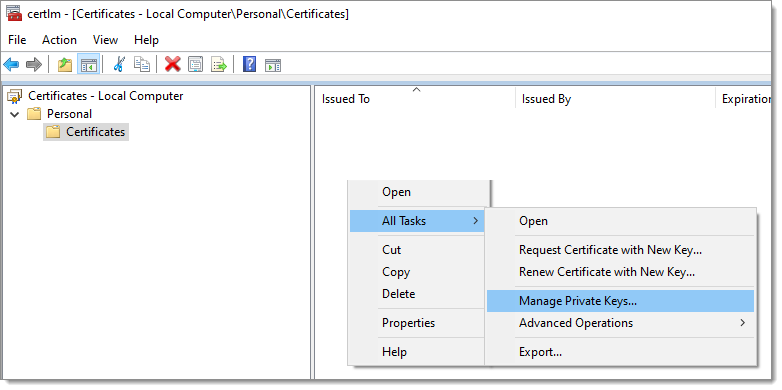
1. Apra ***Local Machine Certificate Manager*** sulla macchina (certlm.msc).
2. Individui i ***Certificati***.
3. Faccia clic con il tasto destro su ***Certificati - Tutte le attività - Gestisci chiavi private***.
4. Conceda l'***autorizzazione di lettura*** sul file del certificato ai gruppi o agli utenti appropriati.
{% hint style="info" %}
Consulti l'articolo del blog di Windows [Service failure with CryptographicException - Keyset does not exist](https://learn.microsoft.com/en-us/archive/blogs/dsnotes/service-failure-with-cryptographicexception-keyset-does-not-exist) per scoprire altri metodi per individuare il file del certificato.
{% endhint %}
---
# Agent Instructions
This documentation is published with GitBook. GitBook is the documentation platform designed so that both humans and AI agents can read, navigate, and reason over technical content effectively. Learn more at gitbook.com.
## Querying This Documentation
If you need additional information that is not directly available in this page, you can query the documentation dynamically by asking a question.
Perform an HTTP GET request on the current page URL with the `ask` query parameter, and the optional `goal` query parameter:
```
GET https://docs.devolutions.net/rdm/it/knowledge-base/how-to-articles/certificate-security-provider-in-a-published-app-environment.md?ask=&goal=
```
`ask` is the immediate question: it should be specific, self-contained, and written in natural language.
`goal` is optional and describes the broader end goal you are ultimately trying to accomplish on behalf of the user. GitBook uses it to tailor the answer towards what is most useful for that goal.
The response will contain a direct answer to the question and relevant excerpts and sources from the documentation.
Use this mechanism when the answer is not explicitly present in the current page, you need clarification or additional context, or you want to retrieve related documentation sections.