> For the complete documentation index, see [llms.txt](https://docs.devolutions.net/llms.txt). Markdown versions of documentation pages are available by appending `.md` to page URLs; this page is available as [Markdown](https://docs.devolutions.net/rdm/it/getting-started/installation/client/custom-installer-service/custom-installer-manager.md).
# Gestore dell'installazione personalizzata
Utilizzi il Custom installer manager in Remote Desktop Manager per creare e distribuire installer MSI con configurazioni e spazi di lavoro predefiniti.
{% hint style="info" %}
Remote Desktop Manager per macOS non supporta il custom installer. L'alternativa consiste nell'[esportare un file `Default.cfg`](https://docs.devolutions.net/rdm/it/getting-started/installation/client/custom-installer-service/rdi-file-generation-options?tab=macos) e applicarlo alle nuove installazioni.
{% endhint %}
1. In Remote Desktop Manager, vada su ***Tools*** – ***All tools*** ed esegua lo strumento ***Custom installer manager***.
2. Quindi selezioni ***Generate custom installer***.
3. Scelga se ***Download MSI from the web*** oppure ***Use pre-downloaded MSI***.
4. Imposti una ***Version*** e un ***Name*** per la configurazione.
5. Se lo desidera, scelga di crittografare la configurazione con una password nel pacchetto di installazione.
6. [Crei una configurazione solo per questo pacchetto](#create-a-configuration) oppure [utilizzi un file Remote Desktop Installer (RDI) esistente](#use-an-existing-file).
#### Creare una configurazione
1. Selezioni ***Create a configuration just for this package***, quindi faccia clic su ***Create***.
2. Consulti [Opzioni di generazione del file RDI](/rdm/it/getting-started/installation/client/custom-installer-service/export-custom-installer-configuration.md) per maggiori informazioni sulle diverse opzioni disponibili. Al termine, faccia clic su ***Export***.
3. Quando richiesto, salvi localmente il file del pacchetto di installazione.
#### Utilizzare un file esistente
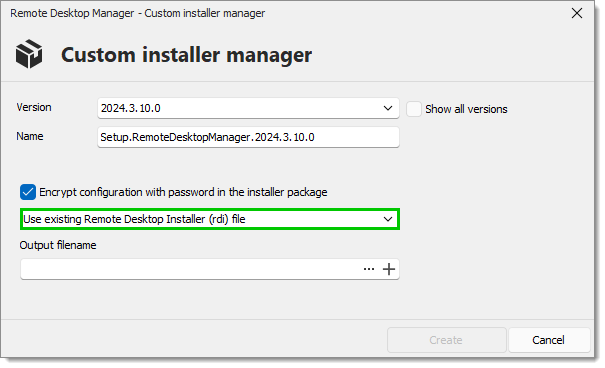
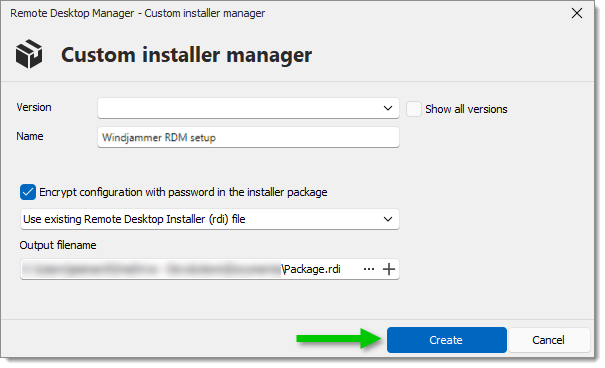
1. Selezioni ***Use existing Remote Desktop Installer (rdi) file***.
2. In ***Output filename***, proceda in uno dei seguenti modi:
* Cerchi un file RDI locale esistente; oppure
* Ne crei uno esportando la configurazione da uno spazio di lavoro. Consulti la nostra guida [Opzioni di generazione del file RDI](/rdm/it/getting-started/installation/client/custom-installer-service/export-custom-installer-configuration.md) per maggiori informazioni sulle diverse opzioni disponibili. Al termine, faccia clic su ***Export***.
3. Faccia clic su ***Create***.
4. Quando richiesto, salvi localmente il file del pacchetto di installazione.
### Distribuzione con soluzioni di gestione degli endpoint
Il ***Custom installer manager*** può essere utilizzato con soluzioni di gestione degli endpoint come Microsoft Intune, Microsoft Configuration Manager (SCCM) o altre piattaforme di distribuzione.
Generando un custom installer che include la configurazione di Remote Desktop Manager richiesta, gli amministratori possono distribuirlo su più dispositivi tramite la propria soluzione di gestione degli endpoint. Ciò consente alle organizzazioni di distribuire Remote Desktop Manager su larga scala, garantendo al contempo che gli utenti ricevano una configurazione predefinita al momento dell'installazione.
{% hint style="info" %}
Consulti [Distribuire Remote Desktop Manager tramite Intune](/rdm/it/knowledge-base/knowledge-base-articles/deploy-remote-desktop-manager-using-microsoft-intune.md) per maggiori dettagli.
{% endhint %}
### Generatore di custom installer di Devolutions Launcher
[Devolutions Launcher](https://devolutions.net/download-center/#launcher) offre la possibilità di creare custom installer. Per farlo, vada su ***Tools – All tools – Custom installer manager***. I passaggi sono quindi gli stessi di Remote Desktop Manager (a partire dal [passaggio n. 3](/rdm/it/getting-started/installation/client/custom-installer-service/custom-installer-manager.md) del presente articolo).
**Vedi anche**
* [Devolutions Academy - Come utilizzare il custom installer](https://academy.devolutions.net/student/page/2397676-how-to-use-the-custom-installer?sid=2202ce15-ae72-4051-b6d9-0a203c58d229\&sid_i=0)
---
# Agent Instructions
This documentation is published with GitBook. GitBook is the documentation platform designed so that both humans and AI agents can read, navigate, and reason over technical content effectively. Learn more at gitbook.com.
## Querying This Documentation
If you need additional information that is not directly available in this page, you can query the documentation dynamically by asking a question.
Perform an HTTP GET request on the current page URL with the `ask` query parameter, and the optional `goal` query parameter:
```
GET https://docs.devolutions.net/rdm/it/getting-started/installation/client/custom-installer-service/custom-installer-manager.md?ask=&goal=
```
`ask` is the immediate question: it should be specific, self-contained, and written in natural language.
`goal` is optional and describes the broader end goal you are ultimately trying to accomplish on behalf of the user. GitBook uses it to tailor the answer towards what is most useful for that goal.
The response will contain a direct answer to the question and relevant excerpts and sources from the documentation.
Use this mechanism when the answer is not explicitly present in the current page, you need clarification or additional context, or you want to retrieve related documentation sections.