> For the complete documentation index, see [llms.txt](https://docs.devolutions.net/llms.txt). Markdown versions of documentation pages are available by appending `.md` to page URLs; this page is available as [Markdown](https://docs.devolutions.net/rdm/es/ribbon-menu-bar/file/import/import-with-network-scan.md).

# Importar con escaneo de red

Escanee un rango de direcciones IP con Remote Desktop Manager para descubrir e importar sesiones directamente en su espacio de trabajo.

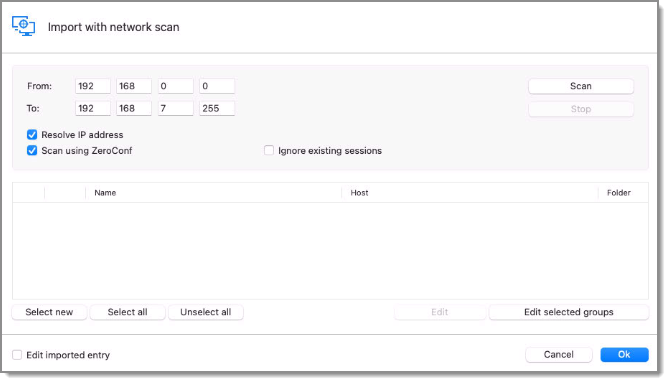
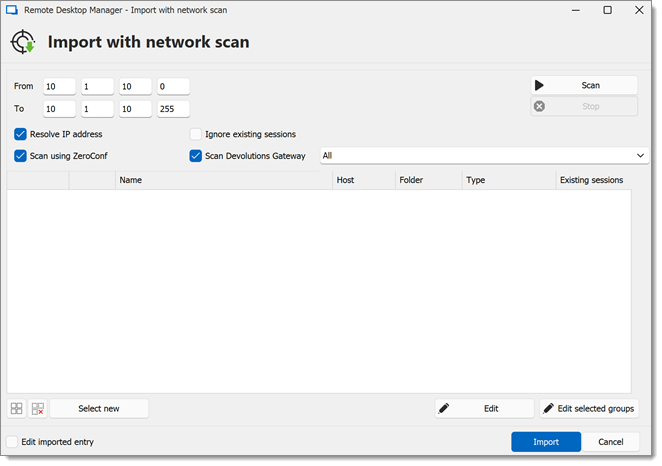
***Importar con escaneo de red*** le permite realizar un escaneo de red basado en un rango predefinido de direcciones IP para encontrar sesiones que importar. Se puede acceder mediante el menú ***Archivo*** – ***Importar*** o haciendo clic derecho en el panel de navegación y seleccionando ***Importar***.

Especifique un rango de escaneo y, una vez completado el escaneo, seleccione las sesiones que desee importar (por defecto, todas las sesiones están seleccionadas) y haga clic en ***OK*** para importar las sesiones en su espacio de trabajo.

{% hint style="warning" %}
Si desea revisar cada sesión una por una a medida que se importan, puede marcar la opción ***Editar entrada importada***. Sin embargo, esto no se recomienda para un gran número de sesiones.
{% endhint %}

### Opciones de escaneo

<table><thead><tr><th width="238.60003662109375">OPCIÓN</th><th>DESCRIPCIÓN</th></tr></thead><tbody><tr><td><strong>Resolver dirección IP</strong></td><td>Intenta resolver las direcciones IP a partir del nombre de host o del nombre de dominio.</td></tr><tr><td><strong>Escanear usando ZeroConf</strong></td><td>Envía un ping a cada dirección IP antes de escanear, mostrando solo las que responden. Esto debería aumentar la velocidad de escaneo.</td></tr><tr><td><strong>Ignorar sesiones existentes</strong></td><td>Oculta las sesiones ya presentes en el espacio de trabajo.</td></tr><tr><td><strong>Escanear</strong> <strong>Devolutions Gateway</strong></td><td>Busca Devolutions Gateways.</td></tr><tr><td><strong>Editar entrada importada</strong></td><td>Abre la ventana <em><strong>Editar</strong></em> para cada entrada seleccionada antes de la importación.</td></tr></tbody></table>

### Véase también

* [Devolutions Academy – Finding devices with the network scan in Remote Desktop Manager](https://academy.devolutions.net/student/activity/2787961-finding-devices-with-the-network-scan-in-remote-desktop-manager)


---

# Agent Instructions
This documentation is published with GitBook. GitBook is the documentation platform designed so that both humans and AI agents can read, navigate, and reason over technical content effectively. Learn more at gitbook.com.

## Querying This Documentation
If you need additional information that is not directly available in this page, you can query the documentation by asking a question.

Perform an HTTP GET request on the following URL with the `ask` and `goal` query parameters:

```
GET https://docs.devolutions.net/rdm/es/ribbon-menu-bar/file/import/import-with-network-scan.md?ask=<question>&goal=<user_goal>
```

`ask` is the immediate question: it should be specific, self-contained, and written in natural language.
`goal` is what the user is ultimately trying to achieve, the reason they need the answer. Sharing it helps GitBook give you a better, more relevant answer. A goal is most helpful when it describes the outcome the user wants rather than restating the question. For example, with `ask=how do I create an API token`, a goal like `automate deployments from our CI pipeline` lets GitBook tailor the answer to that use case.

The response will contain a direct answer to the question and relevant excerpts and sources from the documentation.

Use this mechanism when the answer is not explicitly present in the current page, you need clarification or additional context, or you want to retrieve related documentation sections.