> For the complete documentation index, see [llms.txt](https://docs.devolutions.net/llms.txt). Markdown versions of documentation pages are available by appending `.md` to page URLs; this page is available as [Markdown](https://docs.devolutions.net/rdm/es/knowledge-base/how-to-articles/convert-virtual-folders-in-remote-desktop-manager.md).
# Convertir carpetas virtuales en Remote Desktop Manager
Convierta carpetas virtuales en carpetas reales en Remote Desktop Manager de forma manual o de forma masiva mediante un script de PowerShell.
### Método manual
Es posible eliminar las carpetas virtuales editando manualmente cada carpeta virtual, guardando los cambios y convirtiéndolas en carpetas reales. Sin embargo, este proceso resulta laborioso cuando se trata de un número considerable de carpetas virtuales, ya que requiere convertir cada una de ellas manualmente.
### Método con PowerShell
{% hint style="danger" %}
Antes de proceder con el método con PowerShell, tenga en cuenta lo siguiente:
* Este método elimina todas las carpetas virtuales de las bóvedas del espacio de trabajo.
* Elimine las carpetas duplicadas antes de ejecutar el script de PowerShell desde la nueva entrada.
{% endhint %}
1. Inicie Remote Desktop Manager como administrador haciendo clic con el botón derecho en la aplicación y eligiendo ***Ejecutar como administrador***.
2. Seleccione las bóvedas del espacio de trabajo desde las que desea convertir todas las carpetas virtuales en el ***panel de navegación***.
3. Añada una nueva entrada.
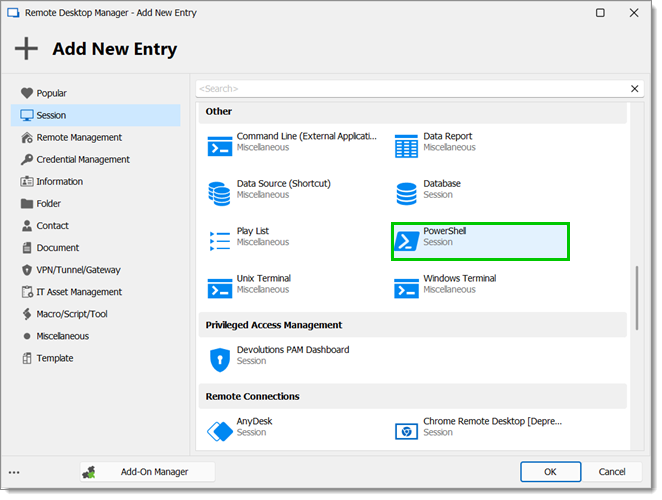
4. Vaya a ***Sesión – PowerShell*** para crear una entrada de sesión de PowerShell.
5. Asigne un nombre a la entrada y elija la carpeta en la que desea crearla.
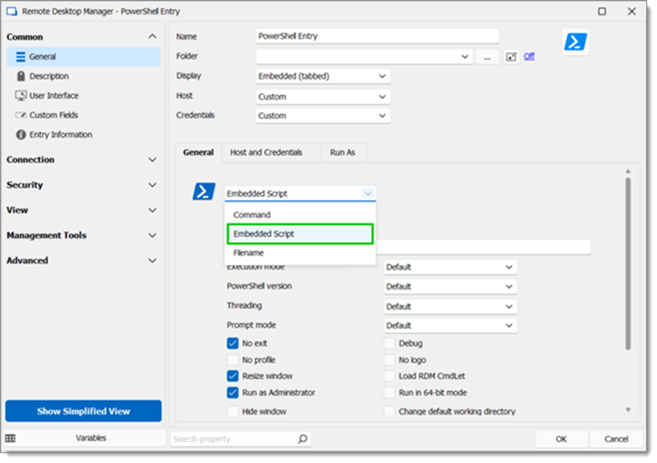
6. Configure la entrada como ***Script incorporado***.
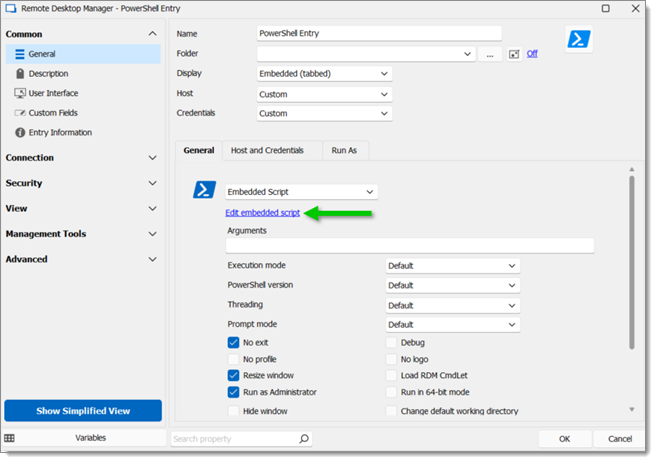
7. Haga clic en ***Editar script incorporado***.
8. Añada el siguiente script:
```powershell
# Check if Remote Desktop Manager PS module is installed
if (-not (Get-Module Devolutions.PowerShell -ListAvailable)) {
Install-Module Devolutions.PowerShell -Scope CurrentUser
}
$beforeAllGroups = Get-Date
$vaults = Get-RDMVault
foreach ($vault in $vaults) {
Set-RDMCurrentRepository -Repository $vault
$vaultname = $vault.Name
Write-Host "Current Vault is $vaultname"
# Get all entries' folder path
$sessions = Get-RDMSession
$allGroups = @()
foreach ($session in $sessions) {
# Split the group folder location for each shortcut
$tempFolder = $session.Group
$shortcuts = $tempFolder.split(';')
foreach ($shortcut in $shortcuts) {
$folder = $shortcut
if ($folder) {
$levels = $folder.split('\')
$nblevels = 1
$Groupfolder = ""
foreach ($level in $levels) {
$name = $level
if ($nblevels -eq 1) {
$Groupfolder = $name
} else {
$Groupfolder = "$Groupfolder\$name"
}
$item = New-Object PSObject -Property @{
Name = $name
Group = $Groupfolder
Levels = $nbLevels
}
$allGroups += $item
$nblevels++
}
}
}
}
# Get all folders that exist in the database
$groups = Get-RDMSession | Where-Object { $_.ConnectionType -eq "Group" }
$realGroups = @()
foreach ($group in $groups) {
# Split the group folder location for each shortcut
$tempFolder = $group.Group
$shortcuts = $tempFolder.split(';')
foreach ($shortcut in $shortcuts) {
$folder = $group.Group
if ($folder) {
$levels = $folder.split('\')
$nbLevels = $levels.Count
$name = $group.Name
$item = New-Object PSObject -Property @{
Name = $name
Group = $folder
Levels = $nbLevels
}
$realGroups += $item
}
}
}
# Sort arrays and extract virtual folders
$realGroups = $realGroups | Sort-Object -Property Levels, Name, Group -Unique
$allGroups = $allGroups | Sort-Object -Property Levels, Name, Group -Unique
$results = $allGroups | Where-Object { $realGroups.Group -notcontains $_.Group }
$results = $results | Sort-Object -Property Levels, Name, Group -Unique
# Convert virtual folders in the database
foreach ($group in $results) {
$name = $group.Name
$folder = $group.Group
try {
$session = New-RDMSession -Name $name -Group $folder -Type Group -SetSession -ErrorAction Stop
Update-RDMUI
} catch {
# Split the parent folder
$tempFolder = $folder.Replace("\$name", '')
$parents = $tempFolder.split('\')
foreach ($parent in $parents) {
try {
$exist = Get-RDMSession -Name $parent -ErrorAction Stop
} catch {
$name = $parent
$index = $parents.IndexOf($parent)
$folder = ""
for ($item = 0; $item -le $index; $item++) {
if ($item -gt 0) {
$folder += "\"
}
$folder += $parents[$item]
}
$session = New-RDMSession -Name $name -Group $folder -Type Group -SetSession
Update-RDMUI
Write-Host "Virtual folder $name has been successfully created in the database!"
}
}
$name = $group.Name
$folder = $group.Group
$session = New-RDMSession -Name $name -Group $folder -Type Group -SetSession
Update-RDMUI
}
Write-Host "Virtual folder $name has been successfully created in the database!"
}
}
$afterCreatingGroups = Get-Date
Write-Host "Time taken to convert virtual folders: $(($afterCreatingGroups).Subtract($beforeAllGroups).Seconds) second(s)"
```
9. Haga clic en ***Aceptar*** para aplicar el script.
10. Haga clic en ***Aceptar*** para guardar la configuración de la entrada y cerrar la ventana.
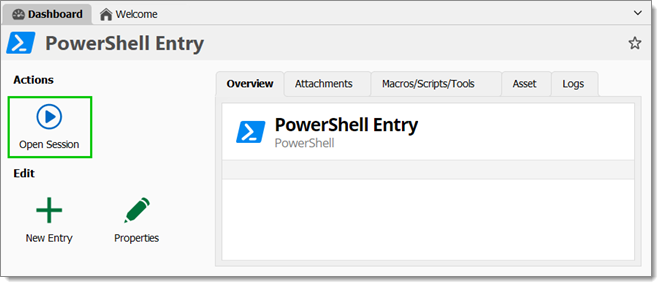
11. Haga clic en ***Abrir sesión*** para ejecutar la entrada.
El script convertirá ahora todas las carpetas virtuales de las bóvedas del espacio de trabajo.
---
# Agent Instructions
This documentation is published with GitBook. GitBook is the documentation platform designed so that both humans and AI agents can read, navigate, and reason over technical content effectively. Learn more at gitbook.com.
## Querying This Documentation
If you need additional information that is not directly available in this page, you can query the documentation dynamically by asking a question.
Perform an HTTP GET request on the current page URL with the `ask` query parameter, and the optional `goal` query parameter:
```
GET https://docs.devolutions.net/rdm/es/knowledge-base/how-to-articles/convert-virtual-folders-in-remote-desktop-manager.md?ask=&goal=
```
`ask` is the immediate question: it should be specific, self-contained, and written in natural language.
`goal` is optional and describes the broader end goal you are ultimately trying to accomplish on behalf of the user. GitBook uses it to tailor the answer towards what is most useful for that goal.
The response will contain a direct answer to the question and relevant excerpts and sources from the documentation.
Use this mechanism when the answer is not explicitly present in the current page, you need clarification or additional context, or you want to retrieve related documentation sections.