> For the complete documentation index, see [llms.txt](https://docs.devolutions.net/llms.txt). Markdown versions of documentation pages are available by appending `.md` to page URLs; this page is available as [Markdown](https://docs.devolutions.net/rdm/es/knowledge-base/how-to-articles/configure-sql-server-for-protected-users-with-integrated-security.md).
# Configurar SQL Server para usuarios protegidos con seguridad integrada
Configure los SPN de SQL Server para la autenticación Kerberos de modo que los Protected Users puedan conectarse mediante la seguridad integrada de Remote Desktop Manager.
Estos son los pasos para configurar su SQL Server y permitir que sus ***Protected Users*** se conecten a la base de datos mediante el método de autenticación de seguridad integrada.
Según Microsoft, ***Protected Users*** bloquea el uso de [hashes NTLM](https://docs.microsoft.com/en-us/windows-server/security/credentials-protection-and-management/protected-users-security-group#domain-controller-protections-for-protected-users). Sin embargo, es posible configurar SQL Server para que también utilice [Kerberos para la seguridad integrada](https://docs.microsoft.com/en-us/sql/database-engine/configure-windows/register-a-service-principal-name-for-kerberos-connections). Remote Desktop Manager admite esto de forma nativa.
Para que SQL Server admita la autenticación Kerberos, es necesario crear SPN. De forma predeterminada, el servicio se ejecuta con cuentas que carecen de los permisos necesarios. Es posible que aparezcan los siguientes mensajes cuando se inicia SQL Server (puede consultar los registros en SSMS en ***Management SQL Server Logs***): "The SQL Server Network Interface library could not register the Service Principal Name (SPN) for the SQL Server service."
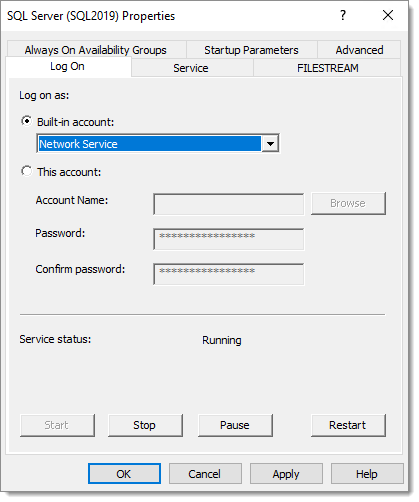
Tendrá que configurar el servicio de SQL Server para que se ejecute con ***Network Service***, ya que dispone de los [permisos necesarios](https://docs.microsoft.com/en-us/sql/database-engine/configure-windows/register-a-service-principal-name-for-kerberos-connections?view=sql-server-ver15#Permissions). Según [este artículo](https://dba.stackexchange.com/questions/180064/what-should-my-spn-entries-look-like-for-each-sql-instance/180147#180147), también es posible conceder los permisos para crear SPN a una cuenta de servicio. También deberá cambiar la cuenta en SQL Server Configuration Manager.
No obstante, es posible que SQL Server siga informando de que no pudo registrar los SPN. Se puede utilizar [Microsoft Kerberos Configuration Manager for SQL Server](https://www.microsoft.com/en-ca/download/details.aspx?id=39046) para corregir los SPN. Muestra botones en los que se puede hacer clic en las columnas Action.
Tras reiniciar el servicio de SQL Server, debería ver en los registros el mensaje “The SQL Server Network Interface library successfully registered the Service Principal Name (SPN) \[ **MSSQLSvc/vdownsrv-sql3.downhill.loc:1433** ] for the SQL Server service.”
Llegados a este punto, la conexión debería volver a funcionar en Remote Desktop Manager.
---
# Agent Instructions
This documentation is published with GitBook. GitBook is the documentation platform designed so that both humans and AI agents can read, navigate, and reason over technical content effectively. Learn more at gitbook.com.
## Querying This Documentation
If you need additional information that is not directly available in this page, you can query the documentation dynamically by asking a question.
Perform an HTTP GET request on the current page URL with the `ask` query parameter, and the optional `goal` query parameter:
```
GET https://docs.devolutions.net/rdm/es/knowledge-base/how-to-articles/configure-sql-server-for-protected-users-with-integrated-security.md?ask=&goal=
```
`ask` is the immediate question: it should be specific, self-contained, and written in natural language.
`goal` is optional and describes the broader end goal you are ultimately trying to accomplish on behalf of the user. GitBook uses it to tailor the answer towards what is most useful for that goal.
The response will contain a direct answer to the question and relevant excerpts and sources from the documentation.
Use this mechanism when the answer is not explicitly present in the current page, you need clarification or additional context, or you want to retrieve related documentation sections.