> For the complete documentation index, see [llms.txt](https://docs.devolutions.net/llms.txt). Markdown versions of documentation pages are available by appending `.md` to page URLs; this page is available as [Markdown](https://docs.devolutions.net/rdm/de/knowledge-base/how-to-articles/configure-sql-server-for-protected-users-with-integrated-security.md).
# SQL Server für geschützte Benutzer mit integrierter Sicherheit konfigurieren
Konfigurieren Sie SQL Server-SPNs für die Kerberos-Authentifizierung, damit Protected Users über die integrierte Sicherheit von Remote Desktop Manager eine Verbindung herstellen können.
Hier sind die Schritte zur Konfiguration Ihres SQL Servers, damit Ihre ***Protected Users*** sich mit der Authentifizierungsmethode „Integrated Security“ mit der Datenbank verbinden können.
Laut Microsoft blockiert ***Protected Users*** die Verwendung von [NTLM-Hashes](https://docs.microsoft.com/en-us/windows-server/security/credentials-protection-and-management/protected-users-security-group#domain-controller-protections-for-protected-users). Es ist jedoch möglich, SQL Server so zu konfigurieren, dass auch [Kerberos für Integrated Security](https://docs.microsoft.com/en-us/sql/database-engine/configure-windows/register-a-service-principal-name-for-kerberos-connections) verwendet wird. Dies wird von Remote Desktop Manager standardmäßig unterstützt.
Damit SQL Server die Kerberos-Authentifizierung unterstützt, müssen SPNs erstellt werden. Standardmäßig wird der Dienst unter Konten ausgeführt, denen die erforderlichen Berechtigungen fehlen. Beim Starten von SQL Server können die folgenden Meldungen auftreten (die Protokolle finden Sie in SSMS unter ***Management SQL Server Logs***): "The SQL Server Network Interface library could not register the Service Principal Name (SPN) for the SQL Server service."
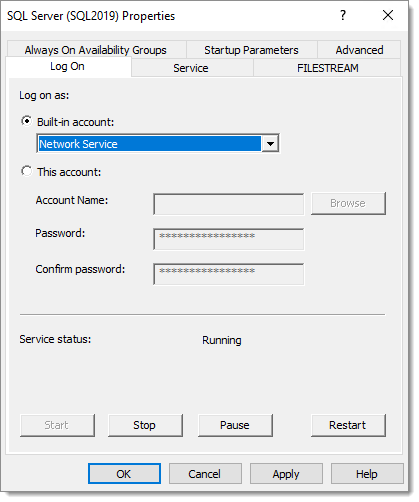
Sie müssen den SQL Server-Dienst so konfigurieren, dass er unter ***Network Service*** ausgeführt wird, da dieses Konto über die [erforderlichen Berechtigungen](https://docs.microsoft.com/en-us/sql/database-engine/configure-windows/register-a-service-principal-name-for-kerberos-connections?view=sql-server-ver15#Permissions) verfügt. Laut [diesem Artikel](https://dba.stackexchange.com/questions/180064/what-should-my-spn-entries-look-like-for-each-sql-instance/180147#180147) ist es auch möglich, einem Dienstkonto die Berechtigungen zum Erstellen von SPNs zu erteilen. Außerdem müssen Sie das Konto im SQL Server-Konfigurations-Manager ändern.
SQL Server meldet möglicherweise dennoch, dass die SPNs nicht registriert werden konnten. Mit dem [Microsoft Kerberos Configuration Manager for SQL Server](https://www.microsoft.com/en-ca/download/details.aspx?id=39046) können die SPNs korrigiert werden. Er zeigt anklickbare Schaltflächen in den Aktionsspalten an.
Nach dem Neustart des SQL Server-Dienstes sollten Sie in den Protokollen „The SQL Server Network Interface library successfully registered the Service Principal Name (SPN) \[ **MSSQLSvc/vdownsrv-sql3.downhill.loc:1433** ] for the SQL Server service.“ sehen.
An diesem Punkt sollte die Verbindung in Remote Desktop Manager wieder funktionieren.
---
# Agent Instructions
This documentation is published with GitBook. GitBook is the documentation platform designed so that both humans and AI agents can read, navigate, and reason over technical content effectively. Learn more at gitbook.com.
## Querying This Documentation
If you need additional information that is not directly available in this page, you can query the documentation dynamically by asking a question.
Perform an HTTP GET request on the current page URL with the `ask` query parameter, and the optional `goal` query parameter:
```
GET https://docs.devolutions.net/rdm/de/knowledge-base/how-to-articles/configure-sql-server-for-protected-users-with-integrated-security.md?ask=&goal=
```
`ask` is the immediate question: it should be specific, self-contained, and written in natural language.
`goal` is optional and describes the broader end goal you are ultimately trying to accomplish on behalf of the user. GitBook uses it to tailor the answer towards what is most useful for that goal.
The response will contain a direct answer to the question and relevant excerpts and sources from the documentation.
Use this mechanism when the answer is not explicitly present in the current page, you need clarification or additional context, or you want to retrieve related documentation sections.