> For the complete documentation index, see [llms.txt](https://docs.devolutions.net/llms.txt). Markdown versions of documentation pages are available by appending `.md` to page URLs; this page is available as [Markdown](https://docs.devolutions.net/powershell/it/devolutions-server-powershell/run-as-custom-pam-providers-powershell-scripts-with-execution-context.md).

# Eseguire script PowerShell dei provider PAM personalizzati con contesto di esecuzione

L'opzione ***Run as*** consente di eseguire gli script dei provider PAM personalizzati in contesti diversi e avvia lo scheduler per farlo. Questa operazione può essere effettuata su una macchina locale o remota, risultando utile per scoprire cosa lo script sta cercando di ottenere, se sta completando determinate azioni o accedendo a determinati file.

{% hint style="info" %}
Devolutions Server include già i modelli di [script personalizzati](https://docs.devolutions.net/pam/it/pam-with-devolutions-server/getting-started/custom-pam-providers/create-a-custom-pam-provider-in-devolutions-server#import-a-custom-pam-template) per Azure Key Vault e Windows Accounts.
{% endhint %}

### Eseguire (Run As) lo script PowerShell in vari contesti

1. In Devolutions Server, vada in ***Administration*** – ***Privileged Access*** – ***Providers***.
2. Clicchi su ***Add***.
3. Clicchi sulla scheda ***Custom***.
4. Selezioni un provider PAM, poi clicchi su ***Continue***.
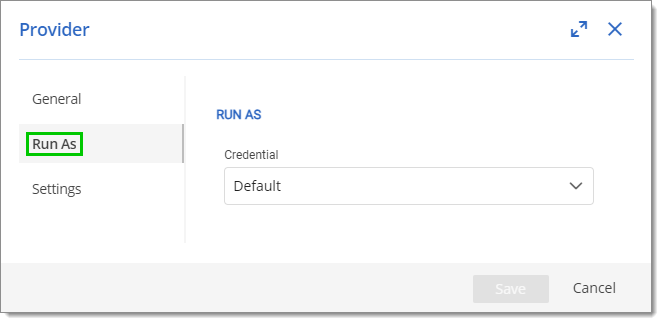
5. Clicchi sulla scheda ***Run as***.

   <figure><img src="https://cdnweb.devolutions.net/docs/docs_en_kb_KB0151.png" alt=""><figcaption></figcaption></figure>
6. Nell'elenco a discesa ***Credential***, selezioni;

   * Default: esegue lo script con la configurazione corrente dello scheduler.
   * Custom: esegue lo script con ***Username***, ***Password*** e ***Host name*** specificati.

   <div data-gb-custom-block data-tag="hint" data-style="info" class="hint hint-info"><p>Si consiglia di scegliere o creare un utente con meno autorizzazioni per testare uno script.</p></div>
7. Clicchi ***Save*** per chiudere questa finestra e salvare le modifiche.

#### Controllare gli host attendibili

Se ***Run as*** non punta a un host attendibile, la configurazione non funzionerà.

Ecco la riga di comando per recuperare gli host attendibili: `Get-Item "WSMan:localhost\Client\TrustedHosts"`

Ecco la riga di comando per aggiornare gli host attendibili della macchina locale con un determinato valore: `Set-Item 'WSMan:localhost\Client\TrustedHosts' -Value '*' -Force`

{% hint style="warning" %}
Si assicuri di sostituire `*` nel comando precedente. Se lasciato così com'è, `*` funge da carattere jolly, il che renderebbe attendibile ogni host remoto.
{% endhint %}

{% hint style="info" %}
Legga l'argomento sugli [host attendibili](https://docs.devolutions.net/server/it/knowledge-base/how-to-articles/enable-winrm-and-add-trusted-hosts) per maggiori informazioni.
{% endhint %}


---

# Agent Instructions
This documentation is published with GitBook. GitBook is the documentation platform designed so that both humans and AI agents can read, navigate, and reason over technical content effectively. Learn more at gitbook.com.

## Querying This Documentation
If you need additional information that is not directly available in this page, you can query the documentation dynamically by asking a question.

Perform an HTTP GET request on the current page URL with the `ask` query parameter, and the optional `goal` query parameter:

```
GET https://docs.devolutions.net/powershell/it/devolutions-server-powershell/run-as-custom-pam-providers-powershell-scripts-with-execution-context.md?ask=<question>&goal=<endgoal>
```

`ask` is the immediate question: it should be specific, self-contained, and written in natural language.
`goal` is optional and describes the broader end goal you are ultimately trying to accomplish on behalf of the user. GitBook uses it to tailor the answer towards what is most useful for that goal.

The response will contain a direct answer to the question and relevant excerpts and sources from the documentation.

Use this mechanism when the answer is not explicitly present in the current page, you need clarification or additional context, or you want to retrieve related documentation sections.