> For the complete documentation index, see [llms.txt](https://docs.devolutions.net/llms.txt). Markdown versions of documentation pages are available by appending `.md` to page URLs; this page is available as [Markdown](https://docs.devolutions.net/powershell/es/devolutions-server-powershell/run-as-custom-pam-providers-powershell-scripts-with-execution-context.md).

# Ejecutar scripts de PowerShell de proveedores PAM personalizados con contexto de ejecución

La opción ***Ejecutar como*** le permite ejecutar scripts de proveedores PAM personalizados en distintos contextos y ejecuta el programador para ello. Esto puede hacerse en una máquina local o remota, lo que resulta útil para averiguar qué intenta lograr el script, si está completando determinadas acciones o accediendo a determinados ficheros.

{% hint style="info" %}
Devolutions Server ya incluye plantillas de [scripts personalizados](https://docs.devolutions.net/pam/es/pam-with-devolutions-server/getting-started/custom-pam-providers/create-a-custom-pam-provider-in-devolutions-server#import-a-custom-pam-template) de Azure Key Vault y Windows Accounts.
{% endhint %}

### Ejecutar como script de PowerShell en varios contextos

1. En Devolutions Server, vaya a ***Administración*** – ***Acceso privilegiado*** – ***Proveedores***.
2. Haga clic en ***Añadir***.
3. Haga clic en la pestaña ***Personalizado***.
4. Seleccione un proveedor PAM y luego haga clic en ***Continuar***.
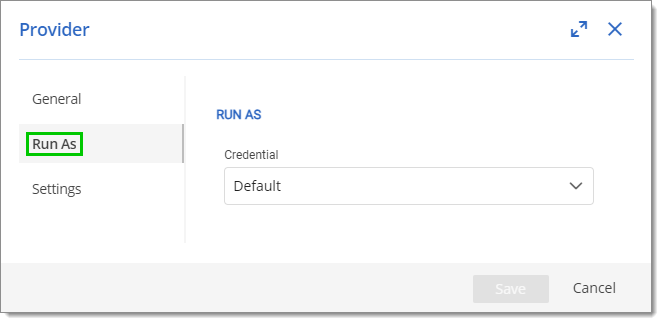
5. Haga clic en la pestaña ***Ejecutar como***.

   <figure><img src="https://cdnweb.devolutions.net/docs/docs_en_kb_KB0151.png" alt=""><figcaption></figcaption></figure>
6. En la lista desplegable ***Credencial***, seleccione una de estas opciones:

   * Predeterminado: ejecuta el script con la configuración actual del programador.
   * Personalizado: ejecuta el script con un ***Nombre de usuario***, una ***Contraseña*** y un ***Nombre de host*** especificados.

   <div data-gb-custom-block data-tag="hint" data-style="info" class="hint hint-info"><p>Se recomienda elegir o crear un usuario con menos permisos para probar un script.</p></div>
7. Haga clic en ***Guardar*** para cerrar esta ventana y guardar los cambios.

#### Comprobar los hosts de confianza

Si ***Ejecutar como*** no apunta a un host de confianza, la configuración no funcionará.

Esta es la línea de comandos para obtener los hosts de confianza: `Get-Item "WSMan:localhost\Client\TrustedHosts"`

Esta es la línea de comandos para actualizar los hosts de confianza de la máquina local con un valor determinado: `Set-Item 'WSMan:localhost\Client\TrustedHosts' -Value '*' -Force`

{% hint style="warning" %}
Asegúrese de reemplazar el `*` en el comando anterior. Si se deja tal cual, el `*` actúa como comodín, lo que haría que todos los hosts remotos pasaran a ser de confianza.
{% endhint %}

{% hint style="info" %}
Consulte el tema sobre los [hosts de confianza](https://docs.devolutions.net/server/es/knowledge-base/how-to-articles/enable-winrm-and-add-trusted-hosts) para obtener más información.
{% endhint %}


---

# Agent Instructions
This documentation is published with GitBook. GitBook is the documentation platform designed so that both humans and AI agents can read, navigate, and reason over technical content effectively. Learn more at gitbook.com.

## Querying This Documentation
If you need additional information that is not directly available in this page, you can query the documentation dynamically by asking a question.

Perform an HTTP GET request on the current page URL with the `ask` query parameter, and the optional `goal` query parameter:

```
GET https://docs.devolutions.net/powershell/es/devolutions-server-powershell/run-as-custom-pam-providers-powershell-scripts-with-execution-context.md?ask=<question>&goal=<endgoal>
```

`ask` is the immediate question: it should be specific, self-contained, and written in natural language.
`goal` is optional and describes the broader end goal you are ultimately trying to accomplish on behalf of the user. GitBook uses it to tailor the answer towards what is most useful for that goal.

The response will contain a direct answer to the question and relevant excerpts and sources from the documentation.

Use this mechanism when the answer is not explicitly present in the current page, you need clarification or additional context, or you want to retrieve related documentation sections.