> For the complete documentation index, see [llms.txt](https://docs.devolutions.net/llms.txt). Markdown versions of documentation pages are available by appending `.md` to page URLs; this page is available as [Markdown](https://docs.devolutions.net/powershell-universal/da/apps/components/surfaces/card.md).
# Kort
Opbyg kort i PowerShell Universal-apps for at vise grupperet indhold og handlinger med overskrifter, medier, sidefødder og udvidelige sektioner.
**Kort indeholder indhold og handlinger om et enkelt emne.**
Kort er flader, der viser indhold og handlinger om et enkelt emne. Kort bør være nemme at skimme efter relevant og handlingsrettet information. Elementer som tekst og billeder bør placeres på dem på en måde, der tydeligt angiver hierarkiet.
## Simpelt kort
Selvom kort kan understøtte flere handlinger, UI-kontrolelementer og en overløbsmenu, skal De udvise tilbageholdenhed og huske, at kort er indgangspunkter til mere kompleks og detaljeret information.

```powershell
New-UDCard -Title 'Simple Card' -Content {
"This is some content"
}
```
## Avanceret kort
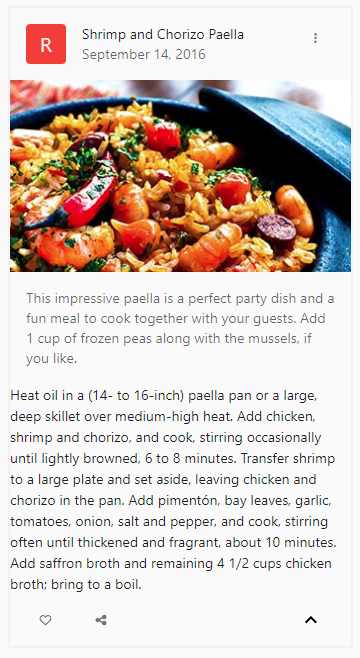
De kan bruge cmdletterne body, header, footer og expand til at oprette avancerede kort. Eksemplet nedenfor opretter et kort med forskellige funktioner baseret på en Hyper-V-VM.
```powershell
$Header = New-UDCardHeader -Avatar (New-UDAvatar -Content { "R" } -Sx @{ backgroundColor = "#f44336" }) -Action (New-UDIconButton -Icon (New-UDIcon -Icon 'EllipsisVertical')) -Title 'Shrimp and Chorizo Paella' -SubHeader 'September 14, 2016';
$Media = New-UDCardMedia -Image 'https://mui.com/static/images/cards/paella.jpg'
$Body = New-UDCardBody -Content {
New-UDTypography -Text ' This impressive paella is a perfect party dish and a fun meal to cook together with your guests. Add 1 cup of frozen peas along with the mussels, if you like.' -Sx @{
color = 'text.secondary'
} -Variant body2
}
$Footer = New-UDCardFooter -Content {
New-UDIconButton -Icon (New-UDIcon -Icon 'Heart')
New-UDIconButton -Icon (New-UDIcon -Icon 'ShareAlt')
}
$Expand = New-UDCardExpand -Content {
$Description = @"
Heat oil in a (14- to 16-inch) paella pan or a large, deep skillet over
medium-high heat. Add chicken, shrimp and chorizo, and cook, stirring
occasionally until lightly browned, 6 to 8 minutes. Transfer shrimp to a
large plate and set aside, leaving chicken and chorizo in the pan. Add
pimentón, bay leaves, garlic, tomatoes, onion, salt and pepper, and cook,
stirring often until thickened and fragrant, about 10 minutes. Add
saffron broth and remaining 4 1/2 cups chicken broth; bring to a boil.
"@
New-UDTypography -Text $Description
}
New-UDCard -Header $Header -Media $Media -Body $Body -Footer $Footer -Expand $Expand -Sx @{
maxWidth = 345
border = '2px solid #f0f2f5'
}
```
## API
* [New-UDCard](/powershell-universal/da/powershell-kommandoer/new-udcard.md)
* [New-UDCardBody](/powershell-universal/da/powershell-kommandoer/new-udcardbody.md)
* [New-UDCardExpand](/powershell-universal/da/powershell-kommandoer/new-udcardexpand.md)
* [New-UDCardFooter](/powershell-universal/da/powershell-kommandoer/new-udcardfooter.md)
* [New-UDCardHeader](/powershell-universal/da/powershell-kommandoer/new-udcardheader.md)
* [New-UDCardMedia](/powershell-universal/da/powershell-kommandoer/new-udcardmedia.md)
## Se også
* [Devolutions Academy – Tilføjelse af et layout til Deres program](https://academy.devolutions.net/student/path/3465905/activity/5612257)
---
# Agent Instructions
This documentation is published with GitBook. GitBook is the documentation platform designed so that both humans and AI agents can read, navigate, and reason over technical content effectively. Learn more at gitbook.com.
## Querying This Documentation
If you need additional information that is not directly available in this page, you can query the documentation by asking a question.
Perform an HTTP GET request on the following URL with the `ask` and `goal` query parameters:
```
GET https://docs.devolutions.net/powershell-universal/da/apps/components/surfaces/card.md?ask=&goal=
```
`ask` is the immediate question: it should be specific, self-contained, and written in natural language.
`goal` is what the user is ultimately trying to achieve, the reason they need the answer. Sharing it helps GitBook give you a better, more relevant answer. A goal is most helpful when it describes the outcome the user wants rather than restating the question. For example, with `ask=how do I create an API token`, a goal like `automate deployments from our CI pipeline` lets GitBook tailor the answer to that use case.
The response will contain a direct answer to the question and relevant excerpts and sources from the documentation.
Use this mechanism when the answer is not explicitly present in the current page, you need clarification or additional context, or you want to retrieve related documentation sections.