> For the complete documentation index, see [llms.txt](https://docs.devolutions.net/llms.txt). Markdown versions of documentation pages are available by appending `.md` to page URLs; this page is available as [Markdown](https://docs.devolutions.net/password-manager/es/application/tools.md).
# Herramientas
Utilice las herramientas de Devolutions Password Manager para generar contraseñas, ejecutar instalaciones personalizadas e importar o exportar entradas en formato CSV, JSON o XML.
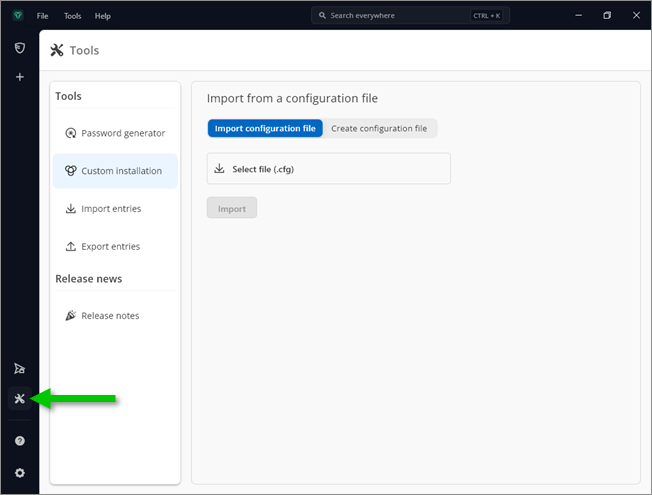
La sección ***Herramientas*** se encuentra en el panel lateral.
### Generador de contraseñas
Cree contraseñas y frases de contraseña aleatorias que sean y difíciles de interpretar o predecir, gracias a una combinación de letras mayúsculas y minúsculas, números y símbolos de puntuación.
### Instalación personalizada
Se pueden crear instalaciones personalizadas para facilitar el despliegue del espacio de trabajo en varias máquinas con la misma configuración preconfigurada. Consulte [Instalación](/password-manager/es/application/installation.md#custom-installation) para obtener más detalles.
### Importar entradas
Devolutions Password Manager admite formatos nativos de muchas herramientas populares. Si un formato nativo o una herramienta de terceros no es compatible, utilice la opción ***Personalizado*** para importar ficheros en formato `.cvs` o `.json`.
### Exportar entradas
Devolutions Password Manager admite compatibilidad con la exportación de entradas en los formatos `.csv`, `.json` y `.xml`. Las entradas tienen sus datos cifrados con una contraseña, sus valores sensibles ocultos y sus adjuntos y documentos incluidos.
#### Véase también
* [Devolutions Academy – Use the Devolutions Password Manager Importer](https://academy.devolutions.net/student/page/3516218-use-the-devolutions-password-manager-importer?curriculum_activity_id=5612175\&path_id=2628397\&sid=22461176-32b8-45f3-a58f-f86c27578c8b\&sid_i=0)
---
# Agent Instructions
This documentation is published with GitBook. GitBook is the documentation platform designed so that both humans and AI agents can read, navigate, and reason over technical content effectively. Learn more at gitbook.com.
## Querying This Documentation
If you need additional information that is not directly available in this page, you can query the documentation dynamically by asking a question.
Perform an HTTP GET request on the current page URL with the `ask` query parameter, and the optional `goal` query parameter:
```
GET https://docs.devolutions.net/password-manager/es/application/tools.md?ask=&goal=
```
`ask` is the immediate question: it should be specific, self-contained, and written in natural language.
`goal` is optional and describes the broader end goal you are ultimately trying to accomplish on behalf of the user. GitBook uses it to tailor the answer towards what is most useful for that goal.
The response will contain a direct answer to the question and relevant excerpts and sources from the documentation.
Use this mechanism when the answer is not explicitly present in the current page, you need clarification or additional context, or you want to retrieve related documentation sections.