> For the complete documentation index, see [llms.txt](https://docs.devolutions.net/llms.txt). Markdown versions of documentation pages are available by appending `.md` to page URLs; this page is available as [Markdown](https://docs.devolutions.net/pam/pam-with-devolutions-cloud/providers/oracle-user-provider.md).
# Oracle user provider
The ***Oracle user*** provider allows Devolutions Cloud to store Oracle account credentials to be used to achieve password rotation.
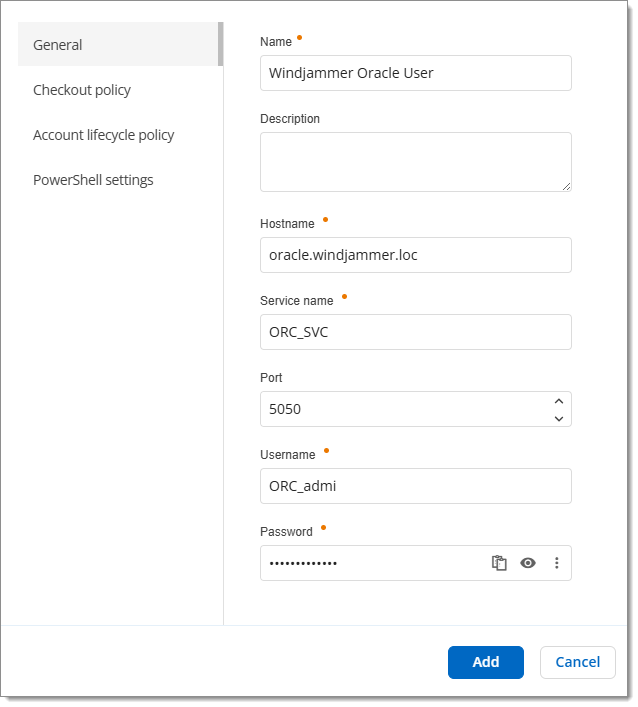
### General
| SETTINGS | DESCRIPTION |
| ---------------- | ------------------------------------------------------------------------------------------- |
| **Name** | Display name of the provider. |
| **Description** | Optional description of the provider. |
| **Host name** | FQDN of the Oracle server against where the scan or the password rotation will be executed. |
| **Service name** | Name of the Oracle service. |
| **Port** | Set the port number used with to connect on the Oracle host. |
| **Username** | Username of the Oracle account with rights to reset passwords. |
| **Password** | Password of the Oracle user account. |
### Checkout policy
| SETTINGS | DESCRIPTION |
| ---------------------------------------- | ------------------------------------------------------------------------------------------------------------------------------------------------------------------------------------------------- |
| **Checkout policy mode** | Choose a checkout policy mode between:
- Default (inherited)
- Inherited
- Custom
|
| **Checkout mode** | Choose whether checkouts are obligatory or not. This amounts to turning the checkouts on/off. |
| **Approval mode** | Determine if checkouts require approval or not. |
| **Users can approve their own checkout** | Determine if users can approve their own checkout request or whether they need the approval of an administrator. |
| **Checkout reason** | Force users to add a reason in checkout requests. |
| **Checkout time (minutes)** | Set the precise checkout time for all users, in minutes. |
| **Max checkout time (minutes)** | Set the maximum checkout time, but leave it to the users to specify their needs for each request. |
### Account lifecycle policy
| SETTINGS | DESCRIPTION |
| ---------------------------- | --------------------------------------------------------------------------------------------------------------------------------------------------------------------------------------------------- |
| **Password policy** | Choose a [password policy](https://docs.devolutions.net/cloud/web-interface/administration/management/password-templates/) previously configured in ***Administration*** – ***Password policies***. |
| **Synchronization schedule** | Set a date and time for automatic synchronization between the provider and its user/user groups. |
### PowerShell settings
| SETTING | DESCRIPTION |
| ---------------------------- | ------------------------------------------------------------------------------------------------------------------------------------------------------------------------------------------------------------------------------------------------------------------------------------------------------------------------------------------------------------------------------------------------------------------------------------------------------------------------------------------------------------------------------------------------------------------------------------------------ |
| **PowerShell settings mode** | Choose a PowerShell settings mode between:
- Default (Workspace settings): Use the default configuration for PowerShell as defined in Administration – Privileged access – Settings – PowerShell default settings.
- Workspace settings: Select the PowerShell settings defined within the same workspace.
- Custom: Create custom PowerShell settings for the provider.
|
---
# Agent Instructions
This documentation is published with GitBook. GitBook is the documentation platform designed so that both humans and AI agents can read, navigate, and reason over technical content effectively. Learn more at gitbook.com.
## Querying This Documentation
If you need additional information that is not directly available in this page, you can query the documentation dynamically by asking a question.
Perform an HTTP GET request on the current page URL with the `ask` query parameter:
```
GET https://docs.devolutions.net/pam/pam-with-devolutions-cloud/providers/oracle-user-provider.md?ask=
```
The question should be specific, self-contained, and written in natural language.
The response will contain a direct answer to the question and relevant excerpts and sources from the documentation.
Use this mechanism when the answer is not explicitly present in the current page, you need clarification or additional context, or you want to retrieve related documentation sections.