> For the complete documentation index, see [llms.txt](https://docs.devolutions.net/llms.txt). Markdown versions of documentation pages are available by appending `.md` to page URLs; this page is available as [Markdown](https://docs.devolutions.net/gateway/overview/system-requirements/system-requirements-for-devolutions-server.md).
# System requirements for Devolutions Server
To use Devolutions Gateway, your system must meet the following requirements.
### Prerequisites
* A Devolutions Server instance.
* For MSPs, one Devolutions Gateway can be deployed per customer site. All you need is to keep the Devolutions Gateway servers reachable by both Devolutions Server and Remote Desktop Manager. Devolutions Gateway only needs to accept inbound connections coming from them. No outbound connections to Devolutions Server and Remote Desktop Manager are required.
### Hardware requirements
| Minimal implementation
(1 to 5 concurrent sessions)
| Small implementation
(5 to 15 concurrent sessions)
| Medium implementation
(15 to 75 concurrent sessions)
| Large implementation
(More than 75 concurrent sessions)
|
| ------------------------------------------------------------- | ------------------------------------------------------------ | -------------------------------------------------------------- | ----------------------------------------------------------------- |
| 2 vCPUs
4 GB RAM
| 4 vCPUs
8 GB RAM
| 8 vCPUs
16 GB RAM
| Deploy multiple Devolutions Gateway instances. |
{% hint style="info" %}
A Gigabit Ethernet controller is recommended for optimal performance.
{% endhint %}
### Software requirements
* Windows 10 (version 20H2, 21H1, and 21H2), or Windows 11 (version 21H2)
* Windows Server 2016, 2019, 2022, or 2025 with .NET Framework 4.8
* Ubuntu Linux 18.04, 20.4, 22.4, and later
* Red Hat Enterprise Linux (RHEL) 8 and later
* Rocky Linux 8 and later
* PowerShell 7 (required only for using the [Devolutions Gateway PowerShell module](https://www.powershellgallery.com/packages/DevolutionsGateway/2025.1.0) on Linux)
### Certificate requirements
Devolutions Gateway supports TLS 1.2 and TLS 1.3 as well as the following cipher suites:
* AES\_256\_GCM\_SHA384
* AES\_128\_GCM\_SHA256
* CHACHA20\_POLY1305\_SHA256
* ECDHE\_ECDSA\_AES\_256\_GCM\_SHA384
* ECDHE\_ECDSA\_AES\_128\_GCM\_SHA256
* ECDHE\_ECDSA\_CHACHA20\_POLY1305\_SHA256
* ECDHE\_RSA\_AES\_256\_GCM\_SHA384
* ECDHE\_RSA\_AES\_128\_GCM\_SHA256
* ECDHE\_RSA\_CHACHA20\_POLY1305\_SHA256
### Basic infrastructure
When installing Devolutions Gateway, it is essential to consider the location of the resources you need to access and the location of the users requiring access to those resources. As seen in the network diagrams below, the gateway can be installed in either an internal (local) network or a remote network, depending on the proximity to the resources and the users.
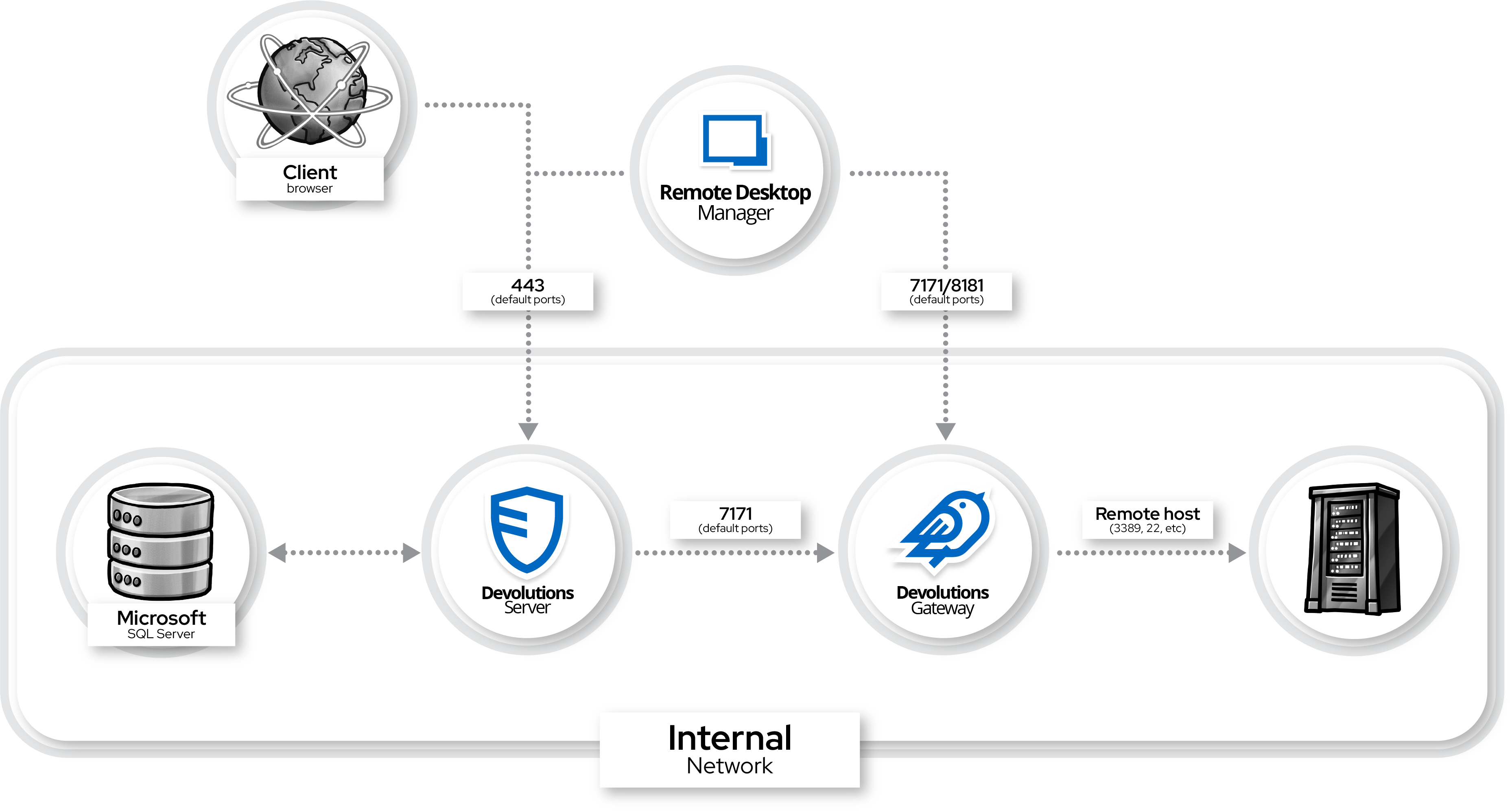
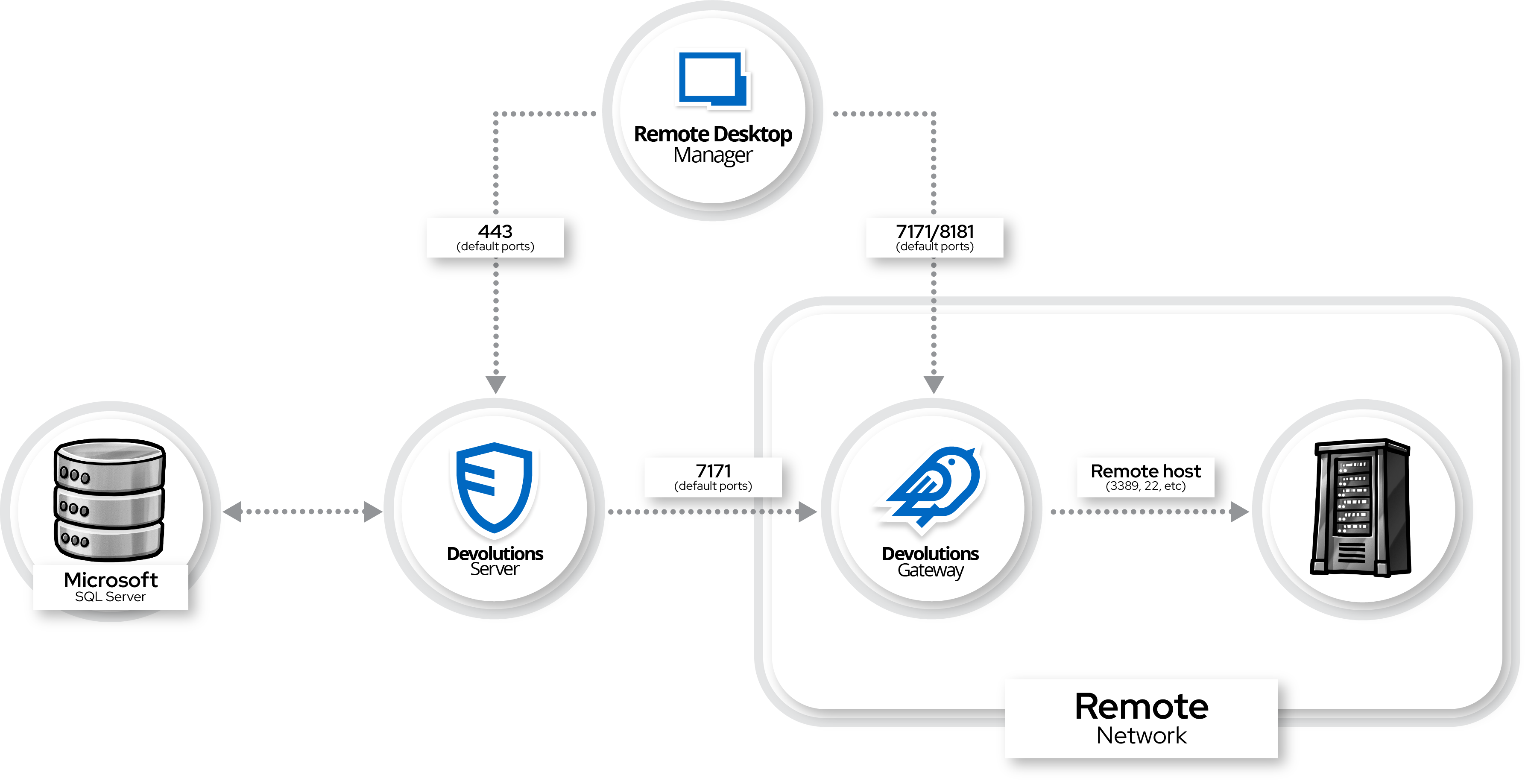
The communication between Remote Desktop Manager / Devolutions Server and the gateway is encrypted to ensure secure data transfer. However, between the gateway and the target host, the connection will use the default protocol associated with the connection type, such as RDP or SSH. It is important to ensure that these protocols are properly secured. The default port for HTTP(s) communication with the gateway is **7171**, while the default port for TCP communication is **8181**. These ports should be open and not blocked by firewalls to allow proper communication.
The interaction between Remote Desktop Manager and Devolutions Gateway is direct and does not pass through Devolutions Server. Security is maintained through the use of a user token, which is encrypted and authenticated using a PEM file to verify that the token was generated by Devolutions Server. This ensures the integrity of the connection and protects against unauthorized access.
For optimal performance, the gateway should be installed as close as possible to the resources it accesses. Additionally, administrators should regularly monitor and update firewall rules to allow the required ports (7171 and 8181) and ensure secure configurations for the protocols in use. Proper handling of the PEM file is critical to maintaining a secure setup.
---
# Agent Instructions
This documentation is published with GitBook. GitBook is the documentation platform designed so that both humans and AI agents can read, navigate, and reason over technical content effectively. Learn more at gitbook.com.
## Querying This Documentation
If you need additional information that is not directly available in this page, you can query the documentation dynamically by asking a question.
Perform an HTTP GET request on the current page URL with the `ask` query parameter, and the optional `goal` query parameter:
```
GET https://docs.devolutions.net/gateway/overview/system-requirements/system-requirements-for-devolutions-server.md?ask=&goal=
```
`ask` is the immediate question: it should be specific, self-contained, and written in natural language.
`goal` is optional and describes the broader end goal you are ultimately trying to accomplish on behalf of the user. GitBook uses it to tailor the answer towards what is most useful for that goal.
The response will contain a direct answer to the question and relevant excerpts and sources from the documentation.
Use this mechanism when the answer is not explicitly present in the current page, you need clarification or additional context, or you want to retrieve related documentation sections.